
Team Calendars 1.5 Release Notes
20 October 2011
The Atlassian Team Calendars team is pleased to announce the release of Team Calendars 1.5. This release focuses on making feature discovery easier when creating new calendars, some small improvements as well as faster performance.
Highlights of this Release:

- Thank you for all your issues and votes.
- Below is a list of highlights for this release
- Also see our complete list of issues resolved.
Performing actions on Calendars just got easier
Over the last couple of releases we added a lot of functionality and wanted to make these features more discoverable for you and your users. When a new calendar is created, you'll be prompted with a dialog to take further action on the calendar.

This dialog is contextually adjusted depending on the type of calendar you create (People/Event, JIRA or Externally subscribed calendars).
Smarter "Share Calendar" dialog
If the calendar you are about to share has restrictions applied to it, the share dialog now reminds you about this so you can ensure that you aren't sharing a calendar with someone that won't be able to view it.

Faster to use
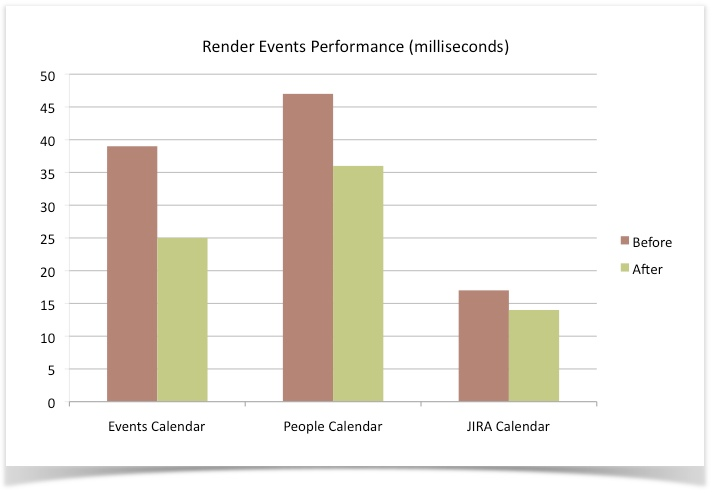
Team Calendars 1.5 also provides a number of performance enhancements, such as, improved load times, faster rendering of events in various calendar views, and much more. The graph below shows you some of the performance improvements we've made for the different types of calendars:
Upgrading to Team Calendars 1.5
Upgrading from a previous version of Team Calendars is straightforward. We recommend that you back up your calendar data before upgrading.
To upgrade to 1.5, simply click 'Upgrade' in the Team Calendars entry of the Plugin Administration screen in Confluence.
Issues Resolved in this Release
Thank you for all your issues and votes.