
Automation Rule | Create an Epic along with it's child issues and link the created child issues subsequently
Platform Notice: Cloud - This article applies to Atlassian products on the cloud platform.
Summary
This article provides information on the steps to be performed to create a rule that will create an Epic along with it's child issues and link the created child issues subsequently.
Environment
Jira Cloud
Solution
In order to successfully create the rule, you will need to perform the below steps:
- Create a Scheduled Trigger based on the interval at which the Epic needs to be created.
- Add the "Create Issue" Action to create the Epic issue.
- Add the branch referring to the "Most Recently Created Issue"
- Add the "Create Issue" action to create the child issue. The parent for the child issue will be set as Trigger issue:
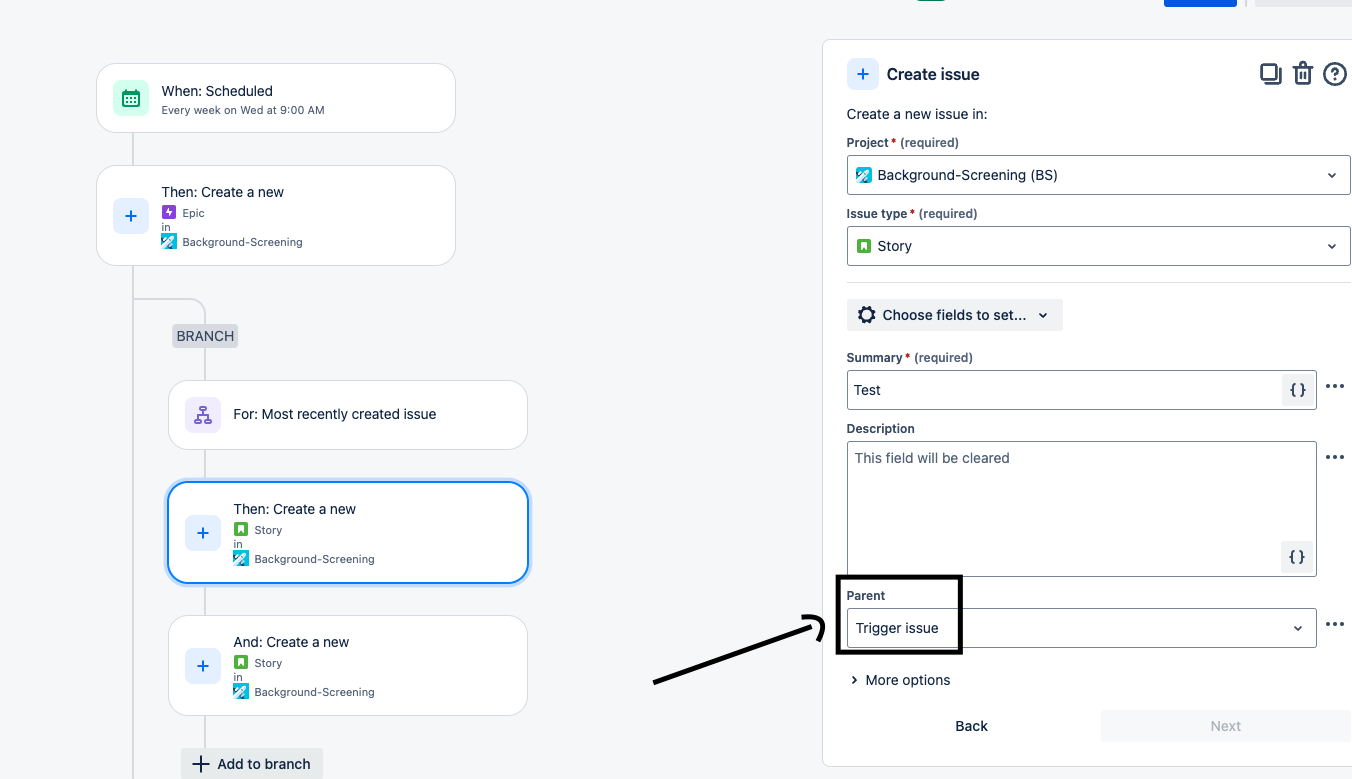
- Add another "Create Issue" action to create the next child issue. You will also need to add the "Linked Issues" field for this child issue and then select the type of link along with the "Most Recently Created Issue" option. This will ensure that the child issue is linked to the previously created child issue.

Please note that the "Linked Issues" field needs to be added for the second child issue or any subsequent ones but not the first child issue.
Last modified on Sep 17, 2024
Powered by Confluence and Scroll Viewport.