
Executing a Salesforce command via a Command Task fails in Bamboo Data Center
Platform Notice: Data Center - This article applies to Atlassian products on the Data Center platform.
Note that this knowledge base article was created for the Data Center version of the product. Data Center knowledge base articles for non-Data Center-specific features may also work for Server versions of the product, however they have not been tested. Support for Server* products ended on February 15th 2024. If you are running a Server product, you can visit the Atlassian Server end of support announcement to review your migration options.
*Except Fisheye and Crucible
Summary
When attempting to execute a Salesforce command via a Command Task in Bamboo, it consistently fails, while manual execution succeeds.
Environment
Bamboo agent 9.6 windows
Diagnosis
Steps follow to reproduce the issue:
- Installed Salesforce CLI on windows bamboo agent and set the executable in Bamboo UI as "C:\Program Files\sf\bin\sf".

- Created a Simple Bamboo plan with Command task executing a Sales force arguments as shown below:
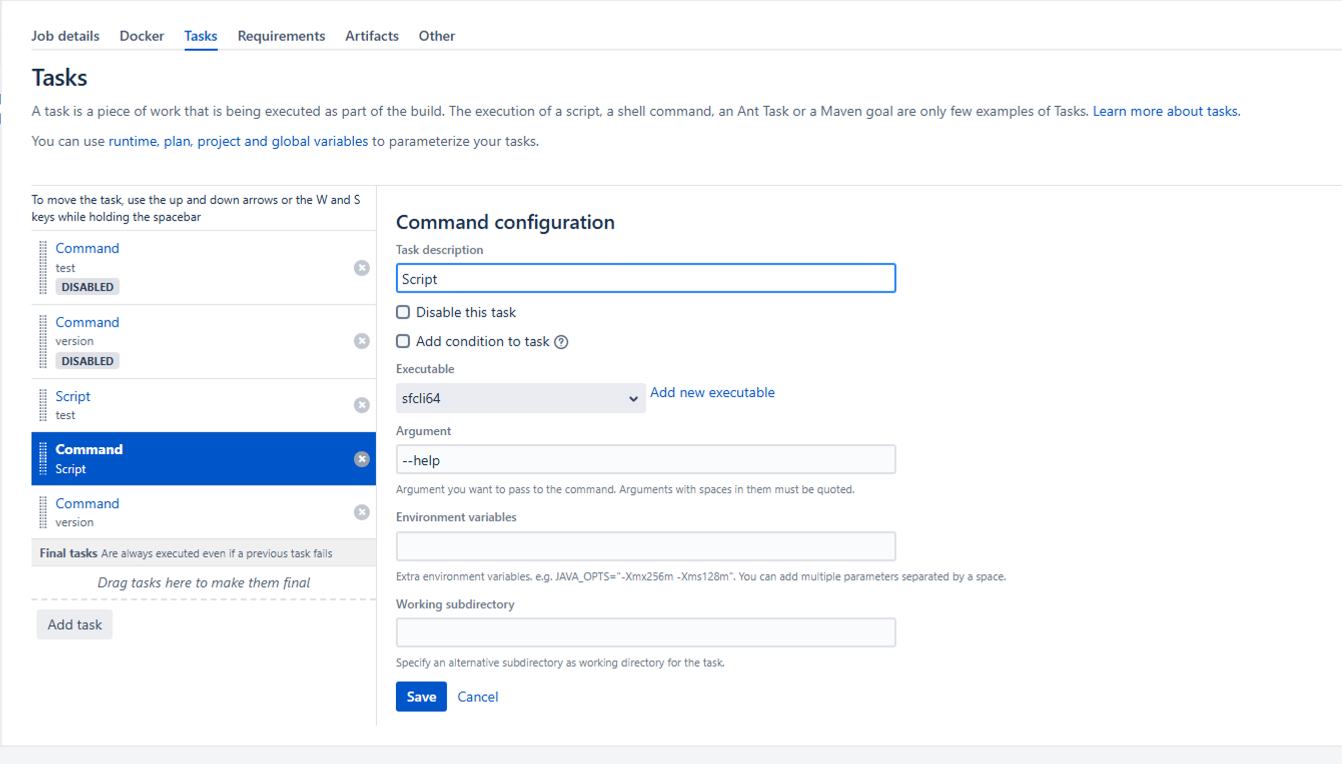
- On running the plan it got failed with the below error logged in atlassian-bamboo.log file:
2025-01-28 13:30:38,067 INFO [0-BAM::agent::Agent:Thread-27] [TaskResultBuilder] Failing task since return code of [C:\Program Files\sf\bin\sf --help] was -1 while expected 0
2025-01-28 13:30:38,067 INFO [0-BAM::agent::Agent:Thread-27] [TaskResultBuilder] Process exception:
com.atlassian.utils.process.ProcessNotStartedException: C:\Program Files\sf\bin\sf could not be started
        at com.atlassian.utils.process.ExternalProcessImpl.start(ExternalProcessImpl.java:344) ~[atlassian-processutils-1.8.7.jar:?]
        at com.atlassian.bamboo.process.ProcessServiceImpl.executeExternalProcess(ProcessServiceImpl.java:203) ~[atlassian-bamboo-core-9.6.9.jar:?]
        at com.atlassian.bamboo.process.ProcessServiceImpl.executeExternalProcess(ProcessServiceImpl.java:217) ~[atlassian-bamboo-core-9.6.9.jar:?]
        at com.atlassian.bamboo.plugins.shell.task.AbstractShellBuildTask.execute(AbstractShellBuildTask.java:46) ~[atlassian-bamboo-plugin-scripttask-9.6.9.jar:?]
        at com.atlassian.bamboo.plugins.shell.task.AbstractShellBuildTask.execute(AbstractShellBuildTask.java:37) ~[atlassian-bamboo-plugin-scripttask-9.6.9.jar:?]
        at com.atlassian.bamboo.task.TaskExecutorImpl.lambda$executeTasks$3(TaskExecutorImpl.java:323) ~[atlassian-bamboo-core-9.6.9.jar:?]
        at com.atlassian.bamboo.task.TaskExecutorImpl.executeTaskWithPrePostActions(TaskExecutorImpl.java:258) ~[atlassian-bamboo-core-9.6.9.jar:?]
        at com.atlassian.bamboo.task.TaskExecutorImpl.executeTasks(TaskExecutorImpl.java:323) ~[atlassian-bamboo-core-9.6.9.jar:?]
        at com.atlassian.bamboo.task.TaskExecutorImpl.execute(TaskExecutorImpl.java:118) ~[atlassian-bamboo-core-9.6.9.jar:?]
        at com.atlassian.bamboo.build.pipeline.tasks.ExecuteBuildTask.call(ExecuteBuildTask.java:76) ~[atlassian-bamboo-core-9.6.9.jar:?]
        at com.atlassian.bamboo.v2.build.agent.DefaultBuildAgent.executeBuildPhase(DefaultBuildAgent.java:242) ~[atlassian-bamboo-agent-core-9.6.9.jar:?]
        at com.atlassian.bamboo.v2.build.agent.DefaultBuildAgent.build(DefaultBuildAgent.java:214) ~[atlassian-bamboo-agent-core-9.6.9.jar:?]
        at com.atlassian.bamboo.v2.build.agent.BuildAgentControllerImpl.lambda$waitAndPerformBuild$0(BuildAgentControllerImpl.java:183) ~[atlassian-bamboo-agent-core-9.6.9.jar:?]
        at com.atlassian.bamboo.variable.CustomVariableContextImpl.withVariableSubstitutor(CustomVariableContextImpl.java:115) ~[atlassian-bamboo-core-9.6.9.jar:?]
        at com.atlassian.bamboo.v2.build.agent.BuildAgentControllerImpl.waitAndPerformBuild(BuildAgentControllerImpl.java:176) ~[atlassian-bamboo-agent-core-9.6.9.jar:?]
        at com.atlassian.bamboo.v2.build.agent.DefaultBuildAgent.lambda$start$0(DefaultBuildAgent.java:159) ~[atlassian-bamboo-agent-core-9.6.9.jar:?]
        at com.atlassian.bamboo.utils.BambooRunnables$1.run(BambooRunnables.java:48) ~[atlassian-bamboo-api-9.6.9.jar:?]
        at com.atlassian.bamboo.security.ImpersonationHelper.runWith(ImpersonationHelper.java:26) ~[atlassian-bamboo-api-9.6.9.jar:?]
        at com.atlassian.bamboo.security.ImpersonationHelper.runWithSystemAuthority(ImpersonationHelper.java:17) ~[atlassian-bamboo-api-9.6.9.jar:?]
        at com.atlassian.bamboo.security.ImpersonationHelper.lambda$makeRunnableWithSystemAuthority$0(ImpersonationHelper.java:38) ~[atlassian-bamboo-api-9.6.9.jar:?]
        at java.lang.Thread.run(Thread.java:840) ~[?:?]
Caused by: java.io.IOException: Cannot run program "C:\Program Files\sf\bin\sf" (in directory "C:\Users\bamboo\bamboo-agent-home\xml-data\build-dir\PROJ-PLAN-JOB1"): CreateProcess error=193, %1 is not a valid Win32 application
        at java.lang.ProcessBuilder.start(ProcessBuilder.java:1143) ~[?:?]
        at java.lang.ProcessBuilder.start(ProcessBuilder.java:1073) ~[?:?]
        at com.atlassian.utils.process.ExternalProcessImpl.createDefaultProcess(ExternalProcessImpl.java:379) ~[atlassian-processutils-1.8.7.jar:?]
        at com.atlassian.utils.process.ExternalProcessImpl.createProcess(ExternalProcessImpl.java:387) ~[atlassian-processutils-1.8.7.jar:?]
        at com.atlassian.utils.process.ExternalProcessImpl.start(ExternalProcessImpl.java:341) ~[atlassian-processutils-1.8.7.jar:?]
        ... 20 more
Caused by: java.io.IOException: CreateProcess error=193, %1 is not a valid Win32 application
        at java.lang.ProcessImpl.create(Native Method) ~[?:?]
        at java.lang.ProcessImpl.<init>(ProcessImpl.java:499) ~[?:?]
        at java.lang.ProcessImpl.start(ProcessImpl.java:158) ~[?:?]
        at java.lang.ProcessBuilder.start(ProcessBuilder.java:1110) ~[?:?]
        at java.lang.ProcessBuilder.start(ProcessBuilder.java:1073) ~[?:?]
        at com.atlassian.utils.process.ExternalProcessImpl.createDefaultProcess(ExternalProcessImpl.java:379) ~[atlassian-processutils-1.8.7.jar:?]
        at com.atlassian.utils.process.ExternalProcessImpl.createProcess(ExternalProcessImpl.java:387) ~[atlassian-processutils-1.8.7.jar:?]
        at com.atlassian.utils.process.ExternalProcessImpl.star
PS: We attempted to use both the 64-bit and 32-bit versions of the Salesforce CLI, but both resulted in the same error.
Cause
For some reason, Bamboo is not treating "C:\Program Files\sf\bin\sf" or "C:\Program Files\sf\bin" as a valid executable.
Solution
After adjusting the executable path to "C:\Program Files\sf\bin\sf.cmd" instead of just ending at "bin" or "bin\sf," the issue was resolved. Running the same plan with the updated path was successful.
