 link located beside each space on the Dashboard and at the top of every page.
Creating a page in Confluence is easy. You can create a page from anywhere within the site by clicking the 'Add Page' link located at the top of every page and beside the space link on the dashboard.
To create a page, you require 'Create Pages' permission which is assigned by a space administrator from the Space Administration screens. See Space permissions or contact a space administrator for more information.
Need help writing pages?
There are two ways to add a new page:
1. Click on the 'Add Page' link located beside each space on the Dashboard and at the top of every page.
This link is only displayed if you have permission to create pages for the space. If you do not see this link, you probably do not have permission to add pages and should contact your space administrator.
|
2. Follow an undefined link
In Confluence, you can create links to pages that you intend to create at a later point. This type of a link is an undefined link and is indicated with a plus sign. Clicking on the link brings up the 'Add Page' screen. Follow the same steps outlined above to create the page.
Here is an example of an undefined link:
What you need to type |
What you will get |
||
|---|---|---|---|
<ac:structured-macro ac:name="unmigrated-wiki-markup" ac:schema-version="1" ac:macro-id="afbcb4b5-bc5c-47a7-aef7-55508379c04b"><ac:plain-text-body><![CDATA[ |
[CONF20:Link to new page] |
[CONF20:Link to new page] |
]]></ac:plain-text-body></ac:structured-macro> |
Screenshot : Adding a page
Click on the thumbnail to see the larger image:
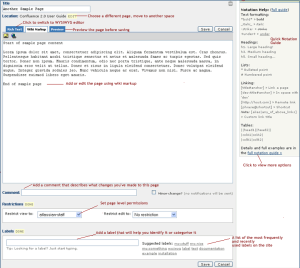
In Confluence, the title of a page is used to create page links. |
|
Confluence does not accept the following characters in the title of the page:
|
Writing Confluence pages
Confluence Notation Guide Overview
Editing an Existing Page
Working with Page Families
Linking Pages
Page Restrictions
Take me back to Confluence 2.0 to 2.5 User Guide
 If you clicked on 'Add page' from another page, Confluence will default the new page as a child of the first. To choose a different parent, click on the
  icon. A pop-up screen allows you select a parent page from one of the tabs displayed or to locate pages anywhere within the site using the search facility.