
Indexing Assets in Jira Service Management
Assets in Jira Service Management help you manage your database of objects (assets and configuration items), making it easy to interact with them through requests. However, querying these objects can be demanding on resources because of the detailed information models they create. To address these challenges and improve performance, you can use an index. Index is an in-memory copy of the Assets object data, separate from the data stored on disk in the database. By using an index, accessing data becomes much faster, leading to improved performance and quicker Assets Query Language (AQL) results.
On this page:
Assets and memory requirements
As your instance grows, the in-memory index might need more Java Virtual Machine (JVM) memory over time. Make sure that your Jira is configured to handle the amount of data you plan to use in Assets. Check out the Assets memory recommendations
How indexing works in Assets
In Assets, indexing is managed through an in-memory cache system Google's Guava Cache. In this system, different types of Assets data use different indexes, each optimized for specific data categories. With this approach, the system remains responsive and effective even as data complexity increases. More about Google’s Guava Cache
Index | What it stores |
|---|---|
Object |
|
Object type attribute |
|
Object type |
|
Object schema | Basic object schema, such as:
|
Object ticket | Relationship to Jira tickets |
File | Files referenced in Assets |
Icon | Icons data |
Custom field, Reference custom field, and Default custom field | Custom field configuration in Assets |
Free text index | ID, key, label, and attribute terms required for searching. The free text index reduces the string to keywords instead of storing the entire string. More about free text index This is the only index that is stored in Lucene. |
Indexed flag
An indexed flag is a setting that determines whether specific attributes of an asset are included in the index for search and retrieval purposes. In Assets, all attributes are indexed by default, except for the text area.
You can choose to remove certain attributes from the index by disabling the indexed flag on those attributes. While this can help reduce memory consumption, it might slow down searches and imports, as attributes will need to be retrieved directly from the database. More about attribute configuration
Disabling indexing on attributes doesn't have a significant impact on reindexing performance. However, it can more than double the import performance for non-indexed attributes.
Free text index
The free text index is stored in Lucene and is used to search text on Assets text attributes, such as Text area, Text, URI, Email, and Select attributes.
The free text index for Assets is stored in the JiraLocalHome/caches/insight_indexes/freetext/directory, with one index maintained per schema. Every night at midnight, Assets automatically runs a scheduled job to reindex the free text index. Currently, there's no option to disable this job. Additionally, a free text reindex is triggered whenever a manual reindex is performed. This setup ensures that the indexing remains up-to-date, although it can limit flexibility in managing reindexing schedules.
Clustering and replication
In a clustered environment, each node maintains its own index, requiring changes to be replicated between nodes so that all nodes are aware of the current data state. This replication process is complex, as it must handle network disruptions, heavy loads (such as during imports), and general performance challenges. Replication occurs with every single object change.
Starting from Jira Service Management 5.8.0, invalidation notifications for the ADD, UPDATE, and REMOVE object operations in Assets use Atlassian Cache node-to-node invalidation instead of cluster messages for the object index. All other operations still use the cluster message approach. More about performance improvements in Assets
Replication flow
Replication includes the following object operations: ADD, UPDATE, and REMOVE. The CacheMessage includes:
index type
type of operation, such as
ADD,UPDATE, orREMOVEID of the entity to update in the index
update time
The default capacity for the work queue size is 10,000. You can configure the capacity by updating the Sender queue size property (com.atlassian.assets.replication.work.queue.size) on the Assets configuration page. More about Assets configuration
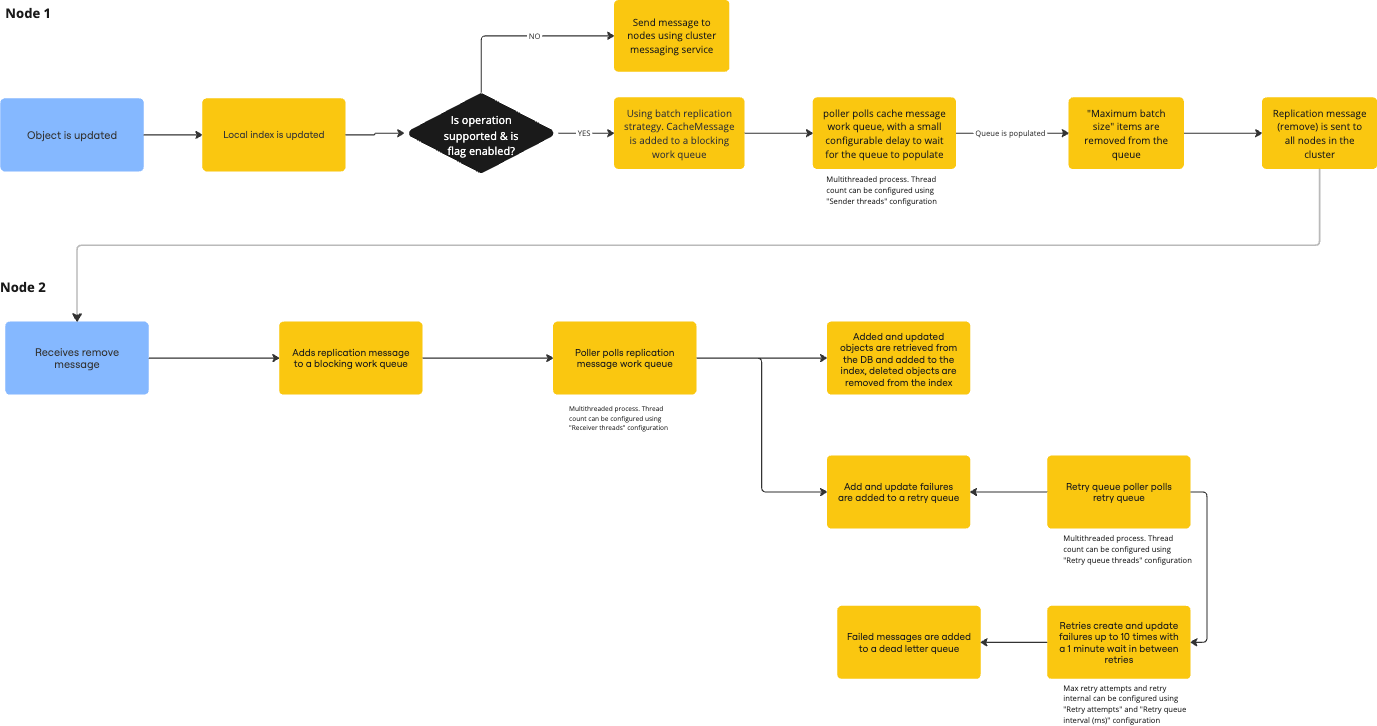
The batch replication message contains the IDs of the objects to be added and deleted and the IDs of updated objects along with their update times. For example, if there’s an object creation with the ID 21229075 in the jiradctest3 node, you can see the following message in the logs:
2024-09-19 16:55:59,747+0200 assets-replicator-3 TRACE [i.r.i.i.replication.poller.CacheMessageWorkQueuePoller] Batch message: AssetsBatchReplicationMessage(id=026ef180-78d5-487e-a8fb-35507714336f, sourceNode=jiradctest3, cacheType=OBJECT, addIds=[21229075, 21229057 ], updateIds={}, deleteIds=[], messageTimestamp=1726757759747, retryAttempts=0, lastRetryTimestamp=1726757759747)On the other nodes, the message could be similar to this:
2024-09-19 16:56:00,729+0200 RMI TCP Connection(4298)-10.150.208.4 DEBUG      [i.r.i.index.replication.AssetsReplicationTransportManager] onRemove for event: 026ef180-78d5-487e-a8fb-35507714336f
2024-09-19 16:56:00,724+0200 RMI TCP Connection(5457)-10.150.208.4 DEBUG      [i.r.i.index.replication.AssetsReplicationTransportManager] Received event from node jiradctest3 from object cache with ID 026ef180-78d5-487e-a8fb-35507714336f
2024-09-19 16:56:00,724+0200 RMI TCP Connection(5457)-10.150.208.4 DEBUG      [i.r.i.index.replication.AssetsBatchReplicationMessageReceiver] Received message with ID 026ef180-78d5-487e-a8fb-35507714336f
2024-09-19 16:56:00,725+0200 assets-replication-receiver-0 TRACE      [i.r.i.i.replication.poller.AssetsBatchReplicationMessageWorkQueuePoller] Processing replication message with ID 026ef180-78d5-487e-a8fb-35507714336f
Replication happens by invalidation. Each node receives a remove message and independently loads updates from the database. More about Assets index validation property defaults
Dead-letter queue
A dead-letter queue (DLQ) is a holding area for messages that can't be processed successfully. By default, items on the retry queue are retried every minute for a total of 10 minutes. If you need, you can configure this in the Assets configuration.
When all retries fail, the failed update messages are moved to the DLQ. If necessary, you can replay (retry) items in the DLQ once you've resolved the root cause of the failure, or you can clear them if the issue can't be fixed or if a reindex has already been completed.
These endpoints let you either replay or clear the DLQ:
GET
rest/insight/1.0/deadletterqueue/replaythat replays the DLQ in a non-cluster mode and sends a broadcast request to replay the DLQ of all nodes in a clustered mode.GET
rest/insight/1.0/deadletterqueue/replay/{nodeId}that sends a unicast request to replay the DLQ of a specific node in a clustered mode. ThenodeIdis the node that should receive the request and replay its DLQ.
Reindexing Assets
You need to be a Jira system administrator to perform a reindex.
Sometimes, your Assets data can fall out of synchronization with the database. This can happen due to direct alterations in the database or if the index replication process fails. To get everything back, you'll need to reindex Assets. Reindexing involves dropping all in-memory data and pulling fresh data from the database. You can perform the following reindex actions:
Clean re-index where all objects will be removed from the index across all nodes, and then will be indexed again. This is recommended if you want to have a fresh state of the index. Once the indexing is in progress, you won't be able to cancel it, search for objects, or filter them. This reindexing will drop all IDs stored in the cache.
Re-index (standard re-index) where all objects will stay in the index during the process, and Assets will index them again. You can search for objects during the process. This reindexing will keep the IDs and only retrieve data for the IDs that are already in the cache.
The standard re-index method can expose faults in cases where IDs have been removed or added. If this happens, we recommend the clean re-index method. More about clean-reindex in Jira settings
During a clean reindex, the local index for each type is cleared out, and a message is sent to all nodes to remove their copies of the index. This message includes the index type to be removed (like object) and the REMOVE_ALL operation. The node that's processing the reindex will start rebuilding its index. You can configure the number of threads used in this process by adjusting the Assets parallelism property on the Assets configuration page. Then, all nodes will remove their local copy of the index and rebuild their indexes using the replication process.
Locking
During a reindex, you can't use Assets on the node that's executing the reindex. In the case of a clean re-index, Assets can't be used across the entire cluster. To manage this, a lock is applied to prevent any modification of Assets data. Once the reindex is completed, Assets will unlock.
Startup
On startup, an Assets reindex will be initiated to restore the index.
Configuration
To access global Jira settings for Assets:
Go to Administration, then Manage apps.
In the Assets section, go to Assets configuration.
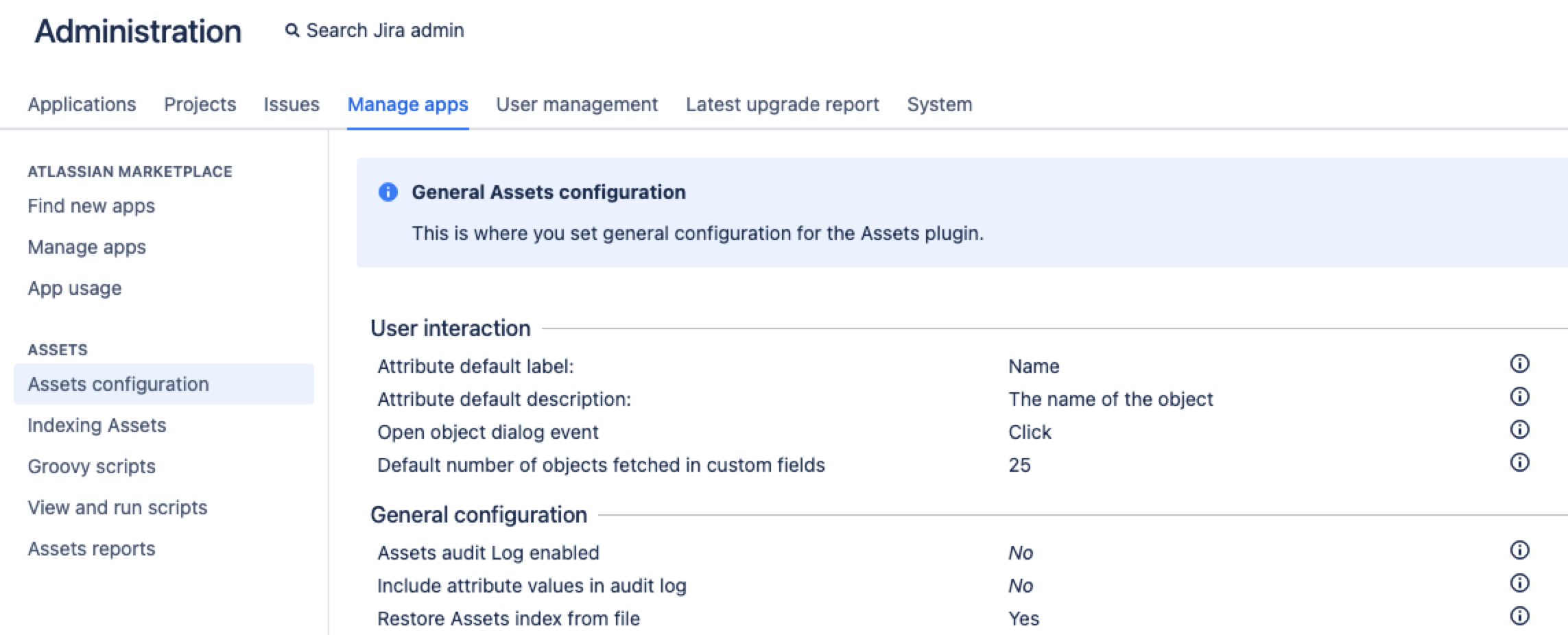
3. At the bottom of the Assets configuration page, select Edit settings.
4. Go to the General Assets configuration section and change the needed configuration.
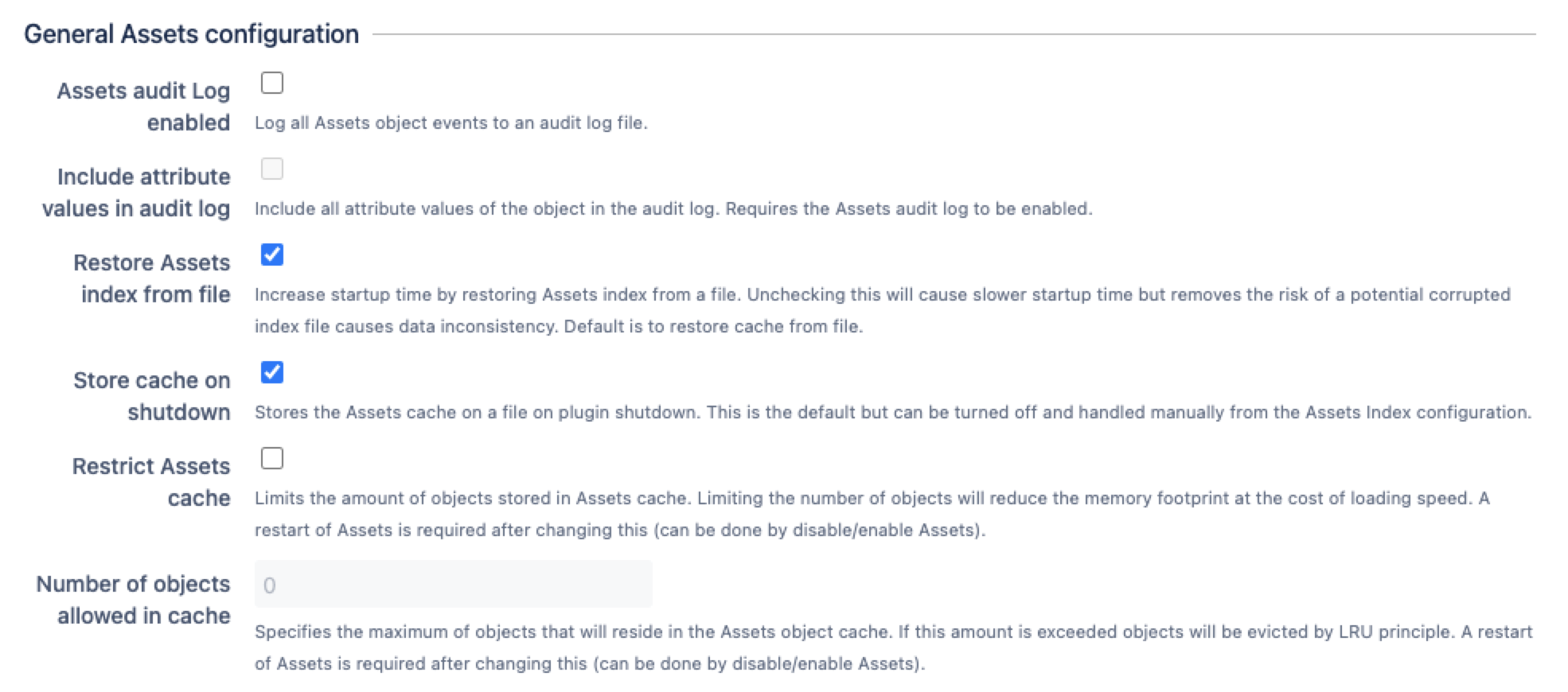
Configuration | Description | Why you might change this |
|---|---|---|
Restrict Assets cache | Limits the amount of objects stored in Assets cache. | To reduce the required memory footprint. |
Number of objects allowed in cache | Specifies the maximum of objects that can reside in the Assets object cache. If this amount is exceeded, objects will be evicted by the last used LRU principle. | To change the maximum number of objects in the cache. |
Restricting the index size
You can limit the number of objects in the Assets index to reduce memory consumption. However, this will affect performance for the objects that aren't in the index, as those objects will be queried directly from the database.
Troubleshooting
If you run into indexing issues, refer to the information below.
Reindex inconsistent state
In some cases, data can end up in an inconsistent state in the database. When this happens, the data can't be referenced in the index, which can cause issues when you're trying to view it in the Assets application.
Starting with Jira Service Management 10.1, these errors display in the Assets indexing UI and logs. More about troubleshooting Assets index
Atlassian profiling and metrics
Assets collects and exposes some Java Management Extensions (JMX) metrics that you can use to monitor your assets replication stats. More about live monitoring using the JMX interface
Logging
Below you can see an overview of loggers (logging mechanisms) used in Assets to monitor and troubleshoot replication and reindexing processes.
Logger | Level | Description |
|---|---|---|
| DEBUG | Logs the DLQ content every 5 minutes by default, but only if the DLQ isn’t empty. You can change the logging frequency by updating Dead-letter queue logging interval (ms). |
| DEBUG | Logs Assets index replication statistics every 5 minutes by default. You can change the logging frequency by updating Dead-letter queue logging interval (ms). |
| DEBUG | Includes all replication logging. More about performance in Assets |
| DEBUG | Logs reindexing. |