
_ColorScheme_SiteandSpace
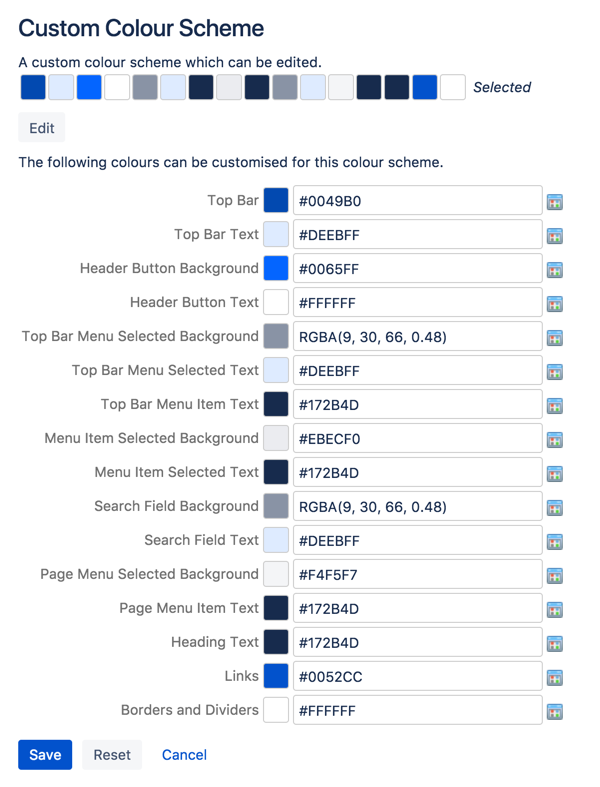
This is an example and description of each color swatch in the Color Scheme page. It is identical for Spaces and Sites.
Some UI elements below are for specific themes, and color changes may not take effect for other themes.- Top Bar - the top navigation bar background
- Top Bar Text - the text on the top navigation bar
- Header Button Background - buttons on the top navigation bar (e.g. Create button)
- Header Button Text - the text on buttons on the top navigation bar
- Top Bar Menu Selected Background - background color of top navigation bar menu items when selected (e.g. spaces)
- Top Bar Menu Selected Text - text color of top navigation bar menu items when selected
- Top Bar Menu Item Text - text on top navigation bar drop down menus (e.g. help or cog)
- Menu Item Selected Background - highlight color on top navigation bar drop down menu items
- Menu Item Selected Text - text color on highlighted top navigation bar drop down menu items
- Search Field Background - the background color of the search field on the header
- Search Field Text - the color of the text in the search field on the header
- Page Menu Selected Background - the background color of the drop down page menu when selected
- Page Menu Item Text - the text of the menu items in the drop down page menu
- Heading Text - all heading tags throughout the space
- Links - all links throughout the space
- Borders and Dividers - table borders and dividing lines
Last modified on Aug 22, 2023
Powered by Confluence and Scroll Viewport.