
Name |
Crowd as an LDAP Server |
|---|---|
Version |
1.0 |
Product Versions |
Crowd v1.0.6 |
Author(s) |
Robert Castaneda [CODEGEIST:CustomWare] , Daren Klamer [CODEGEIST:CustomWare] |
Homepage |
|
Price |
FREE! Priceless! |
License |
N/A |
JavaDocs |
|
IssueTracking |
|
Download JAR |
|
Download Source |
Code, what code? This one is about re-use! |
Description/Features
A layer to turn Crowd into an LDAP server
Motivation - a non-Atlassian product to integrate into our environment. The product supports LDAP authentication, we want to use our Crowd deployment as the central repository of users, rather than setting up an LDAP repository just for this application.
A picture is a thousand words - here is the end result in JXplorer of users listed from Crowd via LDAP:

The requirement is to have no Java/J2EE/Atlassian based products use crowd as the central authentication mechanism via LDAP. To achieve this, we have used Penrose - http://penrose.safehaus.org/ and have configured it to read user/password information from the Crowd database as well as implement a password decrypt/decode function in Penrose so that it can authenticate using the same passwords that are stored in Crowd without duplicating user information. A user in Crowd, is a user in LDAP. The diagram shows the setup below:

Whilst not a plugin that runs within an Atlassian product, it's another solution that can bring outside technologies into the Atlassian world.
How an external application authenticates over LDAP can be different from one application to another. This example has been tested using Crowd itself, that is , using the Penrose LDAP server as a Crowd Directory service and a Crowd external Application setup to test against this directory.
At any time, Crowd can update their algorithm for storing passwords. The mechanism described here makes us of the fact that having access to the right data, a password can be reverse engineered/constructed from the Crowd database. If this ability changes in future, then this will need to be updated, probably to use the
<pwd> type syntax.
As always, an application/infrastructure such as Crowd is only as secure as the infrastructure -database/os - that it runs on.
Steps to setup
- Download and install Penrose Server and Studio from http://penrose.safehaus.org/. This example was created and tested with version 1.1.2
- Setup and connect Penrose Studio as default - you will also be required to setup a jdbc driver to your database - the instructions at http://docs.safehaus.org/display/PENROSE/Installing+JDBC+Driver will be invaluable for this!
- Once inside Penrose Studio, you need to Create a Connection. Here are our settings - they are for EnterpriseDB.

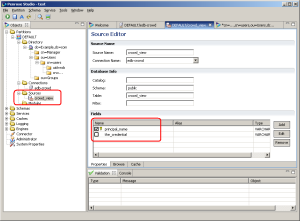
- We then create a Source. In Crowd, we created a View rather than accessing the tables directly. The main table that you need access to is REMOTEPRINCIPALCREDENTIALS
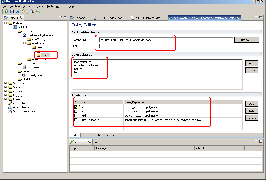
- We then and add a New Dynamic Entry, not a "Dynamic Entry from Source". Within that entry definition, we define the source within the dynamic entry.
- You can then test with an LDAP browser, such as a Crowd Principal search or JXplorer - http://www.jxplorer.org/


Code
The following code decrypts passwords stored in Crowd, note that you need to retrieve the RETRIEVE_ME_FROM_YOUR_CROWD_DATABASE parameter from your DB. To retrieve this parameter, execute the following SQL from the Crowd database:
select * from "SERVERPROPERTY" where "NAME" = 16
The code is below.
import sun.misc.BASE64Decoder;

import javax.crypto.Cipher;
import javax.crypto.CipherInputStream;
import javax.crypto.SecretKey;
import javax.crypto.spec.DESKeySpec;
import javax.crypto.spec.SecretKeySpec;
import java.io.ByteArrayInputStream;
import java.io.ByteArrayOutputStream;
import java.io.InputStream;

            // Buffer used to transport the bytes from one stream to another
        byte[] buf = new byte[CODEGEIST:1024];

        try {
            byte[] hash = new BASE64Decoder().decodeBuffer( RETRIEVE_ME_FROM_YOUR_CROWD_DATABASE );
            SecretKey key = new SecretKeySpec( hash, "DES" );

            DESKeySpec paramSpec = new DESKeySpec( hash );

            Cipher dcipher = Cipher.getInstance( "DES" );
            dcipher.init( Cipher.DECRYPT_MODE, key );

            ByteArrayInputStream bis = new ByteArrayInputStream( new BASE64Decoder().decodeBuffer( thepwd ) );

            InputStream in = new CipherInputStream( bis, dcipher );

            // Read in the decrypted bytes and write the cleartext to out
            int numRead = 0;

            ByteArrayOutputStream bos = new ByteArrayOutputStream();

            while( ( numRead = in.read( buf ) ) >= 0 ) {
                bos.write( buf, 0, numRead );
            }
            return new String( bos.toByteArray() ) ;
        } catch( Exception e ) {
            e.printStackTrace();
        }
Screenshots
Screenshots |
|---|
| There are no images attached to this page. |