
[Bamboo Knowledge Base]
An author is any person who contributes to a build by checking-in code to a repository that is associated with a Bamboo plan. Bamboo extracts the author name from the code repository; an author need not be a Bamboo user.
Bamboo allows you to associate an author with a user. Association is with either the username or email address, and can be automatically or manually configured. This is useful for identifying who has made a particular commit, providing system notifications and apportioning blame. Author association also allows a user to quickly identify their commits on the MyBamboo tab.
On this page:
To manage Bamboo authors
- Click the
 icon in the Bamboo header and choose Overview.
 - Select Authors from the side panel. the Manage Authors screen will display:

On the 'Manage Authors' page you can perform any of the following actions:
Action Description Search for author Search for a particular author using their repository author name Search for user Search for a particular author by their linked user name to see their author association Link user Link an author with their Bamboo user Unlink user Unlink an author from their Bamboo user Unlink all authors Remove all existing author and user associations Auto-link unlinked authors Automatically associate any unlinked authors with a Bamboo user based on their Bamboo username or Email address
To associate an author with a user
- From the Manage Authors screen, use the search tool to locate the author in question
- Select the unlinked author and click Link with user
- Enter the user's name in the field, or use the drop down menu to select a user:
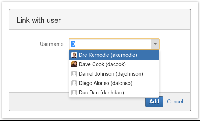
- Click Add
Note: You can link more than one author name to a Bamboo user name.
To disassociate an author with a user
- From the Manage Authors screen, use the search tool to locate the author or username in question
- Click Unlink user
Overview
Content Tools
Apps


 Except where otherwise noted, content in this space is licensed under a Creative Commons Attribution 2.5 Australia License.