
Nested Groups in Crowd
This page describes the way Crowd handles nested groups, i.e. groups that contain other groups or that belong to groups.
Summary of Nested Groups in Crowd
Some user directories allow you to define a group as a member of another group. Groups in such a structure are called 'nested groups'. In Crowd, you can map any group to an application, including a group which contains other groups. Crowd supports nested groups for LDAP directory connectors, Crowd internal directories, Delegated Authentication directories and custom directories. You can enable or disable support for nested groups on each directory individually. For more information, refer to the documentation on configuring a directory.Here's the effect on authorization and presentation of group members to integrated applications:
- When verifying a user's login to an integrated application, Crowd will search the mapped group plus all its sub-groups.
- When an integrated application requests a list of users, Crowd will present a flat list of users gathered from the requested group and its sub-groups.
The rest of this page describes the above functionality in more detail.
In addition, you can follow the instructions to:
Definition of Nested Groups
A 'nested group' is a group which is a member of another group. If you are using groups to manage permissions, you can create nested groups to allow inheritance of permissions from one group to its sub-groups.
In an LDAP directory, a nested group is defined as a child group entry whose DN (Distinguished Name) is referenced by an attribute contained within a parent group entry.
 For example, a parent group 'Group One' might have an
 objectClass=group attribute and one or more member=DN attributes, where the DN can be that of a user or that of a group elsewhere in the LDAP tree:
member=CN=John Smith,OU=Users,OU=OrgUnitA,DC=sub,DC=domain
member=CN=Group Two,OU=OrgUnitBGroups,OU=OrgUnitB,DC=sub,DC=domain
Supported Directory Types
Crowd supports nested groups for the following directory types:
- LDAP directory connectors
- Internal directories
- Delegated Authentication directories
- Custom directories, provided that the customization meets the interface requirements of the
RemoteDirectoryAPI.
The directory importer does not support nested groups when importing users, groups and roles from LDAP into a delegated authentication directory. See CWD-1334.
Group Management via the Crowd Administration Console
The Crowd administrator can view group memberships, add a group as a member of another group, and remove a group's membership of another group.
Verifying a User's Access to an Application
When verifying a user's login to an integrated application, Crowd will search the groups mapped to the application, plus all their sub-groups. If the username exists in one of the groups, Crowd will allow the user access to the application.
Presenting Flattened Lists of Users to Integrated Applications
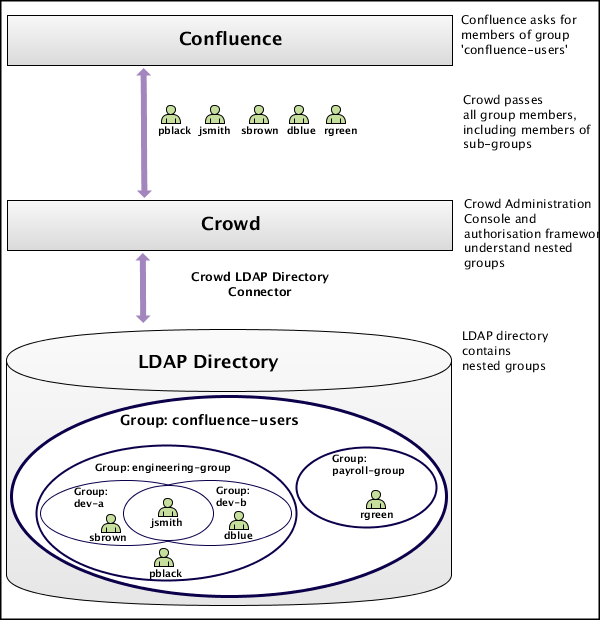
Integrated applications may ask Crowd for a list of members in a group. Crowd will present all users who are members of the group and all users belonging its sub-groups, consolidated into one list. We call this list a 'flattened' group. This is necessary because many integrated applications do not understand the concept of nested groups. For that reason, Crowd makes the nesting transparent to integrated applications.
Use Case: Confluence Requests a List of Users in 'confluence-users' group
A Crowd-integrated Confluence instance will see users in sub-groups as members of the parent group, allowing administrators to use nested groups to manage permissions. (This will not affect Confluence instances that are not Crowd-enabled.)
For example:
- In LDAP we have groups 'engineering-group' and 'payroll-group'. We want to grant both groups access to our Confluence site.
- Using Crowd, we add a group called 'confluence-users' in the LDAP directory.
- Add the 'engineering-group' as a sub-group of 'confluence-users'.
- Add the 'payroll-group' as a sub-group of 'confluence-users'.
- Group memberships are now:
- confluence-users — sub-groups: engineering-group, payroll-group
- engineering-group — sub-groups: dev-a, dev-b; users: pblack
- dev-a — users: jsmith, sbrown
- dev-b — users: jsmith, dblue
- payroll-group — users: rgreen
- When Confluence requests a list of users in the 'confluence-users' group, Crowd will present the following list:
- pblack
- jsmith
- sbrown
- dblue
- rgreen
Diagram: Presenting Flattened Lists of Users to Integrated Applications
User Management via Integrated Applications
Recommendation: Enable External User Management
If you have Jira, Confluence, Bitbucket, Bamboo, FishEye, or Crucible connected to Crowd, and you have nested groups in your directory, we recommend that you turn on external user management, via the administration screen of the integrated application. This will avoid confusion in the user-management screens of the integrated application, since these applications do not understand the concept of nested groups.
Use Case: Application Adds a User to a Group
If an integrated application adds a user to a flattened group, the user is added to the named group and not to any of its sub-groups.
Use Case: Application Removes a User from a Group
If an integrated application attempts to remove a user from a flattened group, Crowd will do the following:
- If the user is a member of the top group in the hierarchy (tree) of groups contained in the flattened list (e.g.
confluence-users), Crowd will remove the user. - Otherwise, Crowd will return an error stating that the user is not a direct member of the group.
Further Notes on Crowd's Processing
- Crowd handles circular/cyclical references — For example, 'group1' is a member of 'group2', 'group2' is a member of 'group3', and 'group3' is in turn a member of 'group1'.
- Crowd ignores members which are not users or groups — Group members might be computers, printers, etc.
- Crowd gracefully handles unreachable groups — There may be references to groups or members that Crowd cannot enumerate. This might be because the referenced group no longer exists, or the LDAP group structure is not entirely consistent. Crowd will ignore such groups and print a warning to the log file.