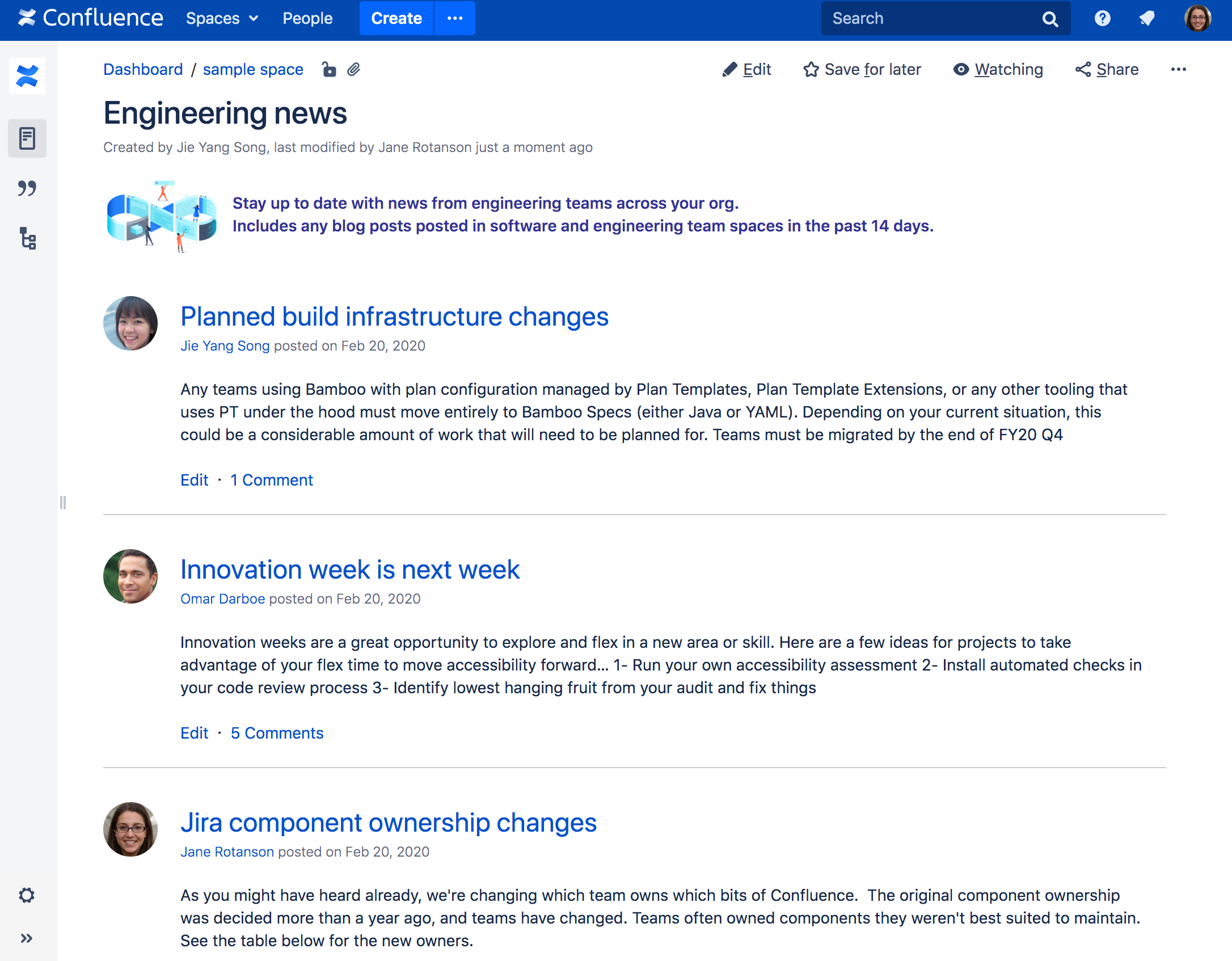
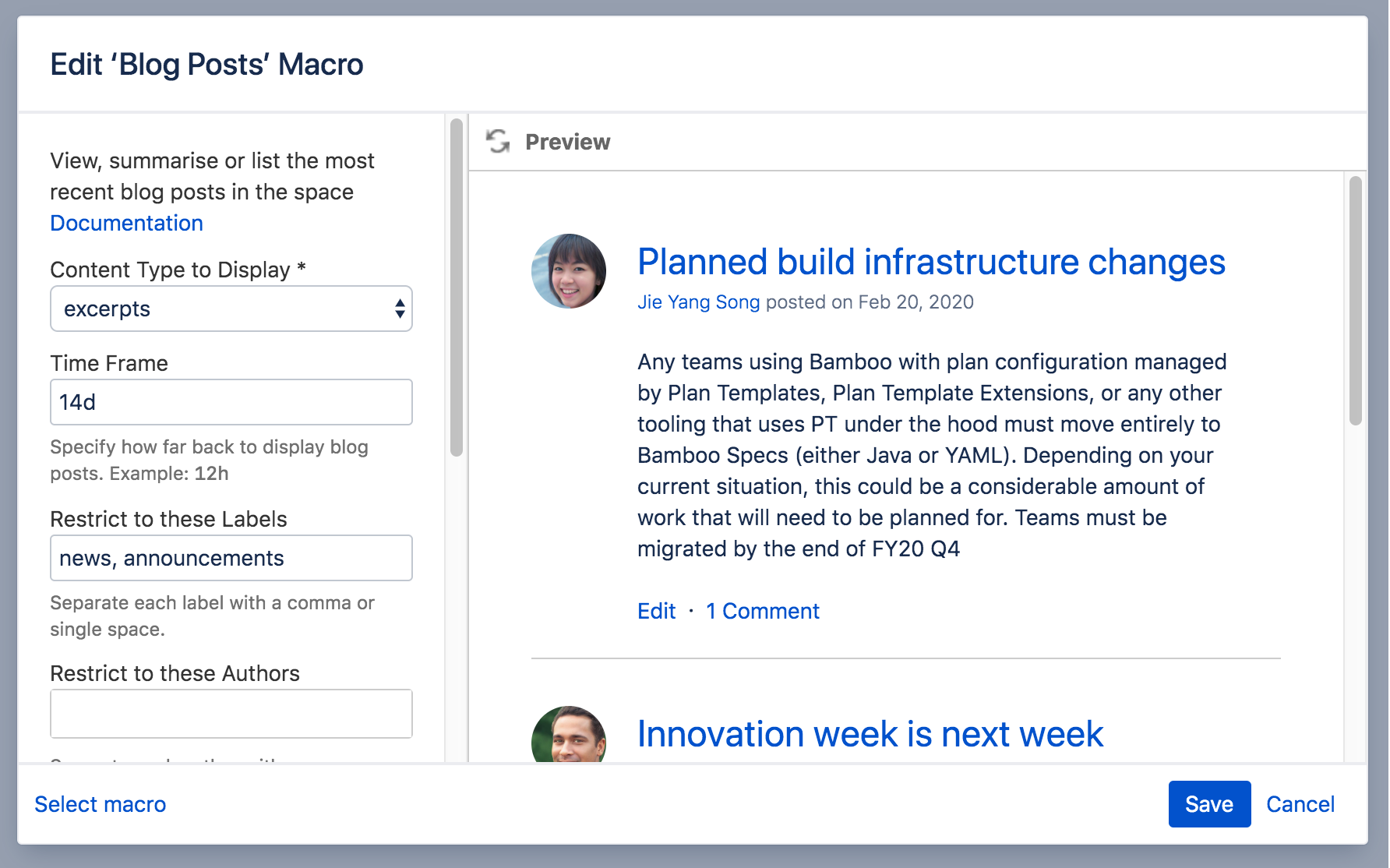
The Blog Posts macro allows you to display blog posts on a Confluence page. Clicking on a title takes you to the blog post. The Blog Posts macro generates output like that in the screenshot below:
In the Confluence editor, choose Insert > Other Macros.
Find and select the required macro.
Parameters
When editing, you can click on the macro placeholder and choose Edit to display the parameters for this macro in the Macro Browser.
Parameters are options that you can set for Confluence macros to control the content or format of the macro output. The table below lists parameters for this macro that can be set in the Macro Browser.
Parameter
Default
Description
Content Type to Display
titles
Available values:
titles — Display a list of blog posts, showing titles only.
excerpts — Display short excerpts from each blog post. 'Read more...' links to the full blog post, if the content is more than 500 characters long.
Time Frame
no limit
Specify how far back in time Confluence should look for the blog posts to be displayed.
Available values:
m — Minutes
h — Hours, so '12h' displays blog posts created in the last twelve hours.
d — Days, so '7d' displays blog posts created in the last seven days.
w — Weeks
Restrict to these Labels
None
Filter the results by label. The macro will display only the blog posts which are tagged with the label(s) you specify here.
You can specify one or more label values, separated by a comma or a space.
To exclude content which matches a given label, put a minus sign (-) immediately in front of that label value. For example: If you specify a label value of -badpage you will get only content which is not labelled with 'badpage'.
To indicate that the results must match a given label value, put a plus sign (+) immediately in front of that label value. For example: If you specify a label value of +superpage,+goodpage you will get only content which has at least two labels, being 'superpage' and 'goodpage'.
Restrict to these Authors
None
Filter the results by author. The macro will display only the blog posts which are written by the author(s) you specify here.
You can specify one or more authors, separated by a comma.
Restrict to these Spaces
@self, i.e. the space which contains the page on which the macro is coded
This parameter allows you to filter content by space. The macro will display only the pages which belong to the space(s) you specify here.
You can specify one or more space keys, separated by a comma or a space.
To exclude content in a specific space, put a minus sign (-) immediately in front of that space key. For example: If you specify a space key of -BADSPACE you will get only content which is not in the BADSPACE.
To indicate that the results must come from a specific space, put a plus sign (+) immediately in front of that space key. For example: If you specify a space key of +GOODSPACE you will get only content in GOODSPACE. (Note that this is not particularly useful, because each content item belongs to one space only. If you put a plus sign next to one space key and list other space keys too, the other space keys will be ignored.)
@favorite — The spaces you have marked as favourite.
@favourite — The same as @favorite above.
@all — All spaces in your Confluence site.
* — The same as @all above.
When specifying a personal space, remember to use the tilde (~) sign in front of the username, such as ~jbloggs or ~jbloggs@example.com.
Maximum Number of Blog Posts
15
Specify the maximum number of results to be displayed. Note that the results are sorted first, and then the maximum parameter is applied.
Sort By
creation
Specify how the results should be sorted. If this parameter is not specified, the sort order defaults to descending order (newest first) based on the creation date.
Values:
title — Sort alphabetically by title.
creation — Sort by the date on which the content was added.
modified — Sort by the date on which the content was last updated.
Reverse Sort
false
Select to change the sort from descending to ascending order (oldest first). Use this parameter in conjunction with the Sort By parameter. This parameter is ignored if the Sort By parameter is not specified.
Is there any way to constrain the formating of the display for this macro? It's pretty messy if you've got it in a list. The title, for example is huge.
I noticed that the HTML for the Title column's heading specifies width="70%" (Confluence 2.3). This is not appropriate when the Author and Date posted column values are about the same length as the title. Web browsers are perfectly good at table layout so I don't see the point of this.
This macro doesnt appear to be working correctly- it doesnt update with the latest posts, and sometimes skips some old ones too. It is very random in this behaviour. Any ideas?
It's over-caching - we've noticed the same sort of thing and so have our clients, eg:
add a new post and it doesn't show up for an hour or so
delete a post and it's still shown
When the cache eventually clears down, it obviously shows the correct information, but while that cache is in place people get confused because the blog-posts macro is not accurately reflecting the actual blog posts.
Can you describe the process of clearing the cache? Do you mean by flushing cache through the Administration > Cache Statistics page? If yes, which one of caches listed on the page sholud be flushed? What are the impacts on performance in case of flushing?
I have found this to be an indexing issue, not a cache issue. I tried flushing everything in the cache through the Admin Console to no avail. What I later found was that the new blog posts were sitting in an unprocessed content indexing queue for the past 2 hrs. This queue is found by clicking the Content Indexing Link under Administration. there were all my blog posts and some other items. By clicking the "Flush Queue" link at the bottom, everything was normal again. This queue is supposed to be processed every minute, but for some reason it's not processing that often ( it had been over 2 hrs). I still haven't figured out why, but at least I can give my users more immediate satisfaction.
I think the reason for this random behavior is that blog-post posts news in order of last edited... so if I edit a post of yesterday (to correct a minor error) it appears in the beggining of the list...
Feature request: New parameter for specifying start (and stop) times, so it will be possible to list the most recent posts with excerpts and the older ones with just titles:
Ditto on the request to be able to control formatting. I'm trying to fit the last n blog posts in a smaller, righthand column and the title is way too large.
I would suggest you to raise a support ticket at our support system: https://support.atlassian.com so that we can follow up the issue from there. Thanks.
Can someone please tell me how to modify the format of news in 2.6.0?
I see the \confluence\WEB-INF\classes\templates\macros\lastblogs.vm file in my older version of Confluence, but in the newest version, this is all that's in the \confluence\WEB-INF\classes directory:
With 2.6.0 a lot of stuff has been moved into a jar file. Open WEB-INF\lib\confluence-2.6.0.jar (jar is simply a zip file). You should find templates\macros\lastblogs.vm in there. If you leave the .jar file as-is but extract the one file to WEB-INF\classes\templates\macros\lastblogs.vm and make your edits it to it there it should override the copy in the jar when you restart Confluence.
I am attempting to use the blog post macro to create a filtered view of posts by specific users. This way it will allow for 'departmental' blog views within our shared space. The parameters shown allow for inclusion based on space name, or by a users personal space, but not by posts in the group space by a specific user. (or hopefully, by multiple usernames). Is there any way to filter the blog post macro by the username that created the post in the Spaces blog, not the individual's blog?
Sorry to say that Confluence does not provide this feature currently and I cannot think of any workaround that can be used to fulfill your request. However, you may want to raise an improvement request in the following:
You could use the Reporting Plugin to do this. Essentially, it would be a modification of this 'recipe'. You will need to modify the 'reporter' to look like this:
Thank you for the suggestion! Unfortunately I don't think we have the content-reporter plug-in implemented, and I am only the space admin, not the admin for the entire confluence installation.
What I will do is ask my users to label/tag their entries, and create filtered views by label/tag.
thank you both for the rapid replies!
I am currently using Confluence 2.5.5. I would consider myself a fairly 'novice' user of confluence - and I am having trouble with the blog-posts macro.
If I use {blog-posts:labels=label_name|match-labels=all} the macro works fine, but the moment I change it to {blog-posts:content=titles:labels=label_name|match-labels=all} the labels and the match-labels filters do not seem to work, and it brings up all the blog posts. What may I be doing wrong? I need to display just a list of post titles based on labels alone.
I was able to get my desired results by using the content_reporter macro. However, I'd appreciate if someone can provide me an update as to why the blog-posts macro was showing the behavior as I expressed.
I believe there must be typo within the blog-posts declaration. I used both the samples you have listed above and true enough that the latter with the content titles displayed all blogs. Perhaps you should be using the following instead:
I am having the same problem. All blog posts appear unfiltered when the macro can't find an instance of the label I have assigned- ie. if the label is "foo", and there aren't any blog posts with that label, all blog posts will appear even though they don't have that label.
The code I am using:
{blog-posts:content=titles|labels=foo|}
As soon as I add a blog post with that label, the filter works.
I have no idea how to fix this - Help anyone? I am using confluence 2.8.1
The official blog-posts macro is fairly limited in its display options. You can create a fully-customised output with the Reporting Plugin, however. An example of a custom blog post output is here.
I am not aware of any parameter or feature to achieve this. If you are keen on this feature, feel free to raise an improvement request in our Issue Tracker system:
Is there any way to create a tabbed (deck and cards) space with different blogs for different tabs? For example, I'm trying to create a newsletter page with four cards, and I'd like three of the cards to have a news blog format. Unfortunately, the same posts are showing up on all three cards.
Thanks for your quick reply. It looks like we have that pulgin (I'm a space admin, rather than a systems admin), as I'm able to build a deck of cards. I'll play around with it a bit.
We are having issues getting the match-labels=all option to work as expected. Has anyone seen this behavior?
For example I expected {blog-posts:time=30d|labels=label1,label2|match-labels=all} to output all news items modified in the last 30 days that have both label1 and label2 attached to them. If some had additional labels they would be included as long as they had both of the specified labels. It seems to work fine unless no entries match at least one of the labels. In that case it appears to include all entries that match one of the specified labels. In the case listed above if no News items match label2, but there are ones that match label1 then you appear to get all the entries that match label1 that meet the other criteria. If a single entry has label2, then the behavior appears to go back to expected and outputs "No news found" with no special formatting. Interestingly enough the message for the single label case with match-labels=all turned on is different and output "No content is labeled with label1" with a red background.
I guess one workaround is to add additional news items with the missing label until the issue is fixed.
For the different message output, I would suggest you to raise an improvement request at https://jira.atlassian.com. Alternatively, we would be happy to raise it on your behalf. Thanks.
2.7.3. I had found that bug report later, but I wasn't certain if we needed Confluence 2.8 or would version 1.4 of the Confluence Advanced Macros fix it. The admins haven't installed 1.4 yet so I don't have the answer yet.
What is the difference between http://developer.atlassian.com and http://jira.atlassian.com, I submitted a report at jira.atlassian.com for the blog-posts macro and it doesn't appear to have been reviewed, but there is definitely work going on with the blog-posts macro in the JIRA database at developer.atlassian.com. Is one system better than the other for submitting issues with the blog-posts macro?
The http://jira.atlassian.com is the issue tracker for improvement request, bug report, feature request and task for Atlassian product. If you happen to have any Confluence related technical issues, please feel free to raise a support ticket via our issue tracker at http://support.atlassian.com
Is there any way to filter a certain space out? I'd like all the news to display, expect from a certain space, because its news is listed separately on the dashboard.
Or, is there a way to specify just the news in the 'main' or 'dashboard' space vs. all new news from all the spaces?
Do you mean you only wish to view news from some particular spaces in the dashboard? Perhaps you can try to modify the Global layout and append the blog-post macro to only display certain space news.
If I happen to misinterpret your question, feel free to raise a support request at the following link and provide detailed explanation on your requirement:
As far as I am concerned, this feature is not yet available in this macro. If you are keen on this feature, feel free to raise an improvement request at http://jira.atlassian.com. Thanks.
Could you please further explain the goal you want to achieve here? It will be great if you can provide a scenario for a better understanding. Alternatively, you can raise a support ticket at https://support.atlassian.com for more queries.
If you would like to filter label1 and label2 in Confluence, you can try the following example. It will returns all the news item with label1 and label2.
This may be a simple question that I'm just not finding the answer to-- but is there any way to reduce the size of the headlines in this macro? The news headlines are HUGE!
You can either try adding some CSS to the output of the page which makes the heading smaller. You might be able to do this with the {style} macro from the Content Formatting Plugin.
Alternately, you might like to customise the display more directly, using something like the Reporting Plugin. An example of a blog post customisation is here.
is there any way to collect news (blog-posts) on a certain page and inform useres by E-Mail, that there is new news? What I try to realise is, that the news is brought to the user and not that he has to look after it . . .
You might want to look at the Mail page plugin. It allows anyone with the 'View' space permission to email a Confluence page. Please follow the detailed doc below to configure the Mail page plugin:
Thank you - I tried this - works fine! But it is not exactly what I am looking for.
If someone makes a change on a page I have posted I recieve an E-Mail. The same behavior should appear when a page is added to a page I have posted. But that is not the case?!
Are you aware of the Watch feature in Confluence? Basically, users will be sent email notifications when changes are made to their watched pages and spaces:
Is there a way to "back-date" news items. Our group provides a lot of presentation across our organization. Previously, we have organized these presentations in a simple table. I would like to try to place those older presnetation items as news items based on the date given and then limit the blog-posts macro so that we don't see the last 50 presos... only the last 5 or so?
In the meantime, the backdating feature is only available when you create news items. You might want to cast your vote on the following improvement request:
Is there a way to add navigation? I'm using this kind of as a blog, but I'm having trouble figuring out how to access older posts without having them just all be on one page.
I am not sure which criteria that you want to use for your filter. But, there are other choices such as filter by spaces or combine parameters to filter as in example no.7 above. Apart from that, you might want to use the {search} macro to filter the results by content and use the lastmodified parameter to control the freshness of the contents. Refer here for more information about the {search} macro. Hope that helps!
I need to divide the news across pages. That is, there will be open forum where all news will be reposited by help of blog-posts and other forum will be the filter of some forums which are presently in open forum.
For that there is Label. But i don't want to use Label.
Thanks & Regards,
As far as I can understand, it sounds like that there is a need for forum-like feature in Confluence. If that is what you are looking for, there is a good discussion on this issue at Confluence as a Forum. Feel free to browse for more information.
As per my understanding, the second choice, Community Bubbles plugin is not compatible with your Confluence version. Hence, you might want to try out the other options.
If possible, consider your instance for an upgrade to the latest version available as more bug fixes and features are included. As you may already know, support for Confluence 2.2.x and 2.3.x has been discontinued.
I have tried to sort the blog news in title order, but I do not get the list sorted. It does not actually matter in which order I try to sort the lines. Did anyone have the same problem? We are working in Confluence 2.9.
Unfortunately, the sort by title parameter is only available for Confluence 2.10.x. You might want to refer to Confluence 2.9.x's documentation on the macro here:
I want to list blog items from all personal spaces vs global spaces, but I also need to exclude blog items with a specific label. Following instructions, I tried this (note the minus sign in front of the label):
I've seen someone already asked a navigationfeature for blog posts.
Is there any chance to see this feature implemented? Currently this macro it's not acting like a real blog because if I shows only 5 posts, I have no way to directly access to previous posts. I have to click on a post and then I have two arrows... Why you do not add paginations?
I saw there is another plugin (Flexi Blog Plugin) that implements many of the requests for the shipped blog macro but I really I do not understand Atlassian policy about development. Why I should get my Confluence instance bloated from thirdy party plugins to see corrections and improvements on shipped plugins?
I found a similar request on Jiira but it seems three years old and on the road map there no improvement on this plugin so I see no utility to raise further requests.
Again, a lot of people asks for reducing title font size since three years ago. Why was not implemented? It's seems a really trivial correction. Yes I see I could change it through css and other ways but would my modifications be retained when I upgrade Confluence?
Our development team practises internal prioritisation when it comes to bug fixes and adding new features. I hope the following page would be able to answer your questions:
Actually I wish have known before buying Confluence
Things are clear here: the blog macro is useless even for a simple blog and to get basic functionalities as a simple pagination I need another plugin (unsupported) and for a decent title font size I need to tweak Confluence.
The steps that Ming Giet mentioned were for the news tab in the space that you can access from Browse > News.
However, I think your query is related to the {blog-posts} macro. In order to achieve your requirement, you have to edit the vm file responsible for the blog-posts macro. There is no direct way of doing it. Here are the steps if you are really keen to achieve this:
Unzip the <confluence-install>/WEB-INF/classes/com/atlassian/confluence/setup/atlassian-bundled-plugins.zip
Unjar the confluence-advanced-macros-X.X.X.X.jar in the unzipped atlassian-bundled-plugins.zip
Once unjarred, edit the /com/atlassian/confluence/plugins/macros/advanced/blog-posts.vm file.
Comment the following lines in the file by adding #* and *#:
Once you have done this, save the file.
Jar the file back to confluence-advanced-macros-X.X.X.X.jar
Zip the atlassian-bundled-plugins.zip back
Restart your confluence.
Your changes would be reflected after this
If you need a guide to help with the editing files within JAR archives, you can refer to this documentation. However, please keep in mind that the confluence advanced macro is a part of bundled plugins. Hence they are stored in a special place, which is located at <confluence-install>/classes/com/atlassian/confluence/setup/atlassian-bundled-plugins.zip. Therefore, if you are following the guide, please make sure the paths are correct.
As a precaution, you might want to backup your atlassian-bundled-plugins.zip before changing anything. Hope this will help you.
As far as I know, there is no direct way of doing it. However, you can probably do the following:
Unzip the <confluence-install>/WEB-INF/classes/com/atlassian/confluence/setup/atlassian-bundled-plugins.zip
Unjar the confluence-advanced-macros-X.X.X.X.jar in the unzipped atlassian-bundled-plugins.zip
Once unjarred, edit the /com/atlassian/confluence/plugins/macros/advanced/blog-posts-titles.vm file.
Remove the following two lines in the file:
Once you have done this, save the file.
Jar the file back to confluence-advanced-macros-X.X.X.X.jar
Zip the atlassian-bundled-plugins.zip back
Restart your confluence.
Your changes would be reflected after this
If you need a guide to help with the editing files within JAR archives, you can refer to this documentation. However, please keep in mind that the confluence advanced macro is a part of bundled plugins. Hence they are stored in a special place, which is located at <confluence-install>/classes/com/atlassian/confluence/setup/atlassian-bundled-plugins.zip. Therefore, if you are following the guide, please make sure the paths are correct.
As a precaution, you might want to backup your atlassian-bundled-plugins.zip before changing anything. Hope this will help you.
I'd actually like to remove the top gray bar that includes "Title, Author, and Date Posted" altogether - how can that be done? I ONLY want the list information, not the header row.
Basically it is the same as the above suggestion. In order to remove the whole header row, kindly follow the following steps:
Unzip the <confluence-install>/WEB-INF/classes/com/atlassian/confluence/setup/atlassian-bundled-plugins.zip
Unjar the confluence-advanced-macros-X.X.X.X.jar in the unzipped atlassian-bundled-plugins.zip
Once unjarred, edit the /com/atlassian/confluence/plugins/macros/advanced/blog-posts-titles.vm file.
Remove the following lines in the file:
Once you have done this, save the file.
Jar the file back to confluence-advanced-macros-X.X.X.X.jar
Zip the atlassian-bundled-plugins.zip back
Restart your confluence.
Your changes would be reflected after this
If you need a guide to help with the editing files within JAR archives, you can refer to this documentation. However, please keep in mind that the confluence advanced macro is a part of bundled plugins. Thus, they are stored in a different location, which is at <confluence-install>/classes/com/atlassian/confluence/setup/atlassian-bundled-plugins.zip. Therefore, if you are following the guide, please make sure the paths are correct.
You also might want to keep a backup of your atlassian-bundled-plugins.zip before doing any changes. Hope this helps.
Thank you - that's really great and much cleaner. Is it equally easy to tell the layout of this macro to ONLY wrap the title content, and not the author and date? This macro works very well, but becomes less effective when all three columns break...
Yes, it is equally easy to wrap only the title content. In the blog-posts-titles.vm file that you have edited previously, just add the style for nowrap for the particular column. The following code will only wrap the title content:
In the documentation which describes how to unjar, there is a note providing a shortcut. It says you can drop the modified file in a particular path without recreating the JAR as long as you get the full path correct.
Is this shortcut applicable to mods to the blog-posts.vm file? Or is it different because the JAR is contained within atlassian-bundled-plugins.zip
blog-posts: Multiple values found: [user2, user1, user3]. Only one value supported.
The documentation supports the author field, but no examples cite its usage. I tried using spaces (instead of commas) with no success as well as removing the parameter name "author=" from the macro (and just inserting the values after the macro name). It works when I specify a SINGLE user. An alternatively acceptable solution would be if it would accept a group, which it does not.
I have tried this out in Confluence 3.0 with Advanced Macros version 1.6.2.6, and I am getting the same result.
This does not happen in Confluence 2.10.3 with Advanced Macros version 1.5.3.3, though.
I have raised a bug report on this issue. I would suggest you to add yourself as a watcher for the aforementioned bug report and feel free to comment or address your concerns through them.
I didn't believe you could set the posting date for news items for dates in the future, has this functionality changed recently?
On your first point, when I looked at it before the blog-posts macro wasn't to flexible on display options. The Reporting Plugin is the option we used, but I believe there is another option from Customware called the Flexi Blog Posts Plugin.
This question has been asked by Dan Collins above and I have answered it here. If you think I have misunderstood your question, feel free clarify more on your requirements.
We really like this macro, but would like to find a way that the icon shown to the left of each item (currently a default system news icon) could be a custom icon, derived from the space that the news is from (presumably the space logo). We have a main intranet-like page that pulls news from throughout our wiki, but it's not obvious enough which news items are from which spaces. Is this something we can modify the macro to do?
Hi Michael,
This is possible by including the {blog-posts} macro in Site Welcome Message. You can bring up Confluence Admin page > General Configuration > Click 'Edit' button > Customize the Site Welcome Message. For example, to display news from my personal space where the space key is CON, I would use {blog-posts:space=CON}. After that just save it and view the effect from Dashboard.
Is it possible to schedule a blog post in Confluence 3.0.1? We see the post date selection when creating a news article, but we aren't able to select a date beyond the current day of the post (dates after the current date are greyed out). I don't see the calendar view in news postings in Confluence 3.0.1, and we'd like to be able to create news and post at a later date. Thanks.
I am afraid that this is not currently possible. However, I have found a similar feature request. Please add yourself as a watcher, vote for this feature and add your own comments to this feature request. For further details on how we include new features and improvements, you might want to read this page
Is there any way to get comments appearing underneath the blog posts? (Not when you're viewing the post individually after clicking it, but when you're viewing the list of them.)
Even if you have to edit a .vm file or something, I'm interested.
I too would like to know if there are any options for displaying comments inline (ie threaded). Not sure if it will need to be a change to the .vm file or not...
We're using Confluence 2.7.1 and haven't experienced this issue. Posts from 2010 seem to appear just fine. We are using BloggingRPC plugin version 1.2.2 (wasn't sure if this was related to the blog-posts macro or not).
I believe you are right (that everything is ok on your end). My recently-updated and recently-updated-dashboard are also doing this, so it looks like it affects macros system wide.
My edited pages and blog posts have the correct timestamp: they just don't show up in the macros.
Is it possible to list only the posts between certain dates? For example, it would be great if I could just show posts made between 31Jan2010 and 6Feb2010.
Unfortunately, this is not possible unless you modify the source code of the Confluence Advanced Macros. The class that you will need to modify is com.atlassian.confluence.plugins.macros.advanced.BlogPostsMacro. If you need assistance, feel free to ask in Atlassian Answers.
No, there is no such a feature yet. If you are keen on it, feel free to raise a feature request in our issue tracker. On a side note, you might be interested in a similar macro, the Flexi Blog Posts Plugin.
Cant get -BADSPACE to work, it seems that default is the current space and it is not possible to combine this parameter with the @all-parameter. Please correct me if my test went wrong!
So you have to specify every single space, e.g. you have 200 spaces and all but 2 (e.g. test and private) are interesting for news. Thats just one scenario which seems to be a blocker for the usage of this macro. Actually i just wanted to have some simple lists, but it seems i have to install the reporting plugin or modify another/this plugin for that.
Some other scenarios this macro nees some enhancements: presentation (e.g. without border), custom columns (e.g. add space, labels, ..), comments
Please add your comments to the discussion, vote on it and add yourself as a watcher for future updates. Also, please bear in mind the following document on how we schedule features for inclusion in our products: Implementation of New Features and Improvements.
i took a advice from Sashidaran Jayaramanon(03.08.09)on this page.
I find the file "confluence-advanced-macros-X.X.X.X.jar/blog-posts-titles.vm" and change the table
to a div-layout
i jared the file and upload them to the server.
bud now i have biger Problem=> the blog und recently updated macros a not available any more. Please help!
Hello all, Novice confluence user here, but loving it wholeheartedly!
I would love to show news messages in excerpts, but the problem is that when I do, the blog titles are hideously huge AND the excerpts themselves are too big to be called that...
Is there any way to further specify the look and feel of blog posts themselves (getting rid of those huge titles would be great) and is there a way to define the length of an excerpt?
By interlacing, do you mean to have a {blog-posts} macro within a blogpost? If this is true, then I believe this is not possible as you will get the following error message:
blog-posts: Already included page another ones, stopping.
The reason for this is to avoid recursive problem as mentioned in this bug report. Hope this helps.
We experienced an issue with the excepts parameters. One of our users used column tags in the blog post and and since one of these was within the first 400 chars it really messed up the blog post page.
Maybe you should consider stripping such input in the excerpt characters.
Also it would be cool with an option to include or exclude images?
By default blog-posts macro is not displaying authors picture, can somebody help achieving this. I have seen in most of the places picture is being displayed with blog entry, even in the top of this article "what you type" and "what you will get" image of Matt is displayed but i am not able to show picture. Is there any parameter i have to use, as of now i have modified the blog-posts.vm to achieve this
This improvement has been introduced in Confluence 3.3. Specifically, this is introduced in Advanced Macros plugin version 1.9, which is not compatible with Confluence 3.2.x. You might want to consider upgrading your Confluence to enjoy this feature.
I have the opposite question. Our company just upgraded to 3.5 and now my picture is all over a project team space because I happen to be the one who posts public status updates. I don't want this. It's a *team* site, not my personal one. So how can I suppress the pictures?
I'm using the blog-post macro with the content:titles option. In FireFox it looks fine, however in IE and Chrome, each blog posts seems to have a bullet point at the end or begining. Any idea's why this might be happening?
I'm having trouble with the CSS on this one. I've tried adding .blogpost, .blogheading and .blogpost .blogheading to my global CSS yet seem unable to style the titles?
Has anyone run into problems in the last few days where the time constraints aren't working? I had it set for only showing posts in the last week and it was working perfectly fine until a few days ago when it started to show the last month or so. I didn't change any of the coding for the macro.
Is see that the issue I want to address is displayed three posts up, that is, when I use the blog-posts macro and specify that it should display posts with a certain label (and no posts with that label has been added), Confluence displays the text "blog-posts:'label" is not an existing label" in a sort of pinkish colour. I would have expected Confluence to display the text "No blog posts found." instead. Am I missing something in the usage of the macro?
According to the table above, the default for Content Type to Display is entire - which I interpret to mean the complete blog contents will be included, but it looks like the default is really title. Is there some way to include the complete contents of a set blog posts based on a set of labels?
Also if I have multiple labels that I want to show, it seems that all of them must be present before anything is shown - I'd like to be able to define the set of labels and treat them as ANY semantics, is there anyway to do this?
NOTE: Using version v4.0, but would really like to do this in v3.5
Yes, you are correct about the default for the Content Type to Display parameter. I've amended the relevant description. Thanks!
It sounds like you would like something like the Operator parameter that is available for the Content by Label macro. Please consider adding a feature request to our JIRA issue tracker.
the default for the parameter should be "entire" and was "entire" up through Confluence 3.5.13. This functionality was either broken or removed in Confluence 4.0 and it is filed a critical bug: CONF-23273
I've updated that issue to reflect that the Confluence 4.0 documentation no longer shows "entire" as the default. It now links to the previous version of this documentation which shows the originally intended functionality.
There are multiple customers commenting on CONF-23273 who are impacted by this bug. Please take the time to vote for this bug so that Atlassian might choose to fix it.
The table above mentions the ability to set the Content Type for the Blog Post macro. In Confluence 4.0 I no longer see a field in the Edit Macro popup for Content Type. Is there a way to edit the parameters of the Blog Post Macro manually?
Any update on this? My old blog macros still display excerpts and if I copy the macro from one page to another I can get them. But if I edit the macro it immediately changes back to the default titles.
we just updated our Confluence 3.5 to Version 4 and have no problems with the "blog-posts"-macro using the space "@all". All "old" blog-posts (made with version 3.5) are displayed using this space-identifier, but not the newest blogposts made with version 4.
Perhaps this is causing my problem: I want blog posts to sort with newest post at top. This worked in our previous version of Confluence, but now it is somewhat broken. It seems to be top posting by date, but then ordering by creation time. If multiple blog posts are made in the same day, you get this...
11/18 Today's first post 11/18 Today's second post 11/18 Today's third post 11/17 Yesterday's post 11/15 Older post 11/14 Older post
But what we want is:
11/18 Today's third post 11/18 Today's second post 11/18 Today's first post 11/17 Yesterday's post 11/15 Older post 11/14 Older post
There seems to be a bug with blog posts in "Advanced Macros 2.0.34". After upgrading to this plugin version today the macro displays the full blog even if I choose "titles" as content type. All other content types working correctly.
After viewing the blog content in storage format I noticed that the parameter "content" does not exists if I choose "titles" als content type.
Same here - blog posts macro (Content Type: titles) was displaying fine until I modified the macro properties. now when I select 'title' for Content type, it displays the full blog post. even deleting and adding macro again gives same problem
158 Comments
Hide/Show CommentsDec 26, 2005
doggy mcdog
Is there any way to constrain the formating of the display for this macro? It's pretty messy if you've got it in a list. The title, for example is huge.
Jan 15, 2007
Peter Hilton
I noticed that the HTML for the Title column's heading specifies
width="70%"(Confluence 2.3). This is not appropriate when the Author and Date posted column values are about the same length as the title. Web browsers are perfectly good at table layout so I don't see the point of this.Jun 15, 2007
David Saia
You can modify the width of that table header row in line 3 of \confluence\WEB-INF\classes\templates\macros\lastblogtitles.vm:
Just be sure to save the file and restart your Confluence server after making the change.
Jul 12, 2010
Anonymous
Try it that way. E.g. change the text size to 10pt.
Cheers,
Daniel
Aug 15, 2006
Thomas Crowder
Hi,
This macro doesnt appear to be working correctly- it doesnt update with the latest posts, and sometimes skips some old ones too. It is very random in this behaviour. Any ideas?
Aug 16, 2006
Matt Ryall (Atlassian)
Thomas, that sounds like an unusual problem. Could you please raise a support request with some screenshots and details of your problem?
Aug 16, 2006
Guy Fraser (Adaptavist)
It's over-caching - we've noticed the same sort of thing and so have our clients, eg:
When the cache eventually clears down, it obviously shows the correct information, but while that cache is in place people get confused because the blog-posts macro is not accurately reflecting the actual blog posts.
Jan 15, 2009
Matus
Can you describe the process of clearing the cache? Do you mean by flushing cache through the Administration > Cache Statistics page? If yes, which one of caches listed on the page sholud be flushed? What are the impacts on performance in case of flushing?
Sep 01, 2009
Tamikia Alford
I have found this to be an indexing issue, not a cache issue. I tried flushing everything in the cache through the Admin Console to no avail. What I later found was that the new blog posts were sitting in an unprocessed content indexing queue for the past 2 hrs. This queue is found by clicking the Content Indexing Link under Administration. there were all my blog posts and some other items. By clicking the "Flush Queue" link at the bottom, everything was normal again. This queue is supposed to be processed every minute, but for some reason it's not processing that often ( it had been over 2 hrs). I still haven't figured out why, but at least I can give my users more immediate satisfaction.
Aug 15, 2011
Anonymous
Has there been a better fix for this issue other than going to the search index and flushing the queue? Our queue will not flush for days sometimes.
Sep 23, 2011
Richard Barlow
Our content index queue wasn’t processing correctly. An hour or more could go by before the index updated itself. Rebuilding our content index from scratch solved our problem - http://confluence.atlassian.com/display/DOC/Rebuild+the+Content+Indices+from+scratch.
Apr 13, 2007
Frederico Guth
I think the reason for this random behavior is that blog-post posts news in order of last edited... so if I edit a post of yesterday (to correct a minor error) it appears in the beggining of the list...
Jan 16, 2007
Christian Løverås
Feature request: New parameter for specifying start (and stop) times, so it will be possible to list the most recent posts with excerpts and the older ones with just titles:
http://jira.atlassian.com/browse/CONF-7672
Mar 22, 2007
Christopher Christophorou
Hi,
is there a way to disable the link from the title of a news post when showing news with excerpts?
Thanks,
Chris
Jun 15, 2007
David Saia
Yes. In the following file:
\confluence\WEB-INF\classes\templates\macros\lastblogs.vm
Comment out line 19, as follows:
## <div class="blogHeading"><a href="$req.contextPath$generalUtil.getPageUrl($blog)">$blog.title</a></div>
and add the following line after it:
Save the file and restart your Confluence server.
May 22, 2007
Ken Hancock
Ditto on the request to be able to control formatting. I'm trying to fit the last n blog posts in a smaller, righthand column and the title is way too large.
Jun 15, 2007
David Saia
The class of the div containing the title is "blogHeading."
You can redefine that CSS tag in your "Custom HTML before end of Head" at Administration ("Look and Feel" section) > Custom HTML > At end of the HEAD
For example, if you wanted the title to appear in 11pt. Arial bold, you could redefine the title style as:
There are other ways to tinker with the CSS, but this seems to be the simplest.
Nov 28, 2007
Mika Zeng
Hi, that custom html worked fine with ver.2.5.7 , but i just upgraded ver 2.6.2 and seems like that dont work any more, any ideas?
Nov 28, 2007
Choy Li Tham
Hi Mika,
I would suggest you to raise a support ticket at our support system: https://support.atlassian.com so that we can follow up the issue from there. Thanks.
Regards,
Choy Li
Nov 29, 2007
Mika Zeng
I will.
Thanks
-MZ
Jul 08, 2008
Anonymous
Stumbled on this old problem and the answer. You need to define additional styles: (Not sure which ones are absolutely required yet)
Works for ver 2.8
.blogpost {
font-family:Arial,Helvetica,Verdana,sans-serif;
font-weight:bold;
font-size:11pt;
}
.blogHeading {
font-family:Arial,Helvetica,Verdana,sans-serif;
font-weight:bold;
font-size:11pt;
}
.blogpost .blogHeading {
font-family:Arial,Helvetica,Verdana,sans-serif;
font-weight:bold;
font-size:11pt;
}
Jun 18, 2007
Rosie Jameson [Atlassian Technical Writer]
Perhaps you might like to log your suggestions in the Confluence project at http://jira.atlassian.com, and/or vote for the following issue? http://jira.atlassian.com/browse/CONF-4740; -- Many thanks.
Nov 24, 2007
Anonymous
Can someone please tell me how to modify the format of news in 2.6.0?
I see the \confluence\WEB-INF\classes\templates\macros\lastblogs.vm file in my older version of Confluence, but in the newest version, this is all that's in the \confluence\WEB-INF\classes directory:
-rw-r-r- 1 lsnaphilly vuser 2326 Sep 26 21:04 atlassian-user.xml
drwxr-xr-x 3 lsnaphilly vuser 4096 Sep 26 21:04 com
-rw-r-r- 1 lsnaphilly vuser 1024 Oct 23 20:37 confluence-init.properties
-rw-r-r- 1 lsnaphilly vuser 2856 Sep 26 21:04 crowd-ehcache.xml
-rw-r-r- 1 lsnaphilly vuser 344 Sep 26 21:04 crowd.properties
-rw-r-r- 1 lsnaphilly vuser 8833 Sep 26 21:04 log4j.properties
-rw-r-r- 1 lsnaphilly vuser 2741 Sep 26 21:04 osuser.xml
-rw-r-r- 1 lsnaphilly vuser 1577 Sep 26 21:04 seraph-config.xml
-rw-r-r- 1 lsnaphilly vuser 165 Sep 26 21:04 seraph-paths.xml
I've looked everywhere and I'm completely stumped on how to do this now.
Thanks,
Mark
Nov 24, 2007
Liam Jones
With 2.6.0 a lot of stuff has been moved into a jar file. Open WEB-INF\lib\confluence-2.6.0.jar (jar is simply a zip file). You should find templates\macros\lastblogs.vm in there. If you leave the .jar file as-is but extract the one file to WEB-INF\classes\templates\macros\lastblogs.vm and make your edits it to it there it should override the copy in the jar when you restart Confluence.
Nov 25, 2007
Anonymous
THANK YOU SO MUCH!
I really appreciate your help. You just saved my life.
M.
Jan 23, 2008
Andrew Gold
I am attempting to use the blog post macro to create a filtered view of posts by specific users. This way it will allow for 'departmental' blog views within our shared space. The parameters shown allow for inclusion based on space name, or by a users personal space, but not by posts in the group space by a specific user. (or hopefully, by multiple usernames). Is there any way to filter the blog post macro by the username that created the post in the Spaces blog, not the individual's blog?
Thanks
Jan 23, 2008
Choy Li Tham
Hi Andrew,
Sorry to say that Confluence does not provide this feature currently and I cannot think of any workaround that can be used to fulfill your request. However, you may want to raise an improvement request in the following:
Feel free to add a comment in the improvement request above to truly reflect the importance of this request.
Regards,
Choy Li
Jan 23, 2008
David Peterson [CustomWare]
You could use the Reporting Plugin to do this. Essentially, it would be a modification of this 'recipe'. You will need to modify the 'reporter' to look like this:
{content-reporter:spaces=@all|type=news} {date-sort:content:modification date|order=descending} {user-filter:content:creator|users=j.bloe, f.bloggs} {content-reporter}You can also specify a 'group=...' instead of/as well as users if you wish. let me know if you have any trouble.
Jan 24, 2008
Andrew Gold
Thank you for the suggestion! Unfortunately I don't think we have the content-reporter plug-in implemented, and I am only the space admin, not the admin for the entire confluence installation.
What I will do is ask my users to label/tag their entries, and create filtered views by label/tag.
thank you both for the rapid replies!
Dec 09, 2008
Anonymous
Hi david
when I did what u said. I am getting an error messge saying
This is not currently in the context of a report.
Feb 07, 2008
Srinidhi
I am currently using Confluence 2.5.5. I would consider myself a fairly 'novice' user of confluence - and I am having trouble with the blog-posts macro.
If I use {blog-posts:labels=label_name|match-labels=all} the macro works fine, but the moment I change it to {blog-posts:content=titles:labels=label_name|match-labels=all} the labels and the match-labels filters do not seem to work, and it brings up all the blog posts. What may I be doing wrong? I need to display just a list of post titles based on labels alone.
any assistance is greatly appreciated,
thanks!
Feb 07, 2008
Srinidhi
I was able to get my desired results by using the content_reporter macro. However, I'd appreciate if someone can provide me an update as to why the blog-posts macro was showing the behavior as I expressed.
Feb 11, 2008
Mei Yan Chan
Hi Srinidhi,
I believe there must be typo within the blog-posts declaration. I used both the samples you have listed above and true enough that the latter with the content titles displayed all blogs. Perhaps you should be using the following instead:
{blog-posts:content=titles|labels=label_name|match-labels=all}Hope this helps.
Regards,
Mei
Aug 01, 2008
Anonymous
I am having the same problem. All blog posts appear unfiltered when the macro can't find an instance of the label I have assigned- ie. if the label is "foo", and there aren't any blog posts with that label, all blog posts will appear even though they don't have that label.
The code I am using:
{blog-posts:content=titles|labels=foo|}As soon as I add a blog post with that label, the filter works.
I have no idea how to fix this - Help anyone? I am using confluence 2.8.1
Apr 15, 2008
Anonymous
Hi - is it possible to display only the titles of the blog-posts - hiding all the column titles, Author and Date Posted data?
Thanks,
Doods
Apr 15, 2008
David Peterson [CustomWare]
The official blog-posts macro is fairly limited in its display options. You can create a fully-customised output with the Reporting Plugin, however. An example of a custom blog post output is here.
Jul 01, 2008
Anonymous
Is there a way to make the time filter work on the published date vs. the edited date?
Jul 02, 2008
Tony Cheah Tong Nyee
Hi there,
I am not aware of any parameter or feature to achieve this. If you are keen on this feature, feel free to raise an improvement request in our Issue Tracker system:
Cheers,
Tony
Jul 10, 2008
Anonymous
Is it possible to hide the author field?
Jul 11, 2008
Ming Giet Chong
Hi,
This feature is not supported in Confluence currently. However, there is a similar improvement request being raised at:
Please add your comment, cast your vote and add yourself as a watcher to the feature request for future updates. Thanks.
Regards,
MG
Jul 17, 2008
Matt Haney
Is there any way to create a tabbed (deck and cards) space with different blogs for different tabs? For example, I'm trying to create a newsletter page with four cards, and I'd like three of the cards to have a news blog format. Unfortunately, the same posts are showing up on all three cards.
Thanks.
Jul 18, 2008
Ming Giet Chong
Hi Matt,
You can try looking at the third party Composition plugin.
Regards,
MG
Jul 18, 2008
Matt Haney
Thanks for your quick reply. It looks like we have that pulgin (I'm a space admin, rather than a systems admin), as I'm able to build a deck of cards. I'll play around with it a bit.
Thanks!
Jul 28, 2008
Nate Nash
@Matt - I am experiencing the same issue with a conflict between the deck/card macro and the blog-posts macro. Did you happen across a solution?
Jul 23, 2008
Anonymous
We are having issues getting the match-labels=all option to work as expected. Has anyone seen this behavior?
For example I expected {blog-posts:time=30d|labels=label1,label2|match-labels=all} to output all news items modified in the last 30 days that have both label1 and label2 attached to them. If some had additional labels they would be included as long as they had both of the specified labels. It seems to work fine unless no entries match at least one of the labels. In that case it appears to include all entries that match one of the specified labels. In the case listed above if no News items match label2, but there are ones that match label1 then you appear to get all the entries that match label1 that meet the other criteria. If a single entry has label2, then the behavior appears to go back to expected and outputs "No news found" with no special formatting. Interestingly enough the message for the single label case with match-labels=all turned on is different and output "No content is labeled with label1" with a red background.
I guess one workaround is to add additional news items with the missing label until the issue is fixed.
Similar JIRA issue, but it is listed as resolved and unduplicatable
Jul 29, 2008
Ming Giet Chong
Hi,
May I know which Confluence version are you using? It seems like the bug issue has been fixed in Confluence version 2.8 at:
For the different message output, I would suggest you to raise an improvement request at https://jira.atlassian.com. Alternatively, we would be happy to raise it on your behalf. Thanks.
Regards,
MG
Jul 29, 2008
Anonymous
2.7.3. I had found that bug report later, but I wasn't certain if we needed Confluence 2.8 or would version 1.4 of the Confluence Advanced Macros fix it. The admins haven't installed 1.4 yet so I don't have the answer yet.
Thanks for the help
Aug 01, 2008
Anonymous
What is the difference between http://developer.atlassian.com and http://jira.atlassian.com, I submitted a report at jira.atlassian.com for the blog-posts macro and it doesn't appear to have been reviewed, but there is definitely work going on with the blog-posts macro in the JIRA database at developer.atlassian.com. Is one system better than the other for submitting issues with the blog-posts macro?
Aug 05, 2008
Ming Giet Chong
Hi,
The http://developer.atlassian.com is the issue tracker for plugins and tools created by members of the Atlassian Developer Network.
The http://jira.atlassian.com is the issue tracker for improvement request, bug report, feature request and task for Atlassian product. If you happen to have any Confluence related technical issues, please feel free to raise a support ticket via our issue tracker at http://support.atlassian.com
Regards,
MG
Aug 06, 2008
Joel Haasnoot
Is there any way to filter a certain space out? I'd like all the news to display, expect from a certain space, because its news is listed separately on the dashboard.
Or, is there a way to specify just the news in the 'main' or 'dashboard' space vs. all new news from all the spaces?
Aug 08, 2008
Mei Yan Chan
Hi Joel,
Do you mean you only wish to view news from some particular spaces in the dashboard? Perhaps you can try to modify the Global layout and append the
blog-postmacro to only display certain space news.If I happen to misinterpret your question, feel free to raise a support request at the following link and provide detailed explanation on your requirement:
Thanks.
Regards,
Mei
Aug 31, 2011
Anonymous
We use the news function as a kind of forum with the macro {blog-posts:content=titles}. All news are in a list with title, author, date.
Question: Is there a way to show also the amount of comments in an addionial column?
Kind regards, Alex
Aug 26, 2008
Azwandi Mohd Aris [Atlassian]
Hi Alex,
As far as I am concerned, this feature is not yet available in this macro. If you are keen on this feature, feel free to raise an improvement request at http://jira.atlassian.com. Thanks.
Cheers,
Azwandi
Oct 07, 2008
Anonymous
Hi Alex,
How did you display the news/blog items in that way.
Could do with a similar overview ourselves and I cannot find any description on how this?
Cheers,
Ollie
Apr 07, 2009
Anonymous
blog-posts:content=titles
Sep 02, 2008
Ming Giet Chong
Hi Raphael,
Could you please further explain the goal you want to achieve here? It will be great if you can provide a scenario for a better understanding. Alternatively, you can raise a support ticket at https://support.atlassian.com for more queries.
Regards,
MG
Sep 08, 2008
Ming Giet Chong
Hi Raphael,
If you would like to filter
label1andlabel2in Confluence, you can try the following example. It will returns all the news item withlabel1andlabel2.{blog-posts:labels=label1,label2|match-labels=all}Hope this helps.
Regards,
MG
Sep 02, 2008
Anonymous
This may be a simple question that I'm just not finding the answer to-- but is there any way to reduce the size of the headlines in this macro? The news headlines are HUGE!
Thanks,
Renee
Sep 02, 2008
David Peterson [CustomWare]
You can either try adding some CSS to the output of the page which makes the heading smaller. You might be able to do this with the {style} macro from the Content Formatting Plugin.
Alternately, you might like to customise the display more directly, using something like the Reporting Plugin. An example of a blog post customisation is here.
Sep 04, 2008
Anonymous
Hi,
is there any way to collect news (blog-posts) on a certain page and inform useres by E-Mail, that there is new news? What I try to realise is, that the news is brought to the user and not that he has to look after it . . .
Thanx
Josef
Sep 08, 2008
Ming Giet Chong
Hi Josef,
You might want to look at the Mail page plugin. It allows anyone with the 'View' space permission to email a Confluence page. Please follow the detailed doc below to configure the Mail page plugin:
Hope this helps. Thanks.
Regards,
MG
Sep 09, 2008
Anonymous
Hi MG,
Thank you - I tried this - works fine! But it is not exactly what I am looking for.
If someone makes a change on a page I have posted I recieve an E-Mail. The same behavior should appear when a page is added to a page I have posted. But that is not the case?!
Regards
Josef
Sep 09, 2008
Ming Giet Chong
Hi Josef,
Are you aware of the
Watchfeature in Confluence? Basically, users will be sent email notifications when changes are made to their watched pages and spaces:For more information, please look at:
Regards,
MG
Sep 09, 2008
Anonymous
Hi MG,
I have been aware of the Watch feature. But your posting guided me to the following plugin: Descendent Notification Plugin
I think that is what I've been looking for - thanks
Josef
Sep 18, 2008
Anonymous
Hello!
Does somebody of you have also got major performance problems as we do?
To run a page with 2 posts and the blogpost makro, it takes like 15 seconds to build up the page...
Anybody got any ideas or workarounds? I am only Content Owner so I have no power to upgrade the hardware.
Thank you
Sep 19, 2008
Azwandi Mohd Aris [Atlassian]
Hi there,
I would suggest you to raise a support request at http://support.atlassian.com and provide us the atlassian-confluence.log. Thanks.
Cheers,
Azwandi
Oct 08, 2008
Brad Johnson
Hi,
Is there a way to "back-date" news items. Our group provides a lot of presentation across our organization. Previously, we have organized these presentations in a simple table. I would like to try to place those older presnetation items as news items based on the date given and then limit the blog-posts macro so that we don't see the last 50 presos... only the last 5 or so?
Oct 16, 2008
Azwandi Mohd Aris [Atlassian]
Hi Brad,
In the meantime, the backdating feature is only available when you create news items. You might want to cast your vote on the following improvement request:
Perhaps, you can give Reporting Plugin (a third-party plugin) a try, which might be able to cater your requirements.
Cheers,
Azwandi
Feb 09, 2009
Anonymous
Hey,
Is there a way to add navigation? I'm using this kind of as a blog, but I'm having trouble figuring out how to access older posts without having them just all be on one page.
Thanks,
Danielle
Feb 11, 2009
Azwandi Mohd Aris [Atlassian]
Hi, Danielle. Perhaps, you might want to give the Flexi Blog Posts Plugin a try. Hope that helps!
Feb 13, 2009
Anonymous
How do you display the News Items in the list format? I´ve tried Flex Blog Posts Plugin but it does not work?
Mar 09, 2009
Giles Gaskell [Atlassian Technical Writer]
Hello there,
Does using the
content=titlesparameter generate the type of list you're looking for?For example, try using {
blog-posts:content=titles} on your page.This generates a list of blog post titles listed in reverse chronological order of creation (by default), minus the content.
Regards,
Giles Gaskell
Technical Writer
ggaskell@atlassian.com
ATLASSIAN - http://www.atlassian.com
Feb 23, 2009
Kaustubha
Hi All
I need to filter the Blog/News, But i dont want to use Label to filter. Do u have any other option to filter the same
Regards,
Kaustubh
Feb 24, 2009
Komathi Krishnan [Atlassian]
Hi Kaustubha,
I am not sure which criteria that you want to use for your filter. But, there are other choices such as filter by spaces or combine parameters to filter as in example no.7 above. Apart from that, you might want to use the {search} macro to filter the results by content and use the
lastmodifiedparameter to control the freshness of the contents. Refer here for more information about the {search} macro. Hope that helps!Cheers
Komathi
Feb 24, 2009
Kaustubha
Hi Komathi,
I need to divide the news across pages. That is, there will be open forum where all news will be reposited by help of blog-posts and other forum will be the filter of some forums which are presently in open forum.
For that there is Label. But i don't want to use Label.
Thanks & Regards,
Kaustubh
Feb 26, 2009
Komathi Krishnan [Atlassian]
Hi Kaustubha,
As far as I can understand, it sounds like that there is a need for forum-like feature in Confluence. If that is what you are looking for, there is a good discussion on this issue at Confluence as a Forum. Feel free to browse for more information.
Cheers,
Komathi
Feb 26, 2009
Anonymous
I am working on confluence 2.2.1. Is it compatiable?
Mar 03, 2009
Komathi Krishnan [Atlassian]
Hi Kaustubha,
As per my understanding, the second choice, Community Bubbles plugin is not compatible with your Confluence version. Hence, you might want to try out the other options.
If possible, consider your instance for an upgrade to the latest version available as more bug fixes and features are included. As you may already know, support for Confluence 2.2.x and 2.3.x has been discontinued.
Thanks
Komathi
Mar 06, 2009
Ulrika Bille
I have tried to sort the blog news in title order, but I do not get the list sorted. It does not actually matter in which order I try to sort the lines. Did anyone have the same problem? We are working in Confluence 2.9.
Mar 10, 2009
Azwandi Mohd Aris [Atlassian]
Hi Ulrika,
Unfortunately, the sort by title parameter is only available for Confluence 2.10.x. You might want to refer to Confluence 2.9.x's documentation on the macro here:
Hope that helps,
Azwandi
Aug 31, 2011
Anonymous
Hi,
I want to list blog items from all personal spaces vs global spaces, but I also need to exclude blog items with a specific label. Following instructions, I tried this (note the minus sign in front of the label):
{blog-posts:max=10|labels=-foo|content=titles|spaces=@personal}
But I'm still getting blog items labeled "foo". I'm on Confluence 2.8.2. What am I missing?
Mar 30, 2009
Lisa Dyer
Sorry, meant to escape the macro to just show the code:
{blog-posts:max=10|labels=-foo|content=titles|spaces=@personal}
Apr 24, 2009
Arie Murdianto
Hi,
Please give a try to add the escape character, like the following:
\{blog-posts:max=10\|labels=-foo\|content=titles\|spaces=@personal}Cheers,
Mar 31, 2009
Davide De Benedictis
Hi all,
I've seen someone already asked a navigationfeature for blog posts.
Is there any chance to see this feature implemented? Currently this macro it's not acting like a real blog because if I shows only 5 posts, I have no way to directly access to previous posts. I have to click on a post and then I have two arrows... Why you do not add paginations?
I saw there is another plugin (Flexi Blog Plugin) that implements many of the requests for the shipped blog macro but I really I do not understand Atlassian policy about development. Why I should get my Confluence instance bloated from thirdy party plugins to see corrections and improvements on shipped plugins?
I found a similar request on Jiira but it seems three years old and on the road map there no improvement on this plugin so I see no utility to raise further requests.
Again, a lot of people asks for reducing title font size since three years ago. Why was not implemented? It's seems a really trivial correction. Yes I see I could change it through css and other ways but would my modifications be retained when I upgrade Confluence?
Bye
Apr 08, 2009
Azwandi Mohd Aris [Atlassian]
Hello Davide,
Our development team practises internal prioritisation when it comes to bug fixes and adding new features. I hope the following page would be able to answer your questions:
Yes, it will be retained provided that you perform it through here.
Cheers,
Azwandi
Apr 08, 2009
Davide De Benedictis
Yes I know that page.
Actually I wish have known before buying Confluence
Things are clear here: the blog macro is useless even for a simple blog and to get basic functionalities as a simple pagination I need another plugin (unsupported) and for a decent title font size I need to tweak Confluence.
Bye
Jun 21, 2009
Dan Collins
Is it possible to remove the top 'date' bar from the post?
Jun 25, 2009
Ming Giet Chong
Hi Dan,
Yes, but there isn't any direct way to do it. You can;
You should be able to remove the date from showing in the blogpost. You can always reset back the default layout if you want to.
Regards,
MG
Aug 05, 2009
Dan Collins
MG,
The suggestion doesn't appear to work in my tests.
Is there anything else that I have to do other than remove that line?
Would this work across the site.....or would it be specific to a space?
DC.
Aug 06, 2009
Sashidaran Jayaraman [Atlassian]
Hi Dan,
The steps that Ming Giet mentioned were for the news tab in the space that you can access from Browse > News.
However, I think your query is related to the {blog-posts} macro. In order to achieve your requirement, you have to edit the vm file responsible for the blog-posts macro. There is no direct way of doing it. Here are the steps if you are really keen to achieve this:
If you need a guide to help with the editing files within JAR archives, you can refer to this documentation. However, please keep in mind that the confluence advanced macro is a part of bundled plugins. Hence they are stored in a special place, which is located at <confluence-install>/classes/com/atlassian/confluence/setup/atlassian-bundled-plugins.zip. Therefore, if you are following the guide, please make sure the paths are correct.
As a precaution, you might want to backup your atlassian-bundled-plugins.zip before changing anything. Hope this will help you.
Cheers
JSashi
Jul 15, 2009
Meredith Raymond
When using blog posts and designating content equal to title, I am getting three columns (title, author and date). Is there a way to omit author?
Aug 03, 2009
Sashidaran Jayaraman [Atlassian]
Hi Meredith,
As far as I know, there is no direct way of doing it. However, you can probably do the following:
If you need a guide to help with the editing files within JAR archives, you can refer to this documentation. However, please keep in mind that the confluence advanced macro is a part of bundled plugins. Hence they are stored in a special place, which is located at <confluence-install>/classes/com/atlassian/confluence/setup/atlassian-bundled-plugins.zip. Therefore, if you are following the guide, please make sure the paths are correct.
As a precaution, you might want to backup your atlassian-bundled-plugins.zip before changing anything. Hope this will help you.
Cheers
JSashi
Jul 23, 2009
Corey Connors
I'd actually like to remove the top gray bar that includes "Title, Author, and Date Posted" altogether - how can that be done? I ONLY want the list information, not the header row.
Aug 03, 2009
Sashidaran Jayaraman [Atlassian]
Hi Corey,
Basically it is the same as the above suggestion. In order to remove the whole header row, kindly follow the following steps:
If you need a guide to help with the editing files within JAR archives, you can refer to this documentation. However, please keep in mind that the confluence advanced macro is a part of bundled plugins. Thus, they are stored in a different location, which is at <confluence-install>/classes/com/atlassian/confluence/setup/atlassian-bundled-plugins.zip. Therefore, if you are following the guide, please make sure the paths are correct.
You also might want to keep a backup of your atlassian-bundled-plugins.zip before doing any changes. Hope this helps.
Cheers
JSashi
Jul 31, 2009
Corey Connors
Thank you - that's really great and much cleaner. Is it equally easy to tell the layout of this macro to ONLY wrap the title content, and not the author and date? This macro works very well, but becomes less effective when all three columns break...
Aug 03, 2009
Sashidaran Jayaraman [Atlassian]
Hi Corey,
Yes, it is equally easy to wrap only the title content. In the blog-posts-titles.vm file that you have edited previously, just add the style for nowrap for the particular column. The following code will only wrap the title content:
Cheers
JSashi
Apr 28, 2010
Anonymous
In the documentation which describes how to unjar, there is a note providing a shortcut. It says you can drop the modified file in a particular path without recreating the JAR as long as you get the full path correct.
Is this shortcut applicable to mods to the blog-posts.vm file? Or is it different because the JAR is contained within atlassian-bundled-plugins.zip
Aug 04, 2009
Michi Kono
When I try to use the following markup, it fails:
It says:
The documentation supports the author field, but no examples cite its usage. I tried using spaces (instead of commas) with no success as well as removing the parameter name "author=" from the macro (and just inserting the values after the macro name). It works when I specify a SINGLE user. An alternatively acceptable solution would be if it would accept a group, which it does not.
Aug 05, 2009
Sashidaran Jayaraman [Atlassian]
Hi Michi,
I have tried this out in Confluence 3.0 with Advanced Macros version 1.6.2.6, and I am getting the same result.
This does not happen in Confluence 2.10.3 with Advanced Macros version 1.5.3.3, though.
I have raised a bug report on this issue. I would suggest you to add yourself as a watcher for the aforementioned bug report and feel free to comment or address your concerns through them.
Cheers
JSashi
Sep 01, 2009
patrick dinneen
Hi,
Is it possible to use this macro BUT in the results I don't want to display the date of the posting-
Tuesday, September 20, 2005.
We use it for upcoming events- to give a list of them and I want to display title and the date of the scheduled event (some date in future).
Thanks,
Patrick.
Sep 01, 2009
David Matsumoto
I didn't believe you could set the posting date for news items for dates in the future, has this functionality changed recently?
On your first point, when I looked at it before the blog-posts macro wasn't to flexible on display options. The Reporting Plugin is the option we used, but I believe there is another option from Customware called the Flexi Blog Posts Plugin.
Sep 01, 2009
Sashidaran Jayaraman [Atlassian]
Hi Patrick,
This question has been asked by Dan Collins above and I have answered it here. If you think I have misunderstood your question, feel free clarify more on your requirements.
Hope this helps.
Cheers
JSashi
Sep 17, 2009
Corey Connors
We really like this macro, but would like to find a way that the icon shown to the left of each item (currently a default system news icon) could be a custom icon, derived from the space that the news is from (presumably the space logo). We have a main intranet-like page that pulls news from throughout our wiki, but it's not obvious enough which news items are from which spaces. Is this something we can modify the macro to do?
Oct 23, 2009
Michael Jositz
Is there a way to post news in the Confluence Welcome Screen? Am looking for something like that... Nothing found so far :-(.
Nov 04, 2009
Jack Low [Atlassian]
Hi Michael,
This is possible by including the {blog-posts} macro in Site Welcome Message. You can bring up Confluence Admin page > General Configuration > Click 'Edit' button > Customize the Site Welcome Message. For example, to display news from my personal space where the space key is CON, I would use {blog-posts:space=CON}. After that just save it and view the effect from Dashboard.
Hope it helps.
Cheers,
Nov 06, 2009
Anonymous
Thanks, worked great
!
Dec 04, 2009
Jamie Showrank
Is it possible to schedule a blog post in Confluence 3.0.1? We see the post date selection when creating a news article, but we aren't able to select a date beyond the current day of the post (dates after the current date are greyed out). I don't see the calendar view in news postings in Confluence 3.0.1, and we'd like to be able to create news and post at a later date. Thanks.
Dec 07, 2009
Sashidaran Jayaraman [Atlassian]
Hi Jamie,
I am afraid that this is not currently possible. However, I have found a similar feature request. Please add yourself as a watcher, vote for this feature and add your own comments to this feature request. For further details on how we include new features and improvements, you might want to read this page
Cheers
JSashi
Dec 11, 2009
Matt B
Is there any way to get comments appearing underneath the blog posts? (Not when you're viewing the post individually after clicking it, but when you're viewing the list of them.)
Even if you have to edit a .vm file or something, I'm interested.
Feb 18, 2010
Anonymous
I too would like to know if there are any options for displaying comments inline (ie threaded). Not sure if it will need to be a change to the .vm file or not...
Jan 04, 2010
Anonymous
The macro does not seem to be rendering anything past 12/31/2009. At this point, I think it may be because of the new year.
Jan 04, 2010
Matt B
We're using Confluence 2.7.1 and haven't experienced this issue. Posts from 2010 seem to appear just fine. We are using BloggingRPC plugin version 1.2.2 (wasn't sure if this was related to the blog-posts macro or not).
So, all's well on our end.
Jan 04, 2010
Anonymous
I'm the same anon.
I believe you are right (that everything is ok on your end). My recently-updated and recently-updated-dashboard are also doing this, so it looks like it affects macros system wide.
My edited pages and blog posts have the correct timestamp: they just don't show up in the macros.
I've made a bug report at:
http://jira.atlassian.com/browse/CONF-18157
Jan 14, 2010
M. Mitry
hello,
how is it possible to format the date/time output of blog-posts macro from english format into e.g. german date format ?
Is it a server side setting?
Thanxs for help
EDIT:
I just found out: its dependent on the JVM locale settings, which u can change with the following JAVA_OPTS
did it for me.
Feb 17, 2010
Anonymous
Is it possible to list only the posts between certain dates? For example, it would be great if I could just show posts made between 31Jan2010 and 6Feb2010.
Feb 17, 2010
Randy Pittman
Maybe this would relate to CONF-12325, CONF-9160, and/or CONF-4683?
Feb 17, 2010
Ganna Astafiev
Hello,
is there a way to restrict the number of characters in „
content=excerpts“-view?Jun 03, 2011
Azwandi Mohd Aris [Atlassian]
Hello Ganna,
Unfortunately, this is not possible unless you modify the source code of the Confluence Advanced Macros. The class that you will need to modify is com.atlassian.confluence.plugins.macros.advanced.BlogPostsMacro. If you need assistance, feel free to ask in Atlassian Answers.
Cheers,
Azwandi
Dec 17, 2010
Anonymous
Hallo,
is it possible to reduce the number of characters in "contect=excerpts"-view? for example
500 -> 200 chars
Ganna: u mean i can modify the class of plugin confluence advanced. Is it possible with plugin
Version 1.6.2.9 (Confluence v3.0.0*) I dont found the class* com.atlassian.confluence.plugins.macros.advanced.BlogPostsMacro. Where can i edit it??
cheers,
Karin
Feb 17, 2010
Ganna Astafiev
Hello,
Are there „Back to the List“- Function in single view?
Feb 24, 2010
Azwandi Mohd Aris [Atlassian]
Hi Ganna,
No, there is no such a feature yet. If you are keen on it, feel free to raise a feature request in our issue tracker. On a side note, you might be interested in a similar macro, the Flexi Blog Posts Plugin.
Cheers,
Azwandi
Feb 22, 2010
Frank Stiller
Cant get -BADSPACE to work, it seems that default is the current space and it is not possible to combine this parameter with the @all-parameter. Please correct me if my test went wrong!
So you have to specify every single space, e.g. you have 200 spaces and all but 2 (e.g. test and private) are interesting for news. Thats just one scenario which seems to be a blocker for the usage of this macro. Actually i just wanted to have some simple lists, but it seems i have to install the reporting plugin or modify another/this plugin for that.
Some other scenarios this macro nees some enhancements: presentation (e.g. without border), custom columns (e.g. add space, labels, ..), comments
Mar 18, 2010
James Mullan
Hello,
Is there any way to change the author of a blog post?
I've imported a number of blog post from a blog on a different application and have published them myself but I'm not the original author.
Thanks
Mar 19, 2010
Zed Yap [Atlassian]
Hi James,
I found an improvement request which has similiar requirement you have mentioned in JIRA:
Please add your comments to the discussion, vote on it and add yourself as a watcher for future updates. Also, please bear in mind the following document on how we schedule features for inclusion in our products: Implementation of New Features and Improvements.
Hope that helps.
Best rgds,
Zed
Apr 06, 2010
Ganna Astafiev
Hi,
how can I change table-layout in a div-layout in view "content=titles". HTML and CSS is not a problem. I don't understand the algorithm.
Thanks for all Help. A link would be enough too.
Ganna
Apr 13, 2010
Ganna Astafiev
Hi,
i took a advice from Sashidaran Jayaramanon(03.08.09)on this page.
I find the file "confluence-advanced-macros-X.X.X.X.jar/blog-posts-titles.vm" and change the table
to a div-layout
i jared the file and upload them to the server.
bud now i have biger Problem=> the blog und recently updated macros a not available any more. Please help!
May 06, 2010
Peter Van Dinter
Hello all, Novice confluence user here, but loving it wholeheartedly!
I would love to show news messages in excerpts, but the problem is that when I do, the blog titles are hideously huge AND the excerpts themselves are too big to be called that...
Is there any way to further specify the look and feel of blog posts themselves (getting rid of those huge titles would be great) and is there a way to define the length of an excerpt?
Many thanks for any help the experts can provide.
Peter
Dec 16, 2010
Anonymous
Hi you all,
i search for other possibility like Peter.. is it possible to define the length or lines of an excerpt?
Greetz
Karin
May 10, 2010
Anonymous
Hello,
does anybody know if it is possible to interlace the blog-post macro ??
May 17, 2010
Sashidaran Jayaraman [Atlassian]
Hi,
By interlacing, do you mean to have a {blog-posts} macro within a blogpost? If this is true, then I believe this is not possible as you will get the following error message:
blog-posts: Already included page another ones, stopping.
The reason for this is to avoid recursive problem as mentioned in this bug report. Hope this helps.
Cheers
JSashi
Jun 11, 2010
Anonymous
Hi,
We experienced an issue with the excepts parameters. One of our users used column tags in the blog post and and since one of these was within the first 400 chars it really messed up the blog post page.
Maybe you should consider stripping such input in the excerpt characters.
Also it would be cool with an option to include or exclude images?
br.
Toke
Jul 12, 2010
Anonymous
Try it that way. E.g. change the text size to 10pt.
Cheers,
Daniel
Jul 12, 2010
Oren Held
Hi,
Trying to achieve a typical blog view (of a certain label), l'm using {blog-posts:labels=my_label|content=excerpts|max=5} macro.
What's not typical, is that it doesn't provide a link to view older posts, so a page with this macro gives access only to the latest five items.
What's the best way to provide a link to older items? e.g. "watch the previous 5 items" in the same excerpts view?
Thanks
Oren
Jul 14, 2010
deepak
Hi,
By default blog-posts macro is not displaying authors picture, can somebody help achieving this. I have seen in most of the places picture is being displayed with blog entry, even in the top of this article "what you type" and "what you will get" image of Matt is displayed but i am not able to show picture. Is there any parameter i have to use, as of now i have modified the blog-posts.vm to achieve this
Thanks
Deepak
Jul 29, 2010
Azwandi Mohd Aris [Atlassian]
Hi Deepak,
This improvement has been introduced in Confluence 3.3. Specifically, this is introduced in Advanced Macros plugin version 1.9, which is not compatible with Confluence 3.2.x. You might want to consider upgrading your Confluence to enjoy this feature.
Cheers,
Azwandi
Jun 26, 2011
Anonymous
I have the opposite question. Our company just upgraded to 3.5 and now my picture is all over a project team space because I happen to be the one who posts public status updates. I don't want this. It's a *team* site, not my personal one. So how can I suppress the pictures?
Dec 16, 2010
Anonymous
Hi,
I'm using the blog-post macro with the content:titles option. In FireFox it looks fine, however in IE and Chrome, each blog posts seems to have a bullet point at the end or begining. Any idea's why this might be happening?
thanks
Dec 21, 2010
Alex Blom
I'm having trouble with the CSS on this one. I've tried adding .blogpost, .blogheading and .blogpost .blogheading to my global CSS yet seem unable to style the titles?
Mar 09, 2011
Anonymous
I am using this macro, however I'd like for it to ONLY show the title, not the author and date also.
Is this possible? If so, how would I go about doing this?
Thanks.
Mar 21, 2011
Anonymous
{blog-posts:content=titles|labels=NONE}Meant to use noformat before, sorry.
Apr 26, 2011
Anonymous
Has anyone run into problems in the last few days where the time constraints aren't working? I had it set for only showing posts in the last week and it was working perfectly fine until a few days ago when it started to show the last month or so. I didn't change any of the coding for the macro.
Anyone know whats up with this? Thanks.
May 16, 2011
Lars Sjögren
Hi,
Is see that the issue I want to address is displayed three posts up, that is, when I use the blog-posts macro and specify that it should display posts with a certain label (and no posts with that label has been added), Confluence displays the text "blog-posts:'label" is not an existing label" in a sort of pinkish colour. I would have expected Confluence to display the text "No blog posts found." instead. Am I missing something in the usage of the macro?
Regards,
Lars
Oct 04, 2011
Anonymous
According to the table above, the default for Content Type to Display is entire - which I interpret to mean the complete blog contents will be included, but it looks like the default is really title. Is there some way to include the complete contents of a set blog posts based on a set of labels?
Also if I have multiple labels that I want to show, it seems that all of them must be present before anything is shown - I'd like to be able to define the set of labels and treat them as ANY semantics, is there anyway to do this?
NOTE: Using version v4.0, but would really like to do this in v3.5
Regards,
Gary
Oct 04, 2011
Paul Watson [Atlassian Technical Writer]
Hi Gary,
Yes, you are correct about the default for the Content Type to Display parameter. I've amended the relevant description. Thanks!
It sounds like you would like something like the Operator parameter that is available for the Content by Label macro. Please consider adding a feature request to our JIRA issue tracker.
I hope this helps.
regards
Paul
Oct 11, 2011
Justin Clarke
Paul,
the default for the parameter should be "entire" and was "entire" up through Confluence 3.5.13. This functionality was either broken or removed in Confluence 4.0 and it is filed a critical bug: CONF-23273
I've updated that issue to reflect that the Confluence 4.0 documentation no longer shows "entire" as the default. It now links to the previous version of this documentation which shows the originally intended functionality.
There are multiple customers commenting on CONF-23273 who are impacted by this bug. Please take the time to vote for this bug so that Atlassian might choose to fix it.
Oct 05, 2011
Anonymous
The table above mentions the ability to set the Content Type for the Blog Post macro. In Confluence 4.0 I no longer see a field in the Edit Macro popup for Content Type. Is there a way to edit the parameters of the Blog Post Macro manually?
Nov 04, 2011
Anonymous
Any update on this? My old blog macros still display excerpts and if I copy the macro from one page to another I can get them. But if I edit the macro it immediately changes back to the default titles.
Oct 13, 2011
Anonymous
Hello,
we just updated our Confluence 3.5 to Version 4 and have no problems with the "blog-posts"-macro using the space "@all".
All "old" blog-posts (made with version 3.5) are displayed using this space-identifier, but not the newest blogposts made with version 4.
How can I display ALL blog-posts?
Oct 14, 2011
Anonymous
The time-stamp of all new blog-posts written with confluence 4 is set to 00:00, so the sorting order and timeframe-setting doesn't work correctly.
Nov 18, 2011
Anonymous
Perhaps this is causing my problem: I want blog posts to sort with newest post at top. This worked in our previous version of Confluence, but now it is somewhat broken. It seems to be top posting by date, but then ordering by creation time. If multiple blog posts are made in the same day, you get this...
11/18 Today's first post
11/18 Today's second post
11/18 Today's third post
11/17 Yesterday's post
11/15 Older post
11/14 Older post
But what we want is:
11/18 Today's third post
11/18 Today's second post
11/18 Today's first post
11/17 Yesterday's post
11/15 Older post
11/14 Older post
Feb 06, 2012
Anton Romm [Teamlead]
We have the same problem!
Feb 09, 2012
Anton Romm [Teamlead]
Atlassian's engineers created a bug CONF-24622
Oct 17, 2011
Anonymous
Version 4.0
I didn't like the size of the blog heading in my page so I added the following to the Custom HTML in the Admin page "End of Head"
<style type="text/css"> a.blogHeading { font:bold 30px arial,sans-serif; } </style>Works!
Jan 11, 2012
Anonymous
There seems to be a bug with blog posts in "Advanced Macros 2.0.34". After upgrading to this plugin version today the macro displays the full blog even if I choose "titles" as content type. All other content types working correctly.
After viewing the blog content in storage format I noticed that the parameter "content" does not exists if I choose "titles" als content type.
Feb 08, 2012
Darragh O'Brien
Same here - blog posts macro (Content Type: titles) was displaying fine until I modified the macro properties. now when I select 'title' for Content type, it displays the full blog post. even deleting and adding macro again gives same problem
Feb 08, 2012
David Corley
Darragh, are you based in Ireland? I'm keen to get in touch with some Atlassian users who might be based there.
Feb 08, 2012
Darragh O'Brien
Hi David, Yes - send me an email off list if you wish - you should be able to lookup my email on your system.
Jan 31, 2012
Anonymous
Since upgrading the error :
Error rendering macro 'blog-posts' : com.atlassian.renderer.v2.macro.MacroException: com.atlassian.confluence.pages.Page cannot be cast to com.atlassian.confluence.pages.BlogPost
is returned on multiple instances
Add Comment