
Cheese Macro
Macros
- Advanced Roadmaps Macro
- Anchor Macro
- Attachments Macro
- Blog Posts Macro
- Change History Macro
- Chart Macro
- Cheese Macro
- Children Display Macro
- Code Block Macro
- Column Macro
- Content by Label Macro
- Content by User Macro
- Content Report Table Macro
- Contributors Macro
- Contributors Summary Macro
- Create from Template Macro
- Create Space Button Macro
- Excerpt Include Macro
- Excerpt Macro
- Expand Macro
- Favorite Pages Macro
- Gallery Macro
- Global Reports Macro
- HTML Include Macro
- HTML Macro
- IM Presence Macro
- Include Page Macro
- Info, Tip, Note, and Warning Macros
- Jira Chart Macro
- Jira Issues Macro
- Labels List Macro
- Livesearch Macro
- Loremipsum Macro
- Multimedia Macro
- Navigation Map Macro
- Network Macro
- Noformat Macro
- Office Excel Macro
- Office PowerPoint Macro
- Office Word Macro
- Page Index Macro
- Page Properties Macro
- Page Properties Report Macro
- Page Tree Macro
- Page Tree Search Macro
- Panel Macro
- PDF Macro
- Popular Labels Macro
- Profile Picture Macro
- Recently Updated Dashboard Macro
- Recently Updated Macro
- Recently Used Labels Macro
- Related Labels Macro
- Roadmap Planner Macro
- RSS Feed Macro
- Search Results Macro
- Section Macro
- Space Attachments Macro
- Space Details Macro
- Spaces List Macro
- Status Macro
- Table of Contents Macro
- Table of Content Zone Macro
- Task Report Macro
- Team Calendar Macro
- User List Macro
- User Profile Macro
- View File Macro
- Widget Connector Macro
On this page
Related content
- No related content found
This macro is available in Confluence Data Center and Confluence Cloud. Learn about the macros available in Confluence Cloud.
Add a Cheese macro to your page to display the words "I like cheese!".
This macro is great for:
- testing Confluence macro functionality
- sharing your love of cheese.
Seriously though, this macro is just for testing purposes. It's provided by the Basic Macros system plugin, and you can disable the Cheese module if cheese isn't your thing.
On this page:
Add the Cheese macro to your page
To add the Cheese macro to a page:
- From the editor toolbar, select Insert
 , then Other Macros.
 - Choose Cheese from the Confluence content category.
- Choose Insert.
You can then publish your page to see the macro in action.
Change the macro parameters
This macro has no parameters.
Other ways to add this macro
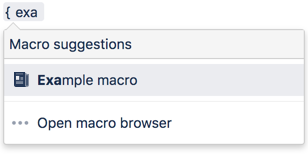
Add this macro as you type
Type { or / followed by the start of the macro name to see a list of macros.
Add this macro using wiki markup
This is useful when you want to add a macro outside the editor, for example as custom content in the sidebar, header or footer of a space.
Macro name: cheese
Macro body: None.
{cheese}
Last modified on Jul 27, 2020
Related content
- No related content found
Powered by Confluence and Scroll Viewport.