
Confluence 2.9 Release Notes
7 August 2008
With great pleasure, Atlassian presents Confluence 2.9.First up is the Search. The new screen design focuses the eye on your search term and results. To help you find information more quickly, Confluence now searches all content types by default and puts the most relevant results at the top of the list. Because a wiki is all about people, Confluence treats personal information as the most relevant. With author filtering, you can now find content written by a specific person.
The macros bundled with Confluence have been treated to a major overhaul. The Chart and Gallery macros offer sophisticated new displays and more interactivity. The revised Pagetree macro is now included in the Confluence download. Try using the Pagetree to add a navigation panel to your pages. We have added some popular new features and fixed a number of much-voted-for bugs in other macros too.
When you are editing a page, Confluence now automatically saves your work and displays the time of the last auto-save. If something goes wrong, you can quickly retrieve your work by selecting 'Drafts' from the user menu.
Other features include resetting page order to alphabetical and some much-needed help in the ongoing battle against spam.
Highlights of this Release:
Responding to your Feedback:
 210 votes satisfied

- Thank you for all your issues and votes. Keep logging, to help us keep improving!
- Below is a list of the highlights in this release.
- Attached is the full list of issues resolved in this release.
Upgrading from a previous version of Confluence
- Confluence 2.9 requires Java 5 at a minimum, and will no longer work with Java 1.4. Before upgrading to Confluence 2.9, please refer to the Confluence 2.9 Upgrade Notes for more details on this change.
- Upgrading Confluence should be fairly straightforward. We strongly recommend that you back up your Confluence Home directory and your database before upgrading.
- Please refer to the Confluence 2.9 Upgrade Notes for further essential information about plugins and other factors affecting your upgrade.
Highlights of Confluence 2.9

Streamlined Search
- The redesigned Search screen helps you to focus on the search term and results, by simplifying the filter box and other parts of the screen.
- By default, the search now includes all spaces and all content types: pages, news items, comments and so on.
- You can filter the search results by space, content type and date modified.
- If your Confluence site uses the standard out-of-the-box configuration for user management, you can also filter the search results by contributor.
- The search results are weighted to give personal information the highest relevance, followed by pages, news items and the other content types.
- When using the Search macro or the Search API, you can now also filter by contributor.
- Take a look at our documentation for more details on the search and the ranking of search results.


Auto Save
- Confluence automatically saves your work to a draft while you are adding or editing a page.
- Now with release 2.9, a message near the 'Save' button shows the time of the latest auto-save.
- If something goes wrong, retrieve the saved draft easily from the dropdown menu under your name.
- You can read more about drafts in the documentation.


Charts
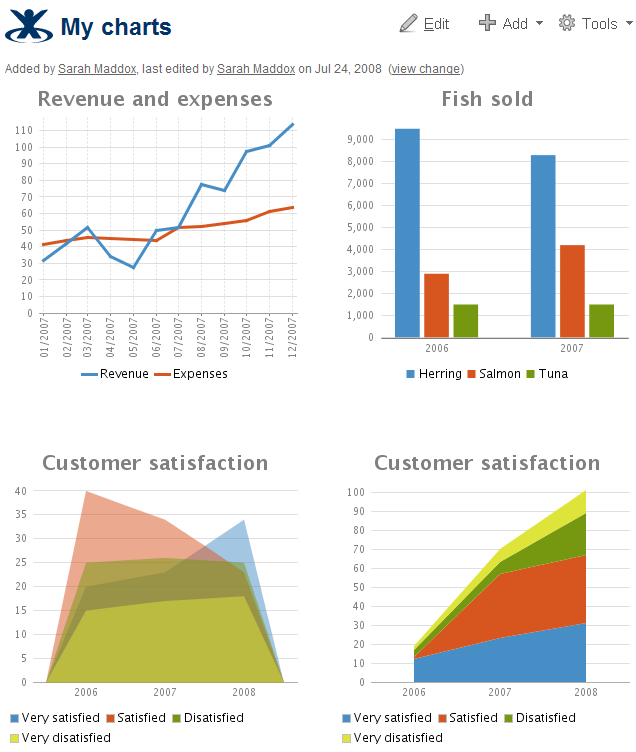
- The Chart macro presents a sophisticated new look.
- Below are some example charts displayed on a Confluence page.
- The documentation shows you how to add the macro to your page and choose different formats and types.

Page Tree
- The Pagetree macro is now bundled as part of your Confluence installation.
- It displays a dynamic, hierarchical list of pages which you can use as a table of contents or a navigation panel.
- You can choose to include a search box above the tree of pages or on its own.
- New links allow viewers to collapse or expand all branches in the tree at once.
- There are a number of options for specifying the root of the page tree. For example, you can show children of the current page, or children of the current page's parent, or all pages in the space.
- Take a look at the documentation to see the complete list of options.


Gallery
- Use the Gallery macro to display a set of pictures on a page.
- Now you can include or exclude individual pictures, or simply display all the images at once.
- Choose pictures from the current page or another Confluence page.
- Take a look at the documentation for help on these and other options.

- Viewers can click an image to zoom in and view the gallery as a slide show.


New Tutorial
- When you download Confluence and choose to include the sample content, you will receive a new Demonstration Space.
- There's a tutorial for those are new to Confluence or new to wikis.
- Other users will enjoy the advanced topics and links to more information.
- You can use the tutorial as a quick-start guide for new starters in your organization.


More in the Menus
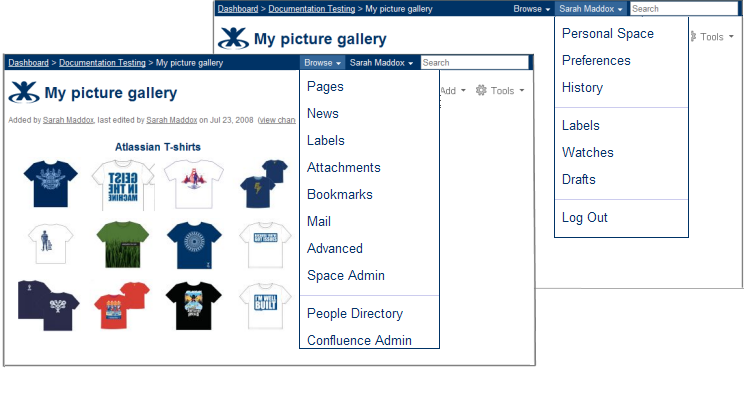
- The Space menu which appeared in Confluence 2.8 has now been renamed to 'Browse'. Faithful Confluence users will recognize and welcome this old friend.
- The Browse menu now includes the People Directory, Space administration and Confluence administration for authorized users.
- You can now reach your personal labels, watches and drafts directly from the dropdown menu under your name on any Confluence page.

Alphabetical Page Ordering
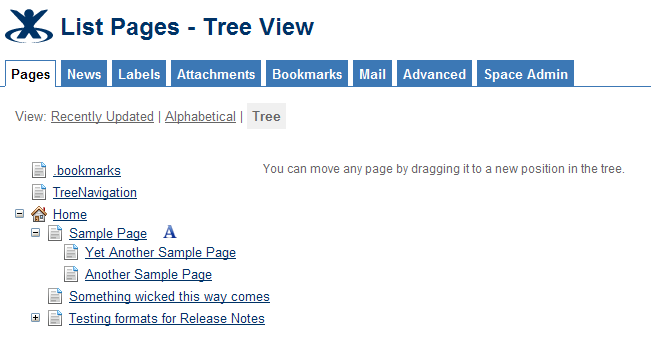
- By default Confluence orders your pages alphabetically, but you can drag and drop them into any order you like.
- Now Confluence 2.9 allows you to reset the page order to alphabetical, just by clicking the
 icon next to the parent page.
 - The documentation tells you more.

Better Spam Prevention
- A new link on the user profile screen allows administrators to jump directly to the user management screen — handy for dealing with those pesky spammers of the human variety.
- We have enhanced Confluence's Captcha functionality to strengthen the barrier against non-human spammers such as bots or web spiders.
- Captcha is now active on user profile pages as well as other pages.
- The image which Captcha displays is now even more difficult for non-humans to read. Take a look at the word 'brihter' in the screenshot below.
- You can read the instructions on configuring Captcha behavior.


Plugin Repository
- The Plugin Repository shows more consistent information about the plugins on your Confluence site, including the system and bundled plugins which are shipped with Confluence.

Engine Room and Developers' Community
- Confluence's request throughput has been improved, thanks to better class- and resource-loading strategies.
- Startup time has also been reduced. This is particularly good for developers and anyone who needs to restart Confluence often.
- The Search API now allows you to filter search results by contributor.
- As part of the ongoing work to make it easier for internal developers and plugin developers to work on Confluence, this release includes re-factorings of some web action classes.
- To improve Confluence's resistance to cross site scripting security vulnerabilities, we have added an experimental automatic HTML entity encoding feature. This is the first step to providing a more secure product by default.

More than 140 Fixes and Improvements
- Take a look at the complete list of issues resolved in Confluence 2.9.
Special Thanks
We'd like to say thank you to Zohar Melamed and Shannon Krebs, who wrote the original Pagetree and Pagetree Search plugins.
The Confluence 2.9 Team
Development
Bugfixing and maintenance
Anatoli Kazatchkov
Brian Nguyen
Chris Broadfoot
Chris Kiehl
Don Willis
Design
Jason Taylor
Stephen Russell
Editor and page tree improvements
Agnes Ro
David Taylor
Dmitry Baranovskiy
Matt Ryall
Engine room
Andrew Lynch
Charles Miller
Christopher Owen
Matthew Jensen
Plugins
Ben Speakmon
Cheryl Jerozal
Jonathan Nolen
Rich Wallace
Ryan Talusan
Tim Moore
David Chui
Product management
Adnan Chowdhury
Search
David Loeng
Paul Curren
Team lead
Per Fragemann
Technical writing
Edwin Dawson
Sarah Maddox
Support
Kuala Lumpur
Arie Murdianto
Azwandi Mohd Aris
David Chui
Fennie Ng
Mei Yan Chan
Ming Giet Chong
Tony Cheah Tong Nyee
San Francisco
Jeremy Largman
Maleko Taylor
Tim Wong
Vincent Chang
Sydney
Ivan Benko
James Fleming
Partha Kamal
Renan Battaglin
Roy Hartono
Ulrich Kuhnhardt