Search the Confluence 4.1.x Documentation:

Index
Downloads (PDF, HTML & XML formats)
Other versions

This documentation relates to Confluence 4.1.x
If you are using an earlier version, please view the previous versions of the Confluence documentation and select the relevant version.
Skip to end of metadata
Go to start of metadata

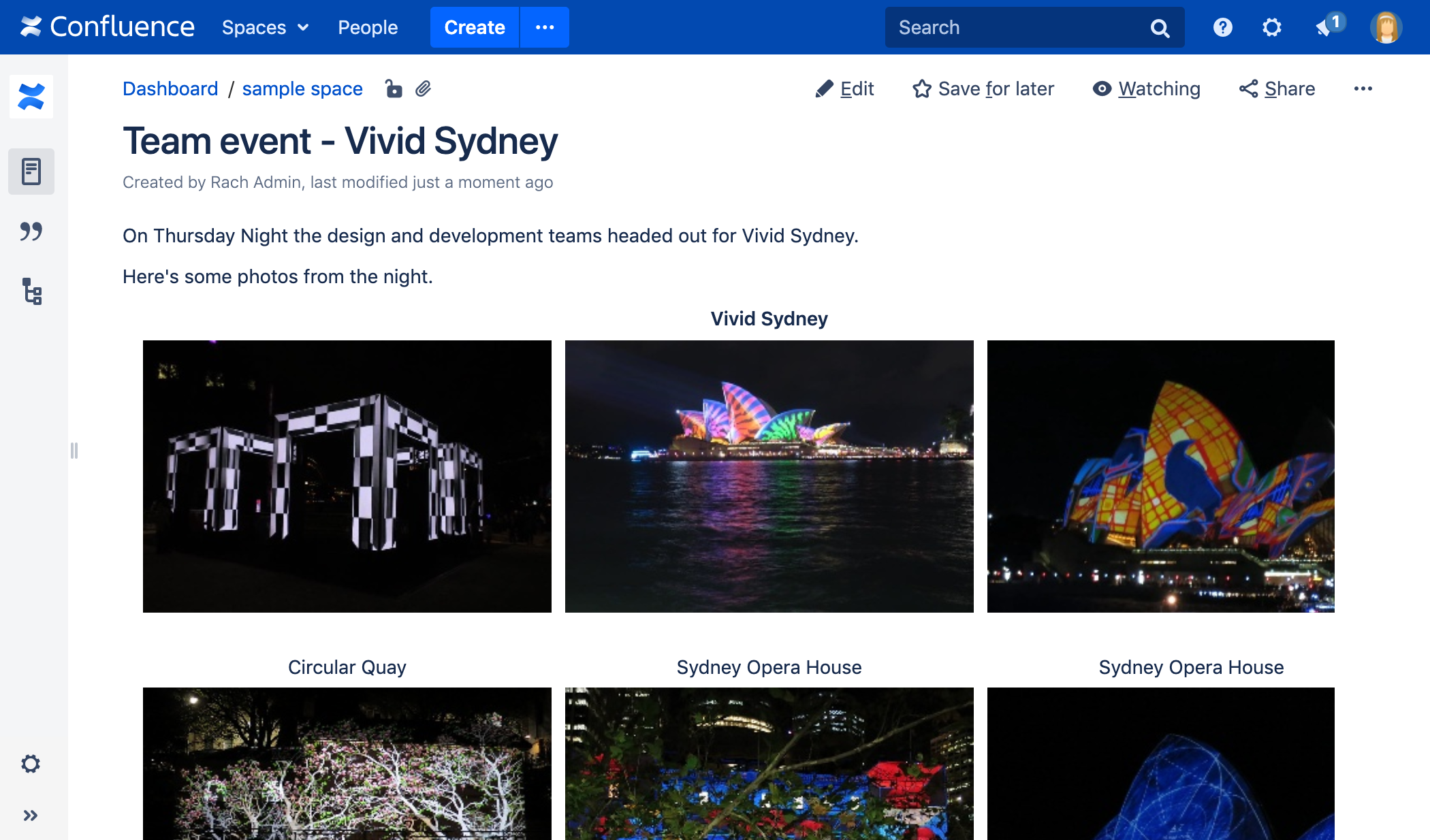
The Gallery Macro displays a gallery of thumbnail images in a table, based on the images attached to a Confluence page. When viewing the page, a user can click a thumbnail image to zoom into the full-size image and then view the images as a slide show.

See below for instructions on how to add the gallery macro to your page.

The gallery macro appears as in the screenshot below.


Screenshot: The Gallery Macro in Confluence


Using the Gallery Macro

To insert the Gallery macro into a page:

  1. In the Confluence editor, choose Insert > Other Macros.
  2. Find and select the required macro.

Parameters

When editing, you can click on the macro placeholder and choose Edit to display the parameters for this macro in the Macro Browser.

Parameters are options that you can set for Confluence macros to control the content or format of the macro output. The table below lists parameters for this macro that can be set in the Macro Browser.

The full list of parameters is shown in the following table.

Parameter

Default

Description

Gallery Title

Nothing

Specify a title for your gallery.

Number of Columns

4

Specify the number of columns for your table.

Images to Exclude

No exclusions i.e. include all the pictures on the page.

The gallery will ignore any pictures specified. You can specify more than one picture, separated by commas.
Please note, the filename and filetype for this parameter are case-sensitive, i.e. 'my picture.PNG' will not be recognised as 'my picture.png'.

Include these Images Only

Include all the pictures on the page.

If you specifically include one or more pictures, the gallery will show only those pictures. You can specify more than one picture, separated by commas.
Please note, the filename and filetype for this parameter are case-sensitive, i.e. 'my picture.PNG' will not be recognised as 'my picture.png'.

Use Images in these Pages

If no page is specified, the gallery macro displays the images attached to the page on which the macro is used.

Specify the title of the page which contains the images you want displayed. To specify a page in a different space, use the SPACEKEY:Page Title syntax.

Sort Images By

None, i.e. the sort order is unspecified and therefore unpredictable.

Specify an attribute to sort the images by. Sort order is ascending, unless you select the Reverse Sort parameter (see below). Options are:

  • name – file name.
  • comment – comment linked to the attached file.
  • date – date/time last modified.
  • size – size of the attached file.

Reverse Sort

Off, i.e. sort order is ascending

Used in conjunction with the Sort Images By parameter above. Use Reverse Sort to reverse the sort order, from ascending to descending.

If the name of an attached file or page contains a comma, you can refer to it in the relevant parameters above by enclosing it in single or double quotes, for example "this,that.jpg", theother.png.

Considerations for using the gallery macro
  • The images shown in the gallery are taken from the files attached to the Confluence page. You can also specify a different page where the attachments are located. For information about attaching images to a page, see Attaching Files to a Page.
  • The comments below the images are drawn from the comments on the attachments. For information about adding comments to attachments, see Attaching Files to a Page.
  • By default, the gallery will include all the images attached to the page. You can also exclude or include images using parameters.
  • Only the following file formats are supported: gif, png, jpeg. The bmp format is not supported.
  • You can sort your images into a particular order.
  • You can specify a title for the gallery and also configure how many columns you want for the table in which your images are displayed.


Related Topics

Displaying Images
Attaching Files to a Page
Editing Attachment Properties
Working with Macros

Take me back to the Confluence User's Guide.

  1. Oct 07, 2008

    Some users are complaining that the images are too small (after clicking on the thumbnail). We posted some wireframes with text on them and since the gallery seems to be resolution and browser size specific, they can no longer read it. Is there a setting to either change it back to a pop-up or force it to render at 100% of the image size?

    1. Oct 16, 2008

      Hi Ben,

      Confluence actually allows you to limit the maximum size of a single file attachment. The detailed doc is available at:

      If you have further questions, please feel free to raise a support ticket at https://support.atlassian.com

      Regards,
      MG

      1. Nov 11, 2008

        I think Ben was referring to image dimensions, not physical file size.  I have the same problem - we added some images to the gallery, and when viewed with a slideshow, the text on them is unreadable.  It would be nice to have configurable image size when viewed either within a gallery or in the slideshow mode.  In addition, would it be possible to (optionally) include a link to the original while viewing the gallery?  This way if an image is too small to see, a user can click on it and view the original file in the new browser window.

        1. Nov 14, 2008

          Hi guys,

          Apologies for any confusion caused here. I guess this problem can be resolved if this feature request can be turned into reality: CONF-6222 (wink)

          Don't forget to cast your vote!

          Cheers,
          Azwandi

  2. Nov 03, 2008

    Anonymous

    Guys, I'm having a really weird problem with the plugin running on Confluence 2.7.3. When I click on the thumbnail, the big picture is appearing at the very bottom of the page, in a way that I have to scroll a long way of blank space before getting it. It's actually way AFTER the footer. Any clue?

    1. Nov 04, 2008

      Hi,

      I would suggest you to lodge a support a request at http://support.atlassian.com. Remember to attach some screenshots.

      Cheers,
      Azwandi

  3. Nov 18, 2008

    Is there an option for displaying the file name under the picture instead of the just the Comment?

    1. Dec 02, 2008

      Hi Tomi, I am afraid that this feature is not available. If you are keen on it, feel free to raise it in http://jira.atlassian.com.

      Cheers,
      Azwandi

  4. Jan 15, 2009

    Will the {include} and {exclude} macros function in earlier versions of confluence?

    Having trouble getting the macro to use only one or two images in the gallery - wondering if I'm doing something wrong or it's just not in the Conf 2.7.3 version.

    1. Jan 20, 2009

      The macro has been improved since Confluence 2.9, part of the Advanced Macros plugin (bundled plugin). Hence, I am afraid that this updated macro is not available for Confluence 2.7.3. Hope that helps.

  5. Jan 16, 2009

    Is there any way to force a redraw of the thumbnails used in the gallery? When uploading a new version of an image, the thumbnail will show the old version.

    If the two images are different aspect ratios, it does this crazy thing where it's the old image with the new image's proportions.

    Only seems to happen with uplaoding new versions of an image using the same filename.  Our current workaround is to rename each offending file from "filename.jpg" to "filename_a.jpg" or something like that, so that the system uses it as a "new" image.  This is however somewhat tedious with large sets of images.

    -Will

    1. Jan 20, 2009

      Hi William,

      I am afraid that this problem is due to your browser cache rather than Confluence. What I would suggest is try holding the shift key and click on the refresh button for your page.If this didn't help I suggest you to raise a support request on this issue at http://support.atlassian.com/.

      Cheers,
      Komathi

      1. Sep 16, 2010

        Anonymous

        I have been having this problem too. It is not a cache error though, because I deleted my cache and the pictures did not change at all. Do you have any other ideas why this may be happening?

  6. Mar 19, 2009

    i think i have done everything correctly but it doesnt seem to resort.

    i couldnt attach images to this wiki so i uploaded to a another server to help clarify what i am doing

    http://www.homeimprovementpages.com.au/media_library/sort_bug_1.png

    http://www.homeimprovementpages.com.au/media_library/sort_bug_2.png

    http://www.homeimprovementpages.com.au/media_library/sort_bug_3.png

    any help is much appreciated

    1. Mar 20, 2009

      Hi David,

      I could not replicate your problem, I would recommend you to raise a support ticket in our Atlassian support system:

      By raising a support ticket, this may speed up the process to overcome this issue. Also, please attach your instance's
      application server log and atlassian-confluence.log.

    2. Oct 21, 2009

      Anonymous

      Confirmed. I'm using Confluence 3.0.0_01.  Within Edit Gallery Macro, if I choose the Reverse Sort checkbox, the resulting macro includes reverseSort=true. This will not reverse sort the gallery.  If I manually change the macro to be reverseSort instead, then the gallery will indeed reverse sort.

      1. Oct 22, 2009

        Hi,

        I have raised a bug report here. I would suggest you to add yourself as a watcher for the mentioned bug report and feel free to comment or address your concerns through it.For further details on how we include new features and improvements, you might want to read this page

        Cheers
        JSashi

  7. Jun 17, 2009

    I am creating an employee directory and I want the thumbnail to link to a personal space.  Any chance? (smile)

    1. Jun 18, 2009

      Hi Philip,

      As far as I know, you can try this method:

      !apple1.jpg! is the attachment image in a page
      try = Space key of a space
      Home = Page title

      For more in formation on linking please refer to this documentation:

      Hope that helps.
      Best rgds,
      Zed

  8. Jun 22, 2009

    Anonymous

    Hello,
    we using the "old" 2.10.2 confluence wiki-software. When I try to use the gallery macro with 165 pictures, none of them are displayed.
    I don't know what can be wrong. These pictures are all fine (.jpg and .JPG).

    Any ideas? Thank you very much!

    1. Aug 11, 2009

      Hi, there. In case this problem remains unresolved, please feel free to raise a support ticket with some sample images and the wiki markup.

  9. Jul 31, 2009

    I'd like to create a gallery that pulls all pictures from a particular space.
    I've tried:

    where LPC=current spacekey
    And also:

    Any help would be greatly appreciated...!

    1. Aug 03, 2009

      Hi Meredith,

      Currently, the gallery macro is only able to pull all pictures from a particular page.
      If all your pictures are stored in a particular page in the space, you can use the following code:

      However, if your requirement is to pull all images in the space, I am sorry to inform that this feature is not available in Confluence yet.
      Feel free to raise for a feature request in http://jira.atlassian.com.

  10. Aug 14, 2009

    I get this error:

    "Error trying to draw image gallery org.apache.velocity.exception.ParseErrorException: Encountered "=" at /templates/gallery-dynamic-slideshow.vm[line 64, column 37] Was expecting one of: ... "-" ... "+" ... "*" ... "/" ... "%" ... ... ... ... ... ... ... ... ... "

    Any ideas why?

    tae

    1. Aug 18, 2009

      Hi Corey,

      I tried to find for the above error message in our issue tracker and found out some similar issue. I think you should take a look at the following bug report and try out the suggestion mentioned in it:

      Basically, I think you have two versions of the gallery plugin installed. One that you installed manually and another that comes bundled with Confluence. If this is true, kindly disable the one that you have installed manually. If this is not true, then one of the workaround mentioned in the aforementioned bug report might be of help.

      If this does not solve your issue, kindly raise a support ticket at https://support.atlassian.com, so that your issue can be further investigated. Also provide the following:

      1. The exact error that you receive when using the macro
      2. A copy of your Confluence log file located at <confluence-home>/logs/atlassian-confluence.log
      3. The system information page. You can obtain the page by accessing the http://<path-to-confluence>/500page.jsp
      4. Screenshots that illustrates the problem.

      Cheers
      JSashi

  11. Sep 14, 2009

    Anonymous

    When I click on an image in the gallery, a new browser window opens, then a dialog box appears asking if I want to open or save the image (standard download dialog box for IE 7). The full screen image and slideshow options don't work.

    code:

    1. Sep 15, 2009

      Hi, there. I have a few suggestions:

      • Check whether you have the legacy Gallery Plugin installed. If so, please disable the plugin
      • Try using other browsers to confirm if it is an IE-only problem.
      • Try clearing out the IE cache. You might as well want to force refresh the browser cache by pressing CTRL+F5 on that page
      • What is the wiki markup? What is the type of the images? Does this problem happens to other images?

      Hope that would be a good start.

      Cheers,
      Azwandi

  12. Sep 30, 2009

    Anonymous

    Is t here a way to make a slide show as you would typically see on a Web page. That is, you see one photo, and you can click on that and see the others one by one. The gallery feature is useful. But I would prefer to have only one photo showing on the page, not all of those in the gallery. Thank you.

  13. Oct 14, 2009

    The gallery generation is horribly slow now after 3.0.

    We used to use the old gallery plugin (which is now uninstalled). This worked fairly fast and ok. After the update it seems that the gallery creation is causing an excessive delay (>30 sec.) and makes it practically unusable. I've meanwhile removed the gallery macro from the most frequented pages to make those pages accessible again.

    Is this a known issue? Any workaround to speed things up?

    1. Oct 21, 2009

      Hi Thoralf,

      In order for us to investigate on this issue further, could you please raise a support ticket to https://support.atlassian.com. Also provide the following information in the support ticket:

      1. Number of images that are being used in the page.
      2. A sample page with all the images attached to the ticket.
      3. Rotate confluence log file. Restart Confluence instance. Enable Page Request Profiling. Reproduce the issue.
      4. A copy of your latest Confluence log file located at <confluence-home>/logs/atlassian-confluence.log
      5. The system information page. You can obtain the page by accessing the http://<path-to-confluence>/500page.jsp

      Cheers
      JSashi

  14. Oct 20, 2009

    I attached a bunch of PNG icons to an 'icons' page in my wiki so I could make them easily accessible to the 'lozenge' macro.  Two issues:

    1. The background of the icons was probably transparent.  It renders in black in the gallery, which is kind of ugly.
    2. There's no way to see the filename easily.  It would be nice to have an option, showfilename=true, that would enable this behaviour.
    1. Oct 21, 2009

      Hi Brian,

      The background of the icons was probably transparent. It renders in black in the gallery, which is kind of ugly.

      I afraid this is a known issue. There is an bug report on this issue:

      Please add your comments to the discussion and add yourself as a watcher for future updates. Also, please bear in mind the following document on how we schedule features for inclusion in our products: How we approach fixing bugs.

      There's no way to see the filename easily. It would be nice to have an option, showfilename=true, that would enable this behaviour.

      You might want to raise an improvement request in JIRA:

      Hope that helps,
      Best rgds
      Zed

    2. Nov 01, 2010

      Anonymous

      Found the following feature request for allowing for the display of filenames in the gallery plugin

      http://jira.atlassian.com/browse/CONF-13936

  15. Oct 21, 2009

    I have a page with five attachments on it. All of them are JPEGs, with file names ending in .jpg. All of them have MIME types set to image/jpeg. All five of them were uploaded at the same time, using the API.

    The page includes the {gallery} macro with no arguments. Three of the attachments display in the gallery, but the remaining two do not.

    The only obvious distinction is that the two attachments that don't display are larger than the other three; they're both over 1.5 MB in size.

    Any thoughts/things to look for?

    1. Oct 22, 2009

      Answer: the gallery macro does not support progressive JPEGs. There's a bug for this, without a fix date. I'd suggest that this limitation be documented on this page.

  16. Oct 27, 2009

    Anonymous

    Hi, how can I insert text under the pictures? In the example above, under the office photo it says "Here's an office photo", not sure how to do that.

    Thanks

    1. Oct 27, 2009

      The text shown is the comment for the attachment. You can enter a comment when uploading an attachment, or by editing an existing attachment.

  17. Oct 28, 2009

    Anonymous

    Hi,

    I am trying to  create a Gallery with a slideshow mode. For some reason it doesn't work. On click it only opens up in a new window. Any idea why it doesn't work?? I did work once, the very first time. Then it stopped working.

    Thanks,

    Nithya

    1. Nov 04, 2009

      Hi,

      I am trying to create a Gallery with a slideshow mode. For some reason it doesn't work. On click it only opens up in a new window. Any idea why it doesn't work?? I did work once, the very first time. Then it stopped working.

      I have once experience that user have two Gallery plugin that cause the problem. You might want to check if your instance is having two Gallery module. You can check this through 500page.jsp or in the plugin manager via Confluece Admin >> plugin

      Hope that helps.
      Best rgds,
      Zed

  18. Nov 11, 2009

    Anonymous

    Hi,

    I am having problems with Gallery -macro. Confluence 3.0.2 gives me the following error - Unknown macro:

    . We had gallery plugin in previous version of Confluence but I uninstalled that.

    Can anyone help, please? Thanks in advance.

    1. Nov 12, 2009

      Hi,
      The Gallery macro should come with Confluence 3.0.2. Could you please double check if this macro has been disabled in your Confluence instance via Confluence Admin page > Plugin > Advanced Macros > Gallery. If it is disabled, please try to enable it and try again.

      Hope it helps.

      Cheers,

  19. Feb 02, 2010

    mw

    Here are two feature requests for the Gallery macro:

    1. How about losing the "fade to white" transition and just doing a straight crossfade to the next image? White isn't always desirable.

    2. How about allowing users to hide specific thumbnails in the gallery, but still have them appear in the slideshow? For example,what if I'd like the macro to act like a traditional slideshow where there's only ONE thumbnail: the first image. All others are hidden in the Gallery, but subsequently appear in the slideshow. This would give users the option to use the macro to create a full gallery of images OR a PowerPoint-style slideshow presentation. Verrrrrrrrry useful!

    1. Feb 05, 2010

      Hi Mw,

      I have created two improvement requests as per your requirements:

      1. ADVMACROS-151
      2. ADVMACROS-152

      Please add yourself as a watcher, vote for these improvement requests and add your own comments to these requests. For further details on how we include new features and improvements, you might want to read this page

      Cheers
      JSashi

      1. Aug 04, 2011

        Anonymous

        Hallo! When will the second point be done? Should not be too complicated to implement..

        would be really helpful!

  20. Feb 19, 2010

    Anonymous

    Is it possible to include a url as a hyperlink in the image comment? It seems markup is not processed from the image comment, but this would be very useful to me.

    1. Feb 22, 2010

      Hi

      I am afraid that this is not currently possible. Feel free to raise an improvement request at http://jira.atlassian.com and describe in detail how you require this improvement to work. Please add yourself as a watcher, vote for this request and add your own comments to this improvement request. For further details on how we include new features and improvements, you might want to read this page

      Cheers
      JSashi

  21. Jun 24, 2010

    Anonymous

    Hi,

    Are there any plans to add a rating functionality to gallery images?

    Thanks in advance for your reply.

    Cheers

    rich

    1. Jul 26, 2010

      Hi Rich,

      I would strongly recommend you to raise a feature request in JIRA:

      Also, there is also few third party plugin which might be able to satisfied your requirement:

      Cheers,
      Zed

  22. Dec 10, 2010

    Anonymous

    Hi curious if there is a way to put a max image limit to the gallery.

    I want to keep uploading 3 slides to attachments, but only have current 2 or 3 images uploaded viewed instead of all of them.

    Example:

    1. Dec 10, 2010

      Anonymous

      sorry example

      gallery:sort=date|reverseSort|max=2

    2. Feb 18, 2011

      Anonymous

      +1 to this request.  Please open a ticket on it or whatever. I came here looking for this feature.  Now I have to move my images to a holding page and manage the qty.... icky workaround.

  23. Feb 01, 2011

    Anonymous

    Can the images in the gallery be used as links ?

  24. Feb 08, 2011

    Anonymous

    I've attached images to a page and added them to the gallery macro, but I keep getting an error saying: "There are no images attached to this page."

    Here's the code:

    {gallery:title=Test|columns=1|include=http://confluence.ict.usc.edu:8080/download/thumbnails/1507471/ChrInjuryStates_Design.jpg}

    1. Feb 08, 2011

      Hello there,

      It looks like you might be using the parameters (which are described above) incorrectly.

      You need to specify the page (in your Confluence site) to which your image is attached (using the page parameter) and then use the include parameter to specify the file name of the image attached to that page.

      Hence, an example of what your code might look like is:

      • {gallery:title=Test|columns=1|page=MYSPACEKEY:Page Containing Attachment|include=ChrInjuryStates_Design.jpg}

      Where ChrInjuryStates_Design.jpg is the file name of the image attached to a page called Page Containing Attachment in the MYSPACEKEY space of your Confluence site.

      (If no page parameter is specified, the gallery macro looks for images attached to the page on which the macro is used. If it can't find any, you'll get that error message.)

      Cheers,
      Giles.

  25. Apr 27, 2011

    Hi there,

    I've got a problem with the gallery Macro. When I click on a picture the slideshow doesn't start. I just see a transparent gray screen without a picture.

    Can anyone help me?

    Thank's!

    Kind Regards

    Chris

    1. May 13, 2011

      Hi Christoph,

      To further investigate on this, I would suggest you to raise a support ticket under Confluence project in:

      At least, a Confluence support engineer could help you to look into your problem.

      Cheers,
      Joa

    2. May 25, 2011

      We have the same problem.  Did you ever raise a support issue on this?  If so, was Atlassian able to resolve it?  And, are you willing to share whatever fix they did, with us?  If you never raised a support issue, then I'll go ahead and do it, I just don't want to duplicate things if I don't have to.

      Thanks,

      Jo-Anne

  26. May 31, 2011

    Is it expected behaviour for the title of the gallery to show up in the toc ? I think it shouldn't, or if it does, it should be clickable.

  27. Jun 06, 2011

    Is there a way to set the column width for the gallery macro? I have some narrow images that look all scrunched together in the gallery format. Since the column attribute is already set (column=n), it would be great to set a percentage or value for each column.