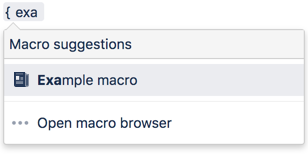
The Livesearch macro allows you to add a search box to a Confluence page. When users enter a search term into the search box, Confluence will dynamically display matching results as they type.
Using the Livesearch Macro
To add the Livesearch macro to a page:
Parameters
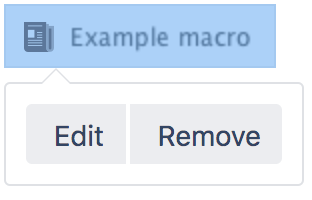
When editing, you can click on the macro placeholder and choose Edit to display the parameters for this macro in the Macro Browser.
Parameters are options that you can set for Confluence macros to control the content or format of the macro output. The table below lists parameters for this macro that can be set in the Macro Browser.
Parameter | Default | Description |
|---|---|---|
ID | none | Uniquely identifies the Livesearch when there are multiple Livesearch macros in one page. |
Restrict to this Space Key | all spaces | Specify a space key to limit the search to the given space. Case-sensitive. |
Related Topics
Searching Confluence
Search Results Macro
Working with Macros
Take me back to the Confluence User's Guide.


40 Comments
Hide/Show CommentsJul 16, 2008
Mark
Am trying to use this in velocity template with
Does not seem to work?
Jul 22, 2008
Ming Giet Chong
Hi Mark,
The spacekey with the "@self" parameter doesn't supported in LiveSearch macro. It has to be with the space key in Confluence. However, if you are keen to have this feature to be implemented in the future macro version, you can always raise a feature request at https://jira.atlassian.com.
Regards,
MG
Oct 01, 2010
Anonymous
See https://studio.plugins.atlassian.com/browse/LIVESEARCH-4 and http://jira.atlassian.com/browse/CONF-20946
Oct 01, 2010
Steven Currie
That comment was from me; sorry.
Jul 30, 2008
Margaret Ostrander
I love this macro! It's so helpful, and we've now just begun to use it in customized left nav's, which can be really helpful to the space.
We're encountering some problems with the drop-down list of candidate terms that appears when searching using this utility. For example, in a given wiki space:
Performing the search (eg clicking 'Go') yields in appropriate search results for each of the above examples. It's only the drop-down list that isn't consistently functioning.
The problem is also happening in at least one other space in our instance of Confluence. In both cases, livesearch is inside a table as follows:
|| Search || Browse || Projects || | Search this wiki {livesearch:id=1|spaceKey=gregwikiprod} |Any tips?
Margaret Ostrander
Jul 31, 2008
Tony Cheah Tong Nyee
Hi Margaret,
To enable us to investigate this issue further, I would suggest you to raise a support request in our Support Channel regarding this issue:
Please also provide us with the following information on the support request created as they may be helpful in our investigation:
Cheers,
Tony
Aug 01, 2008
Anonymous
Thanks Tony!
- Margaret
Feb 23, 2009
Stefan
Is there a way to provide a search field, which searches in n spaces? Not one or all, but multiple spaces?
Feb 23, 2009
Komathi Krishnan [Atlassian]
Hi Stefan,
As far as I am concerned, the parameter 'space' accepts just one space name to be searched. Perhaps the following improvement request will enable multiple spaces searches in future.
Vote for it and feel free to add yourself as watcher.
Thanks
Komathi
Apr 03, 2009
Carrie Moley
Just a small thing, but I was wondering if there was any way to include Mail items in the default search so that mail items show up in the drop-down?
Apr 06, 2009
Azwandi Mohd Aris [Atlassian]
I have created an improvement request at the plugin's issue tracker. Remember to cast your vote on it!
Apr 09, 2009
Anonymous
Hello,
I tried to use this macro, but what is spaceKey? Can I assign more than one spaceKey to a livesearch? If I can, how can I write the code? Thank you.
YC
Apr 09, 2009
Anonymous
the "spaceKey" is found in the URL of the wiki. For example, in this wiki https://wiki.thomsonreuters.com/display/gregwikiprod, the spaceKey is "gregwikiprod". It's something that you have to define when first creating a wiki space.
Apr 23, 2009
Mathieu Filotto
Hi,
I would like to restrict my search to a specified space. So I use the spaceKey parameter and the drop-down menu works well.
But when I click on the "Go" button, my results are not filter by space anymore.
Is there a way to solve that problem ? (my version of Confluence is 2.9.2)
Thanks
Math
Apr 24, 2009
Azwandi Mohd Aris [Atlassian]
Hello Math,
Good news is, it has been fixed in the plugin version 2.10. The downside is, it is not compatible with Confluence 2.9.x, hence you might want to consider your instance for an upgrade
Hope that helps,
Azwandi
May 09, 2009
Anonymous
Really kewl! My only problem with this macro is that even though everything seems to work in IE6, I get a javascript error (exclamation inside yellow triangle) with the message: 'target.form' is null or not an object. Have you all seen that in IE6? I know I'm living in the past, but IE6 is still the standard where i work
Thanks,
bc
Jun 02, 2009
Zed Yap [Atlassian]
Hi,
I could not replicate the problem, could you please provide me the plugin version you are using?
Best rgds,
Zed
Jul 03, 2009
Anonymous
Hi,
i've the same problem in ie6 using the livesearch macro 2.8
Thanks,
/thorsten
Jul 06, 2009
Azwandi Mohd Aris [Atlassian]
This seems to be a known issue for the plugin - http://developer.atlassian.com/jira/browse/LIVESEARCH-12. Please note that this bug has been fixed in plugin version 2.10. Please check the compatibility of that plugin version with your Confluence version before upgrading the plugin.
Nov 05, 2009
Anonymous
I've run into a weird situation with my livesearch macro. I'm using the spacekey to limit it to the appropriate space.
I have several pages about meeting minutes, with the words "meeting" and "minutes" appearing in the body of the text and sometimes in the title of the page. When I start typing "meet," those pages appear in the results box; however, these results disappear if I keep typing past "meeti." If I hit "go" it takes me to a blank results page, but the pages show up if I manually remove the * wildcard from the search box.
Any idea what's happening here? It doesn't make sense to me that results disappear when I type more of a word, even though the whole word appears on the page...
Nov 11, 2009
Sashidaran Jayaraman [Atlassian]
Hi,
I believe you are encountering this bug. Although it has been resolved as fixed, the issue is still present as I am able to reproduce the issue myself. I have put a comment in the bug report so that the developers will take note of the problem.
As a workaround, would you be able to use the backslash after the search string as mentioned in the bug report?
Cheers
JSashi
Nov 05, 2009
Anonymous
since upgrading to 2.10.3 our live search macro has been behaving strangely. For example, the word "macros" appears on the title of a few pages. When searching for "macros" however, we get a null set (no results). However, when searching the singlar "macro", the pages with "macros" do appear. Is there a bug with how stemming is working? Please advise.
Nov 11, 2009
Sashidaran Jayaraman [Atlassian]
Hi,
I believe you are encountering the same problem as the person above. I would suggest you to add yourself as a watcher for this bug report and feel free to comment or address your concerns through it. Sorry for any inconveniences.
As a workaround, would you be able to use the backslash after the search string as mentioned in the bug report?
Cheers
JSashi
Nov 11, 2009
Anonymous
Unfortunately, the backslash workaround doesn't work in our environment. The backslash causes a security related error.
I'm passing along the bug report to our technical team for further follow-up. Thanks much for the information.
Margaret Ostrander
Thomson Reuters
Nov 11, 2009
Sashidaran Jayaraman [Atlassian]
Hi Margaret,
May I know what security error that you have encountered when using the backslash? If this is difficult to explain, I would suggest you to raise a support ticket to https://support.atlassian.com, so that your issue can be further investigated. Also provide the following:
Cheers
JSashi
Nov 11, 2009
Margaret Ostrander
Thanks Sashi. We'll pursue through the methods you suggest -- I'm passing this along to our technical team who will be better able to article what the error is, as it is somewhat complicated. I really appreciate the quick information.
Nov 12, 2009
Sashidaran Jayaraman [Atlassian]
No worries, Margaret. We will wait for the support ticket for further investigation.
Cheers
JSashi
Nov 11, 2009
Anonymous
Hi, same livesearch problems here. We have installed Confluence 3.02 and Themebuilder 3.3.5-M2-conf210. Workaround with Backslash works but is not really satisfying :(
Nov 11, 2009
Sashidaran Jayaraman [Atlassian]
Hi,
I understand that the workaround might not be suitable in all cases. I have informed the developers regarding this issue and we are in the midst of investigating further on the issue. I would suggest you to add yourself as a watcher for the mentioned bug report and feel free to comment or address your concerns through it.
For further details on how we include new features and improvements, you might want to read this page
Cheers
JSashi
Jan 11, 2010
Markus Schwarz
Hi,
is ist possible to use the macro in the velocity-context ( like #quicksearch() ) ?
Jan 25, 2010
Azwandi Mohd Aris [Atlassian]
If you would like to achieve this via the Admin Console->Layout screen, you can use the $helper context:
Mar 12, 2010
Stacy Shenker
We are using livesearch within a theme builder site. When the search is done with more that the default items and we click on the second page, we lose our theme and it goes to the default theme. The first page of results is with our page. Is there any way to express the number of results or make it so the second page does not go to the confluence search page
Jun 14, 2010
Basak Gazioglu
Hi,
Would love to use the livesearch macro, but I have one quick question. Is there a way to limit the search only to pages, but not users, comments, etc. I used the type=page, but it did not work. Can you help? Thanks in advance...
Jun 16, 2010
Sashidaran Jayaraman [Atlassian]
Hi Basak,
I am afraid that this is not currently possible. Feel free to raise a feature request at http://jira.atlassian.com and describe in detail how you require this feature to work. Please add yourself as a watcher, vote for this feature and add your own comments to this feature request. For further details on how we include new features and improvements, you might want to read this page
Hope that helps.
Cheers
JSashi
Jun 18, 2010
Basak Gazioglu
Thank you very much for your reply Sashi. I, infact, saw one example at a knowledge base site:
https://wiki.csuchico.edu/confluence/display/lms/Vista+Knowledge+Base
See the search box in the middle. It acts like it is restricting user pages from the search results, no?
Basak.
Jul 26, 2010
Anonymous
Hi,
Whenever I start typing a word in our livesearch (which only searches a certain space), the drop-down box displays the proper pages. However, as the word gets longer, the pages disappear as if none of them contain the word. Then, if I press "Go," the search results page doesn't have any results, and the search term I typed has an asterik added to the end. If I remove the asterik and press "Go" again, the search results are correct. Is there any way to fix that?
Thanks!
Aug 04, 2010
Husein Alatas [Atlassian]
Hi,
If you are using Confluence version prior to 3.2, I believe you are encountering this bug in Livesearch Macro. This is fixed in Livesearch Macro version 2.11.1 which is bundled in Confluence 3.2 or higher. As for the best resolution, I would strongly suggest you to upgrade your Confluence instance to the latest version.
If you are using Confluence 3.2 or higher, I would suggest you to raise a support ticket to https://support.atlassian.com, so that your issue can be further investigated.
Cheers,
Husein
Sep 28, 2011
Anonymous
I am trying to make the livesearch macro wider but cannot find how to do this. Is there any way such as editing the macro file itself to make this happen?
Oct 05, 2011
Anonymous
Situation:
Whenever I tried to search a word/content in our confluence it is giving me only the result of the page which has its result on the body, but whenever I clicked it, it doesn't direct me to the exact word.
How I will be able to get this search feature in our confluence since I am using composition plugin with cloaking feature?
Jan 06, 2012
Anonymous
When I try to search with multiple words (eg. "Buy some milk"), the dropdown list under the search box is no more updated after I typed the first space in my query. Is it possible to get a preview with multiple words in a query ?
Thanks.
Add Comment