Search the Confluence 4.1.x Documentation:

Index
Downloads (PDF, HTML & XML formats)
Other versions

This documentation relates to Confluence 4.1.x
If you are using an earlier version, please view the previous versions of the Confluence documentation and select the relevant version.
Skip to end of metadata
Go to start of metadata


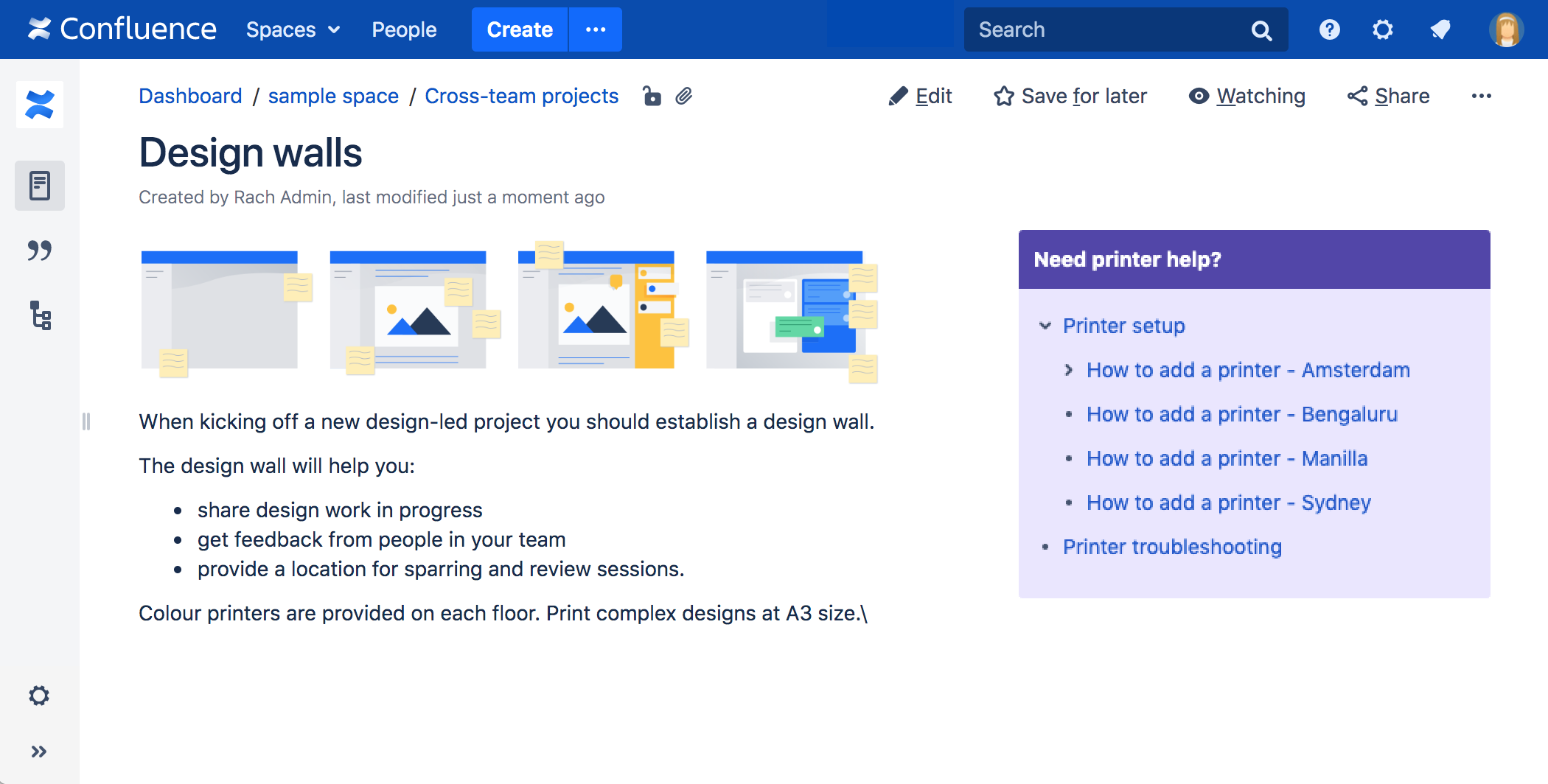
The Panel Macro allows you to display a block of text within a customisable panel, like a text box. Here is an example:

My Title

A formatted panel.

Using the Panel Macro

To add the Panel macro to a page:

  1. In the Confluence editor, choose Insert > Other Macros.
  2. Find and select the required macro.

Parameters

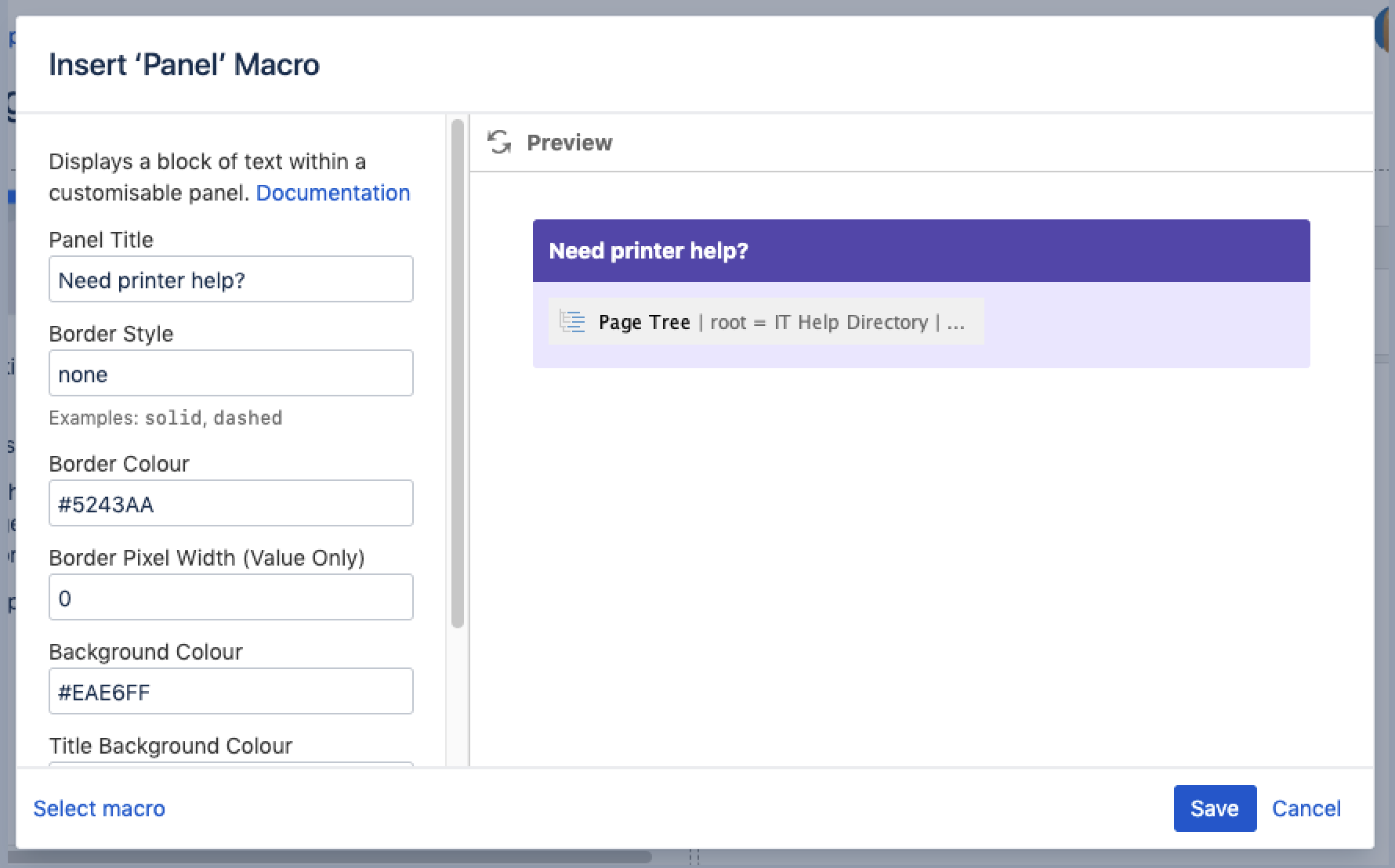
When editing, you can click on the macro placeholder and choose Edit to display the parameters for this macro in the Macro Browser.

Parameters are options that you can set for Confluence macros to control the content or format of the macro output. The table below lists parameters for this macro that can be set in the Macro Browser.

Parameter

Default

Description

Panel Title

none

The title of the panel. If specified, this title will be displayed in its own title row.

Border Style

solid

The style of the panel's border. Accepted values are solid, dashed and other valid CSS border styles.

Border Colour


The colour of the panel's border.

Border Pixel Width (Value Only)


The width of the panel's border (in pixels).

Background Colour


The background colour of the panel.

Title Background Colour


The background colour of the title row of the panel.

Title Text Colour


The colour of the text in the title row of the panel.

Colours can be specified HTML colour names or hexidecimal codes.

Notes

  • You can use panels within columns and table cells.

Related Topics

Working with Macros

Take me back to the Confluence User's Guide.

Labels:
  1. Nov 28, 2007

    Anonymous

    Would be nice to update this to be able to change the titlecolor


    1. Nov 28, 2007

      Hi,

      There is an improvement request pertaining to "add titlecolor to panel macro" currently being tracked at the following:

      If you are keen on this improvement, I would suggest you to cast your vote to the improvement to increase its popularity as well as add yourself as a watcher to get the updates.

      Regards,
      Choy Li

      1. Feb 01, 2010

        In the mean time you could add a User Macro called style like this :

        Macro Name:

        style

        Macro has a body

        Use unprocessed macro body

        Output:

        Macro generates HTML markup

        Template:

        <style type="text/css">
        $!body
        </style>

        Then affect any part of the panel using standard CSS :

        {style}
        div.panelHeader{
          color: white;
        }
        
        div.panelMacro {
          margin-top: 0px;
          margin-bottom: 5px;
        }
        
        div.panelMacro table.warningMacro td,
        div.panelMacro table.tipMacro td,
        div.panelMacro table.infoMacro td {
          padding-top: 10px;
          padding-bottom: 10px;
        }
        
        div.panelMacro table.warningMacro td ul,
        div.panelMacro table.tipMacro td ul,
        div.panelMacro table.infoMacro td ul {
          margin-top: 0px;
          margin-bottom: 2px;
        }
        {style}
        

        I also use a User Macro called div so I can either quickly specify some CSS with the style param, or just wrap a div with a specific className around something so I can target it more specifically from a style block :

        Macro Name:

        div

        Macro has a body

        Convert macro body wiki markup to HTML

        Output:

        Macro generates HTML markup

        Template:

        <div class="$!paramclass" style="$!paramstyle">
        $!body
        </div>

    2. Jan 02, 2008

      Anonymous

      Hi,

      youn can use CSS for changing der color. Just copy this code in your site:

      It will look like this:

      Test

      Test

      Cheers Mirco

      1. Apr 28, 2008

        Is there a way to add an image as a background for the panel?

        1. Apr 29, 2008

          Hi Bill,

          This is currently not supported.

          Regards,
          Mei

          1. Apr 29, 2008

            is there an existing feature request I can vote for?

          2. Apr 29, 2008

            also, is there a list of the other panel components that can be controlled like panelHeader?

            1. May 02, 2008

              Hi Bill,

              There isn't any existing feature request at the moment. If you are keen on the requirements, you can try modifying the macro (if you have access to the source) or simply create a new macro that incorporates the requirement you are after. For more guidelines, please see:

              Alternatively, you can raise for a feature improvement at:

              Regards,
              Mei

    3. Jan 20, 2009

      panel:title=Business Functions|borderStyle=solid|borderColor=#4682B4|titleBGColor=#4682B4;color:#FFFFFF|bgColor=#FAFAFA
      panel

      • This works
      1. Mar 24, 2010

        Anonymous

        Thanks, that DOES work ..   I guess it has to be right were you've placed it ..  Thanks Sathya!

  2. Feb 10, 2008

    Anonymous

    hi the comment made on nov 28 in 2007 9:20 how do you post you jira issue on the forum ?

    1. Feb 10, 2008

      Hi,

      You may want to give a try to use the JIRA Issue Macro, which allows you to display a list of issues matching with any JIRA filter.

      Regards,
      Choy Li

  3. Apr 04, 2008

    Anonymous

    Is it, or will it somehow be possible to customize the panels e.g. rounded down angles, and customized background colors (color gradient) or background images?

    Thank you very much in advance

    Paul

    1. Apr 07, 2008

      Hi Paul,

      I would suggest you to raise a new feature request at our issue tracker:

      Regards,
      MG

  4. Sep 18, 2008

    Anonymous

    I am using a lot of panel macros in the space I'm building and I'm wondering if anyone else has had a problem with the macro not working correctly in IE?  It's the latest version and these huge gray boxes are put behind the panels and space everything out to an extent that it's unusable. 

    Help!?

    1. Sep 19, 2008

      Hi,

      I would suggest you to raise a support request at http://support.atlassian.com, with a sample wiki markup so that we could help you to troubleshoot the problem. Thanks.

      Cheers,
      Azwandi

  5. Nov 20, 2008

    Anonymous

    Hi,

    Is there anyway to have two panels or tables side by side?. There seems to be soo much wasted space by a panel taking up an entire row of the page, especially if you are trying to show a comparison.

    1. Nov 21, 2008

      Hi,

      Try to arrange the {panel} macros inside a table.

      Cheers,
      Azwandi

    2. Jan 20, 2009

      Try creating a section with two or more columns and placing the panels within these columns. This will enable you to have two or more panels side by side.

  6. Aug 17, 2009

    Anonymous

    I'm trying to just add a background color to a cell or row of cells in a table.  It's not the head of the table, and using tags like {panel} mess with the formatting.  Is there a way to make a cell in the middle of a table a different color?  Most of what I've tried so far ends up with an unrecognized macro error...

    (edited)

    1. Aug 17, 2009

      Hello there,

      Are you wanting to conduct table cell/row colouring in a panel or a table?

      If it's a table, Confluence does not inherently support this feature 'out of the box'. However, this thread provides some discussion on how you could achieve this using other Confluence plugins.

      Best regards,

      Giles Gaskell
      Technical Writer
      ggaskell@atlassian.com
      ATLASSIAN - http://www.atlassian.com

  7. Oct 26, 2009

    Does anyone else have problems with this macro displaying in Firefox (v3.5.x)? On my workstation, the background color doesn't display; on another user's workstation, the background color does not display, and the text is squished into a column about 50px wide.

  8. Dec 21, 2009

    Anonymous

    how to you control the width of a table?

    for instance, i copied the coding from above "Usage with the Wiki Markup Editor" and got a table as it said, but it was the whole width of my page.

    any ideas? i am not a coder and know very little about coding.

    thanks in advance for your help.

    1. Jan 03, 2010

      Hi,

      how to you control the width of a table?

      for instance, i copied the coding from above "Usage with the Wiki Markup Editor" and got a table as it said, but it was the whole width of my page.

      any ideas? i am not a coder and know very little about coding.

      thanks in advance for your help.

      I think you can achieve this by using the HTML macro. I have actually wrote an example below. Please paste the code below to Confluence page:

      Hopefully, the example above will give you an idea on how to change the width of the panel macro

      Best rgds,
      Zed

      1. Feb 04, 2010

        I tried this Macro but it is contoling every panel I have on my wiki space, how can I make it control just one?

  9. Jan 15, 2010

    Hello -

    How do you adjust the title of the panel to be a header, or a larger font? Is that possible or do I have ot submit a request?

    Thanks!

    1. Jan 18, 2010

      Hi Daniel,

      How do you adjust the title of the panel to be a header, or a larger font? Is that possible or do I have ot submit a request?

      I have a mere suggestion you might want to try the HTML macro. I have created an example on this below please copy the code and ensure that the HTML plugin is enable:

      Hope that helps.
      Best rgds,
      Zed

  10. Feb 05, 2010

    I used the macro to adjust the width of my panel but it adjust the width of all the panels on the page. I there a way to customize the width of each panel on the page?  I have 2 columns with several panels in both columns and I want each panel to be customized to fit the content. Also, when putting the panels in columns, the left margin disappears.

    1. Feb 12, 2010

      Hi Martrice,

      I used the macro to adjust the width of my panel but it adjust the width of all the panels on the page. I there a way to customize the width of each panel on the page? I have 2 columns with several panels in both columns and I want each panel to be customized to fit the content. Also, when putting the panels in columns, the left margin disappears.

      You might want to try the code shown below:

      Basically the above is to wrap the panel macro to have different Div class.

      Hope that helps.
      Best rgds,
      Zed

  11. Mar 23, 2010

    Anonymous

    Is there any way to nest panels similar to tables? Apparently the panel macro does not honor named panels when closing the tag, so it has no idea which panel it's closing.

    For example (which is broken):

    Top Level Panel

    Sub-level panel
    -
    -
    -

    Sub-level panel2

    -
    -
    -

    1. Mar 24, 2010

      Hi,

      I have a mere suggestion, you might want to create a user macro to have the panel macro for example:

      Then on a Confluence page you could try the following code:

      Hope that helps.
      Best rgds,
      Zed

  12. May 27, 2010

    HI,

    if you want to set up the style of the panel for a space on a global way you could try to set the style as follows in the custom space layout

    Try other HTML code to customize as needed.

    This helps to use the panel macro with no additional style coding if you use a general style, so that you just can write:

    Instead of eg following each time when you need it to write:

    Try yourself.

    Cheer, Klaus

  13. Jun 10, 2010

    Where do I find the source of the panel macro?
    It doesn't seem to be in: https://studio.plugins.atlassian.com/svn/BASICMACROS/tags/confluence-basic-macros-1.4/

    I want to edit the HTML of the panel macro, but I don't know which files have to be changed.

    Thanks

    1. Sep 03, 2010

      Indeed, the interface (HTML) is defined inside a class instead of a template file. If you have access to Confluence source code, take a look into com.atlassian.renderer.v2.macro.basic.AbstractPanelMacro. Hope that helps.

  14. Jul 05, 2010

    Anonymous

    Hi

    Can i add a horizontal scroll on a panel as a way of adjusting the length of the panel? I want the contents to be displayed in a box that can be scrolled down on a page, and not take the entire length of a page.

    Pls help

    1. Jul 27, 2010

      Hi,

      There's no direct way of doing this. However, you can add the following stylesheet to any space you require:

      You can add this stylesheet at Dashboard > <space name> > Space Administration > Space Stylesheet

      Feel free to change the values of width and height.

      Cheers
      JSashi

  15. Aug 05, 2010

    My panel macro does not have rounded edges as in the above example.  I don't see any parameters to make that happen built into the macro.  Is there a trick to it?

    Edit: I am running version 3.3

    Thanks

    1. Aug 11, 2010

      As far as I know, this comes with the Documentation Theme. If you are using any other theme, try switching to the Documentation Theme and see the changes.

    2. Aug 11, 2010

      Depending of the theme in use the panel Macro has no rounded edges. You can customize the style in general or for each space using CSS if you don't want to change your theme in use.

      1. Aug 11, 2010

        Anonymous

        Yep indeed that was it.  Easy reader uses squared edges it would appear.  Documentation Theme has the rounded.

        Thanks guys!

        1. Aug 11, 2010

          Hallo Tim, Klaus and Azwandi

          Thank you very much for this comment and the resolution. (star) You've alerted us to something we need to fix in a few documentation pages, as well as this one. We need to add a note telling people that the output depends on the theme, and that our docs are using the Documentation theme.

          I have raised a documentation issue for this task: CONF-20566.

          Cheers, Sarah

    3. Jan 04, 2011

      Anonymous

      We are using a Custom Theme on Conf v2.10.1 and it does not have rounded corners. I have tried to get rounded corners by looking at the CSS of the current page. I have applied it to 2.10.1 and if I use rounded corners it works, however, no panel border makes it hard to see that the corners are actually rounded. Now, if I add the border via CSS, it goes square again.

      Can someone paste the style code that i need to apply to 2.10.1 to get rounded corners for panels, tool tips, ect.. and have borders. Take the 'info' macro for example. I can figure it out once i see the code for that one.

      MUCH APPRECIATED! Kudos to anyone who has this handy.

      1. Jan 04, 2011

        Check out whether or not you have the same issue using Firefox. As far as I know IE does not support rounded corners.

        1. Jan 05, 2011

          Anonymous

          I am using FF 3.6.13 on both OSX and XP Pro, both do not work when I try to use CSS to create rounded corners on panels or on info macros. Look at the info macros on this page right now, those appear just fine, so I know it isn't a browser issue.

          In the style macro or in the Space CSS if I add this:
          #content .infoMacro, #content .tipMacro, #content .warningMacro, #content .noteMacro, #content .panel {-moz-border-radius:5px 5px 5px 5px;}

          It creates rounded corners (however, there is no border so you can not really tell that they are round).

          So then I add this:
          .panelMacro table {
          border: 1px solid #CCCCCC;
          margin: 0;
          width: 100%;
          }

          And it creates a solid 1px border around it, however it now reverts back to square.

          What am I missing? Can someone send me the CSS so I can have panels and tool tips/info that look like the ones on this page. (Basically, trying to get the CSS so I can have panels new panels from Conf 3.4 running in Conf 2.10.1).

          1. Jan 19, 2011

            Anonymous

            Thanks for the detailed description of the problem. I have the EXACT same thing. Does anyone have the CSS code to make rounded panels in older versions of Conf 2.xx? Looking for CSS to do this
            Can any experts out there please post the CSS to modify panels to be rounded? Kudos to anyone that can!!! :-) Thanks in advance.

            1. Jan 19, 2011

              Whether or not you have rounded corners depends on where you apply your CSS. Document Theme has predefined rounded corners within its theme – other themes might have different styles so same macro displays different results according to theme in use. On this page are enough hints to achieve this and you might want to add you specific style within stylesheet which you will find under space admin.

              If you want to design your own panel presets than look at panelbox which is real cool but IE will still not show up with rounded corners.

              1. Jan 19, 2011

                Anonymous

                Nice of you to reply, I wish I could use a plugin, but like any Enterprise size organization, we can't install plugins without going through a 1yr process with I.T. (we are very very large) :-)

                So hence, I do things with CSS. As for themes, our company has a modifed one (just mostly for default colors and company logo), so it has the default panel theme code. I can either use 'Space' CSS or 'Page-Level' to override whats showed on the page, I am just trying to get the correct code to do so for rounded corners (ie, the same default CSS panel code used in new versions of Conf, like 3.4.6).

                Per other Anon post above, when I add:

                The first line works (by itself and gives rounded corners). But when the 2nd line is added (to get the borders so you can see the rounded corners), the entire thing reverts back to square. How do I get the default CSS panel code for Conf 3.4.6 so I can copy/paste into 2.xx? Rounded corners are sexy and would really like to use them. Please help if you know how :-)

                1. Feb 02, 2011

                  What a pity with your IT – seems to be made more complicated as necessary – I would expect a month regardless of size of organization.

                  I dont know where theme CSS is stored and you might use firebug to find it out, but it wouldnt matter because coding might differ from that what you would place inside a page from that, what you would write inside coding of a theme.

                  Your syntax seem to be wrong, your second line overwrites your first. If you want to aplly same styles to several containers you would write "content .tipMacro, panelMacro table" in a single line and than open CSS with {. Than you would go ahead and apply all CSS coding and close with }. What you write into CSS is just standard HTML and you should be familiar with HTML to do so.

                  CSS is handled within levels, so the last level-entry overwrites all previous entries in lower levels. If you apply CSS several times within a page only the last one will be displayed by the end.

            2. Dec 01, 2011

              Anonymous

              I'm no expert, but I was able to create the rounded corner panels by copying the theme default css codes for panels in the documentation theme into my space stylesheet to use with the global theme. 

  16. Sep 02, 2010

    How do you get rounded corners on the panels? I only get square corners.

    1. Sep 02, 2010

      Eric,

      You have to be using the "Documentation" Theme to get rounded corners without mucking with CSS.

  17. Oct 04, 2010

    Anonymous

    Is it possible to edit the panel title (fontsize)?

    1. Oct 04, 2010

      You can edit the style by using standard CSS on just one space or overall depending whether or not you customize the global style sheet under admin or the style sheet under space admin.

  18. Oct 12, 2010

    Is there a way to change the title text color? I tried titleColor=# but this does not work.

  19. Feb 02, 2011

    I am using the Panel Macro to show the Table of Contents at the top of a page. The problem is that it's too wide - and I haven't found anything on this page that is helpful for me. Editing to add that I don't want to add the HTML plugin at this stage.

    Editing again to show you what it is that I"m trying to achieve: https://wiki.csuchico.edu/confluence/display/lms/Assessments#Assessments-CurrentIssues.

    I want what they have!! Maybe I shouldn't be using a panel at all but something else??

    Please can you help?

    1. Feb 02, 2011

      You may just used the wrong syntax check this out:

       code here

      will result into:

      But on this page there are some other hints too!

      Panel

      this is a test

      Some other text here!

      1. Feb 03, 2011

        Aha - thanks so much - I hadn't gone for the section/columns option - but now I see that I can do that easily and just leave the right column blank. Thank you VERY VERY much!

        1. Feb 05, 2011

          OK… If you dont need or use space created on left or right using "columns" than it would be even more easy to just embed a panel into "div" like:

           code for div

          which will result ino this:

          this is a small info panel

          It would be much more convenient if a panel macro would support style settings by applying parameters directly – but at least you have now a few workarounds.

  20. May 11, 2011

    Anonymous

    Is there a wiki code or macro that will space things evenly within a panel? I have people pictures with thier names beneath them and I'm sick of hitting the space bar 10000 times. There must be an easier way.

    -CP

    1. May 12, 2011

      use standard div style to get this done within the panel macro and it will work. On this page you will find lots of hints how to manage this and the easiest way would be to just use "|" and create a table.

  21. Jul 28, 2011

    Changing my space to the "Easy Reader" them has caused my panels to stick together, i.e. there is no longer any space between consecutive panels. Can anyone suggest how I may create such a space?

  22. Sep 20, 2011

    Is there a way to specify an indirect color, e.g. bgColor=default or bgColor=None or bgColor=SameAsGlobalBgColor?

  23. Sep 22, 2011

    Anonymous

    Wy can't there be attributes like id, class or style?! This would solve lots of formatting problems.

  24. Sep 23, 2011

    Anonymous

    Has support for background images in panels been added?   

    thank you.

  25. Oct 19, 2011

    As far as I understand it we have to use the documentation theme in order to get rid of those ugly sharp edged panels and get nice looking round edges. Is there any reason why the different themes use different styles ? This makes it complicated to use them within one site, i.e. documentation theme for a documentation space and the simple theme for the rest.

    What's the recommended way of getting round edges in other themes ?

  26. Jan 02, 2012

    It appears that with the new editor, it's impossible to delete a panel without deleting all of its content. This is very unfortunate.