
Jira Align Points Planned vs. Points Accepted Report
Summary
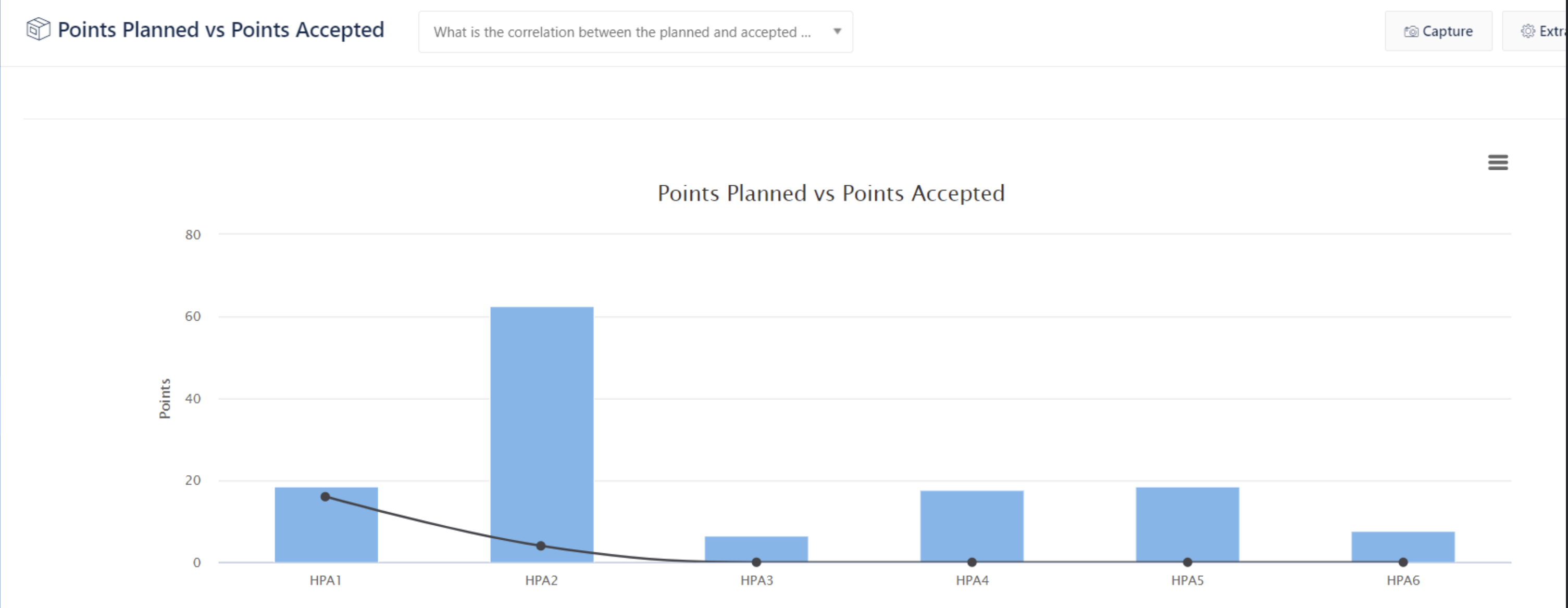
This article explains the calculations in the Points Planned vs. Points Accepted Report when a Program and PI are chosen for the top-tier configuration filter
The blue bar chart is “Points Planned”
The line chart is “Points Accepted”
Solution
It can be worth comparing the PPvsPA chart with the information that comes from the StoryGrid Export in a spreadsheet.
The following scenarios show some of the differences:
1 - Points Planned (aka Committed Data)
Top-tier configuration bar set to:
Program: Program A
PI: PI 2
All Stories belonging to Program: Program A
Scenario | PI | Sprint | StoryGrid Export Stories | Points Planned Vs Accepted report |
|---|---|---|---|---|
Agile Team Stories | ||||
If the Story's PI is assigned to PI 2 AND to a sprint that belongs to parent PI 2, then the Story will be included | PI 2 | Belongs to PI 2 | Yes | Yes |
If the Story's PI is assigned to the PI 2 but no sprint is assigned, then the Story will be included | PI 2 | Unassigned Backlog | Yes | No |
If the Story's Sprint is a sprint that belongs to the parent PI 2, but the PI is "Unassigned Backlog" then the Story will be included. | Unassigned Backlog | Belongs to PI 2 | Yes | Yes |
If the Story's Sprint is a sprint that belongs to the parent PI 2, but the assigned PI is not PI 2 then the Story will be included. | Assigned but not PI 2 | Belongs to PI 2 | Yes | Yes |
If the Story's PI is assigned to PI 2 AND a sprint that does NOT belong to the parent PI, then the Story will be included | PI 2 | Assigned but does not belong to PI 2 | Yes | No |
Kanban Team Stories | ||||
Kanban Team Stories assigned to the PI 2 | PI 2 | N/A | Yes | Yes |
Kanban Team Stories assigned to other PI | None OR Assigned but not PI 2 | N/A | No | No |
Other scenarios | ||||
Parent Feature is in a recycled bin. Child Stories counted | Yes | Yes | ||
Stories with Inactive Teams | Yes | No |
Example 1 - Points Planned - Kanban Story point distribution:
Kanban Team Stories LOE Story Points are equally divided across each of the sprints in "Points Planned vs. Points Accepted". As a Kanban Team Story cannot be assigned to a sprint.
For example, if you have 5 sprints in PI 2.
If you have 1 Kanban Story assigned to PI 2 of 16 LOE points, then it will contribute 3.2 points to each sprint.
2 - Points Accepted
Agile Team Stories Accepted LOE/Story Points are assigned to the sprint that the Story has assigned. This is regardless of the Accepted Date.
Kanban Team Stories Accepted LOE/Story Points are included in the sprint IF the Accepted Date falls within the sprints in the chart. The Points will be totaled in the sprint that covers the Accepted Date.
Example 2 - Points Accepted - Kanban Story Accepted after sprint is completed:
Kanban Team Story A has been assigned to PI Z
PI Z - 1 Nov - 28 Nov
PI Z has the following 2 sprints:
Sprint Z1 - 1 Nov - 14 Nov
Sprint Z2 - 15 Nov - 28 Nov
Kanban Team Story A is Accepted on the 29 Nov.
The chart is filtered by the PI.
Kanban Team Story A LOE/Story Points will not be included in the Points Accepted chart.
Example 3 - Points Accepted - Kanban Story Accepted on a date inside a sprint
Kanban Team Story A has been assigned to PI Z
PI Z - 1 Nov - 28 Nov
PI Z has the following 2 sprints:
Sprint Z1 - 1 Nov - 14 Nov
Sprint Z2 - 15 Nov - 28 Nov
Kanban Team Story A is Accepted on the 28 Nov.
The chart is filtered by the PI.
Kanban Team Story A LOE/Story Points will be included in the Points Accepted chart in Sprint Z2.